The “Account Closing Soon” email scam is a phishing campaign that attempts to steal email account credentials by impersonating an email service provider. The phishing emails warn recipients that their accounts are scheduled for closure and that immediate verification is required to prevent permanent data loss. The scammers use the threat of losing access to important emails and stored information to persuade recipients to follow a malicious link.
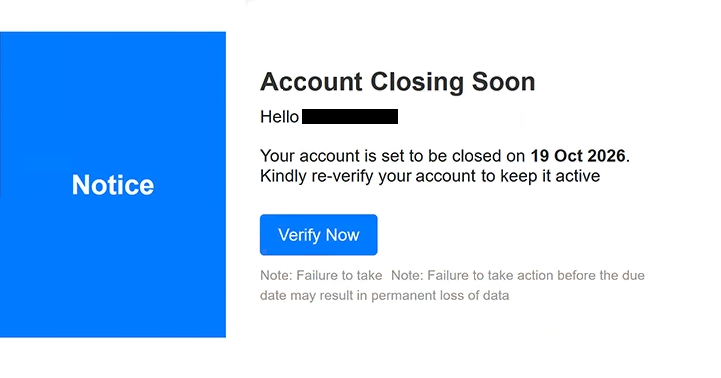
The phishing emails impersonate cPanel, a legitimate platform used to manage web hosting services and email accounts. Their subject lines begin with “FINAL WARNING” and include the recipient’s account information and a scheduled closure date. In the examined example, the date is October 19, 2026, although this is part of the scammers’ claim rather than evidence of an actual account termination.
The body of the phishing email contains a prominent “Account Closing Soon” warning and informs the recipient that their account will be closed unless they complete a re-verification process. A button labeled “Verify Now” is provided for this purpose. The phishing email also warns that failure to act before the stated deadline may result in permanent data loss, creating additional pressure to respond quickly.
Clicking the verification button directs recipients to a phishing website hosted through the InterPlanetary File System (IPFS), a decentralized system for storing and distributing content. The website displays a counterfeit email login interface designed to capture usernames and passwords. Its appearance can change depending on the recipient’s email domain, allowing the scammers to imitate different email providers.
For example, recipients using Gmail may encounter a login page resembling Google’s authentication interface. This adaptive design makes the phishing attempt more convincing because the displayed branding can match the email service the victim normally uses. However, the login page is not operated by the legitimate provider, and credentials submitted through it are exposed to the attackers.
Stolen email credentials could allow scammers to access private correspondence, obtain sensitive attachments, and impersonate account owners. Attackers may also attempt to reset passwords for other online services connected to the compromised email address. This could expose additional accounts, particularly when the affected mailbox is used for account recovery.
The full “Account Closing Soon” phishing email is below:
Subject: FINAL WARNING: Your – Account Is Scheduled for Closure 19 Oct 2026.
Notice
Account Closing Soon
Hello –
Your account is set to be closed on 19 Oct 2026. Kindly re-verify your account to keep it active –
[Verify Now]
Note: Failure to take Note: Failure to take action before the due date may result in permanent loss of data
How to recognize phishing emails
Phishing emails that threaten account closure frequently use alarming language and strict deadlines to encourage recipients to act without verifying the information. In this campaign, the subject line includes “FINAL WARNING,” while the body claims that the recipient’s email account will be permanently closed unless verification is completed. Such warnings should be examined carefully, particularly when they arrive unexpectedly.
The “Verify Now” button is another important warning sign. Although it appears to offer a way to preserve account access, it leads to a website outside the legitimate email service. Recipients should examine the actual destination of verification links rather than assuming that a familiar button label or recognizable company name indicates authenticity.
The phishing website’s ability to imitate different email providers can make the deception more difficult to recognize. A login page displaying Google or another familiar provider’s branding is not necessarily genuine. The website’s actual address is more important than its visual appearance, especially when the page is reached through an unexpected account verification email.
Recipients should also inspect the sender’s email address and compare it with the organization supposedly responsible for the notification. Display names and logos can be imitated, while suspicious domains or inconsistencies between the sender and the linked website may indicate phishing. However, an apparently legitimate sender address alone does not prove that an email is authentic.
Another characteristic is the threat of permanent data loss. The phishing emails present account closure as an unavoidable consequence of ignoring the verification request, but they provide no independently verifiable evidence that the account is actually scheduled for deletion. The urgency is intended to make the recipient prioritize immediate action over checking the warning.
Site Disclaimer
2-remove-virus.com is not sponsored, owned, affiliated, or linked to malware developers or distributors that are referenced in this article. The article does not promote or endorse any type of malware. We aim at providing useful information that will help computer users to detect and eliminate the unwanted malicious programs from their computers. This can be done manually by following the instructions presented in the article or automatically by implementing the suggested anti-malware tools.
The article is only meant to be used for educational purposes. If you follow the instructions given in the article, you agree to be contracted by the disclaimer. We do not guarantee that the artcile will present you with a solution that removes the malign threats completely. Malware changes constantly, which is why, in some cases, it may be difficult to clean the computer fully by using only the manual removal instructions.