The “Account Policy Review, Password Expiration Date” scam is a phishing email that combines two administrative-sounding claims to pressure the recipient into taking action. The message states that the account is undergoing a policy review and that the password is approaching its expiration date. It suggests that failure to update credentials will result in restricted access or temporary suspension. These claims are fabricated and are not issued by a legitimate provider.
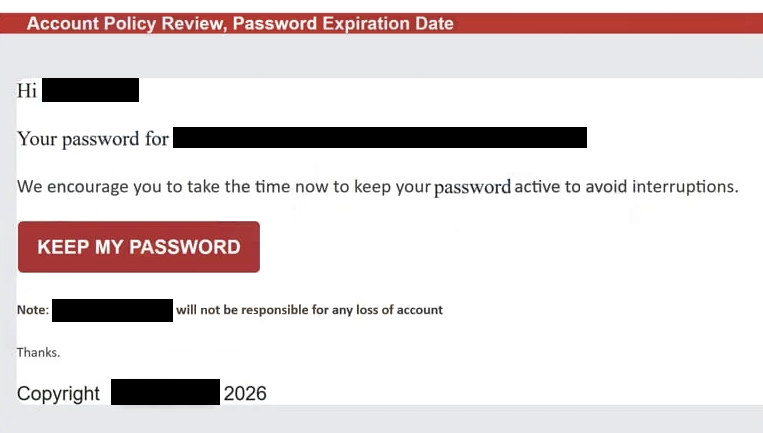
The email is structured to sound procedural rather than urgent. It may reference internal compliance checks, updated security standards, or password lifecycle requirements. Instead of accusing the recipient of wrongdoing, it frames the situation as routine maintenance. This tone makes the request appear reasonable. A button or embedded link is presented as the required step to confirm account details and renew the password.
Selecting the link opens a web page that appears to be an account sign-in screen. The page may include branding elements and a brief notice about password expiration. However, the domain displayed in the browser does not match the official website of the service being impersonated. The page does not provide access to real account settings. It only contains a form requesting login credentials.
The form asks for a username or email address and a password. In some cases, it may also prompt the user to enter a new password, creating the illusion that the expiration process is legitimate. Any information entered into the form is transmitted directly to the scammers. The site does not update password settings and does not connect to the actual service.
Once credentials are obtained, attackers can attempt to access the real account. If successful, they may change the password again, update recovery details, and block the legitimate user from signing in. Depending on the type of account targeted, this can expose personal communications, financial records, stored documents, or business data.
The combination of policy review and password expiration is deliberate. Password updates are common security practices, so the claim feels plausible. By pairing this with administrative language about compliance, the email reduces suspicion and encourages cooperation.
The full “Account Policy Review, Password Expiration Date” phishing email is below:
Subject: Update Password for – ADMIN
Account Policy Review, Password Expiration Date
Hi -,
Your password for –
We encourage you to take the time now to keep your password active to avoid interruptions.
Keep my password
Note: – will not be responsible for any loss of account
Thanks.
Copyright – 2026
How to recognize phishing emails
This scam can be identified by looking closely at the technical details and the context of the request. The sender address is often the first warning sign. While the display name may resemble a known service or support team, the full email address usually belongs to an unrelated domain. Legitimate password expiration notices are sent from official service domains.
Another indicator is the lack of specific account references. The email typically avoids mentioning the user’s name, account ID, or recent activity. Genuine password expiration notifications often direct users to change credentials through their established account dashboard rather than through an embedded link.
The link itself reveals further signs of fraud. When inspected, the destination URL does not match the official website of the service being referenced. The domain may contain extra words, unusual extensions, or subtle spelling variations. Authentic providers require password updates to be completed inside their secure environment, not through external web pages reached from unsolicited emails.
The linked page’s design is also limited. It focuses immediately on credential entry and does not provide full account navigation or access to settings before authentication. Legitimate services allow users to log in through their official website and then manage password changes within the account security section.
The tone of the message emphasizes compliance and continuity rather than overt threat. It suggests that access will be limited if the password is not updated before the stated expiration date. This pressure is used to encourage fast action without verification.
By examining the sender domain, reviewing the link destination, and recognizing that password changes should be performed only within official account dashboards, recipients can identify the “Account Policy Review, Password Expiration Date” scam and avoid exposing sensitive login information.
Site Disclaimer
2-remove-virus.com is not sponsored, owned, affiliated, or linked to malware developers or distributors that are referenced in this article. The article does not promote or endorse any type of malware. We aim at providing useful information that will help computer users to detect and eliminate the unwanted malicious programs from their computers. This can be done manually by following the instructions presented in the article or automatically by implementing the suggested anti-malware tools.
The article is only meant to be used for educational purposes. If you follow the instructions given in the article, you agree to be contracted by the disclaimer. We do not guarantee that the artcile will present you with a solution that removes the malign threats completely. Malware changes constantly, which is why, in some cases, it may be difficult to clean the computer fully by using only the manual removal instructions.