The “Action Required: Email Verification” email is a phishing scam that attempts to steal email account credentials by presenting recipients with a fabricated server verification request. The message impersonates a generic mail server notification and claims that recipients need to verify their email server account to keep it active. The warning is not associated with a legitimate email provider or mail server service.
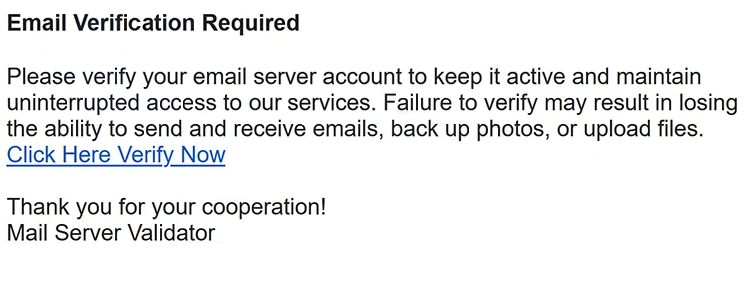
The phishing email uses “Action Required: Email Verification” as its subject line. Its contents state that verification is necessary to maintain uninterrupted access to services. Recipients are warned that failing to complete the process could result in losing the ability to send and receive emails, back up photos, or upload files.
The message presents itself as coming from a “Mail Server Validator.” This identity is fabricated and is used to make the email appear like an administrative notification. The campaign is not connected to a legitimate service operating under that name.
The fraudulent website is branded as “MailServer” and displays an “Activate email” form. Visitors are asked to provide their email address, password, and password confirmation. The page includes an “Activate & send” button that supposedly completes the activation process.
The phishing page also displays logos belonging to several well-known email services, including Gmail, Yahoo, Outlook, ProtonMail, and Zoho. The presence of multiple providers indicates that the page is not designed around a single email service. Instead, it can be used to collect credentials belonging to users of different providers.
Information entered into the form is sent to the scammers. Providing an email address and password does not activate an email server account or verify access to any legitimate service. The verification scenario exists solely to convince visitors to disclose their login information.
Valid credentials obtained through the “Action Required: Email Verification” scam could allow unauthorized access to the corresponding mailbox. Attackers with access to an email account may be able to read private correspondence and misuse the mailbox to contact other people while impersonating its owner.
Email accounts can also be linked to other online services through password-reset and recovery functions. Access to the mailbox may therefore allow criminals to attempt password resets for accounts associated with the compromised email address.
The actual purpose of this campaign is credential theft. The claims about maintaining email functionality, backing up photos, uploading files, and keeping the server account active are used to persuade recipients to visit the fraudulent “MailServer” page and submit their login credentials.
The full “Action Required: Email Verification” phishing email is below:
Subject: Action Required: Email Verification
Email Verification Required
Please verify your email server account to keep it active and maintain uninterrupted access to our services. Failure to verify may result in losing the ability to send and receive emails, back up photos, or upload files.
[Click Here Verify Now]
Thank you for your cooperation!
Mail Server Validator
How to recognize and avoid the “Action Required: Email Verification” phishing email
The verification request should be treated cautiously because the message asks recipients to use an embedded link to resolve an alleged problem with their email account. Instead of following “Click Here Verify Now,” recipients can access their email provider independently through its official website or application and check whether any legitimate action is required.
The generic “Mail Server Validator” identity is another important detail. The email does not represent a legitimate provider responsible for the recipient’s mailbox. Users should examine the complete sender address rather than relying on the name or administrative wording displayed in the message.
The destination of the verification link also exposes the deception. The campaign directs recipients to emailactivator.github.io rather than an official login or account-management page operated by their email provider. Users should check the destination behind unexpected links before opening them and avoid entering passwords into unfamiliar websites reached through unsolicited emails.
The design of the phishing page should not be considered evidence of legitimacy. It displays the “MailServer” branding and logos for Gmail, Yahoo, Outlook, ProtonMail, Zoho, and other email services, but those companies are not identified as participants in the campaign. Displaying recognizable logos is part of the fraudulent page’s presentation.
Recipients should also question why a generic verification page would request an email password and then ask for the same password to be confirmed. Legitimate account issues should be handled directly through the service that operates the account rather than through a third-party page reached from an unexpected email.
Users who receive the “Action Required: Email Verification” email but do not submit credentials through the associated website should avoid the link and delete the message. Simply receiving or reading the email does not disclose the account password.
Anyone who has already entered credentials into the “Activate email” form should change the affected email password through the legitimate provider. If the same password is used for other services, those passwords should also be replaced with unique ones. The mailbox should additionally be checked for unauthorized access or unexpected changes.
Site Disclaimer
2-remove-virus.com is not sponsored, owned, affiliated, or linked to malware developers or distributors that are referenced in this article. The article does not promote or endorse any type of malware. We aim at providing useful information that will help computer users to detect and eliminate the unwanted malicious programs from their computers. This can be done manually by following the instructions presented in the article or automatically by implementing the suggested anti-malware tools.
The article is only meant to be used for educational purposes. If you follow the instructions given in the article, you agree to be contracted by the disclaimer. We do not guarantee that the artcile will present you with a solution that removes the malign threats completely. Malware changes constantly, which is why, in some cases, it may be difficult to clean the computer fully by using only the manual removal instructions.