The “Action Required: Update Your Email” phishing scam is a targeted email-based attack designed to steal email account credentials by creating a false sense of urgency. The scam email claims that the recipient must update or verify their email account immediately to prevent service disruption, loss of access, or security issues. The message presents itself as an official notice from an email service provider, even though it has no legitimate connection to any real provider.
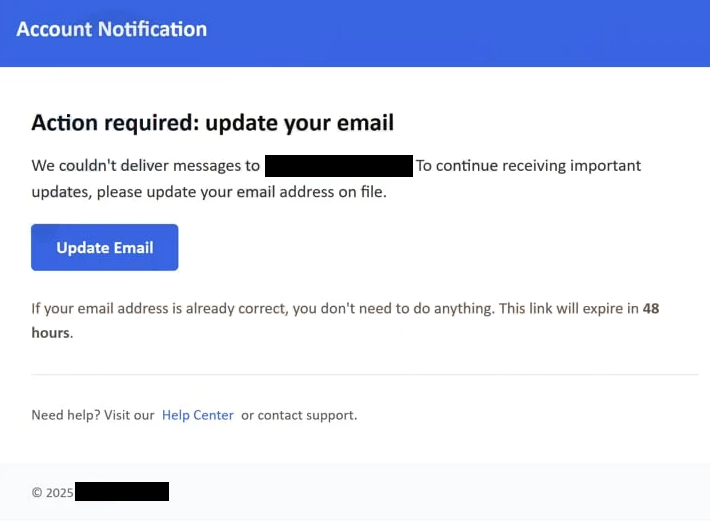
The email states that an update is required and implies that the recipient’s email account is at risk if no action is taken. The wording is direct and time-sensitive, encouraging the recipient to act quickly rather than question the message. This pressure is intentional and is a core part of how the scam operates.
Within the email, a button or link is provided. These links are often labelled with phrases such as “Update Email,” “Verify Account,” or “Continue.” Clicking this link redirects the recipient to a phishing website that imitates an email login page. The page is designed to look familiar and credible, using branding elements, layouts, and colours similar to real email services.
The phishing page requests the recipient’s email address and password. In some cases, it may also ask for additional information such as recovery email details or security questions. Once the information is entered, it is transmitted directly to the scammers. The page may then display an error message, redirect to a generic page, or return the user to a legitimate website to avoid suspicion.
The stolen credentials allow attackers to access the victim’s email account. This access can be used to read private messages, reset passwords for other online accounts, or send further phishing emails from the compromised address. Because email accounts are often linked to banking, shopping, and social media services, the impact of this scam can extend far beyond the email account itself.
This scam targets both personal and business users. Business email accounts are especially valuable because they may provide access to internal systems or contact lists. The attackers rely on the common expectation that service providers send account-related emails, making the message appear routine rather than suspicious.
The full “Action Required: Update Your Email” email is below:
Subject: Action required for – on 12 December, 2025 !
Account Notification
Action required: update your emailWe couldn’t deliver messages to -. To continue receiving important updates, please update your email address on file.
Update EmailIf your email address is already correct, you don’t need to do anything. This link will expire in 48 hours.
Need help? Visit our Help Center or contact support.
© 2025 –
How to recognise phishing emails like “Action Required: Update Your Email”
Recognising phishing emails such as the “Action Required: Update Your Email” scam requires attention to specific details rather than relying on general impressions. One of the most important indicators is the sense of urgency. The email insists that immediate action is required and suggests negative consequences if the recipient delays. Legitimate service providers do not force account updates through threatening language or strict deadlines delivered by unsolicited emails.
Another clear sign is the request for credentials. Email providers do not ask users to confirm passwords through email links. Any message that directs recipients to enter login details after clicking a link should be treated as suspicious, regardless of how authentic the page appears.
The sender address is another key indicator. While the display name may look official, the actual email address often belongs to an unrelated domain or contains subtle inconsistencies. Checking the full sender address rather than relying on the visible name can reveal that the message does not originate from a legitimate service.
Phishing emails also rely on generic greetings. The “Action Required: Update Your Email” message does not address recipients by name. Instead, it uses neutral phrases such as “Dear User” or omits personalisation entirely. Legitimate account notifications often include specific user information or reference recent account activity.
The link destination is another warning sign. Hovering over the link without clicking it may reveal a URL that does not belong to the official website of the claimed provider. Phishing links often use random strings, subdomains, or misspellings to appear convincing at a glance.
Spelling and formatting issues can also indicate phishing. While some scam emails are carefully written, many contain awkward phrasing, inconsistent capitalisation, or layout issues that do not match official communications. Even small inconsistencies can signal that the message is not authentic.
Another indicator is the lack of alternative communication channels. Legitimate providers usually notify users of important account issues through their official websites or apps after login. A message that demands immediate action but provides no way to verify the claim independently should not be trusted.
Recipients should also consider whether the email aligns with recent activity. If there has been no attempt to update settings, change passwords, or log in from a new location, an unexpected update request is suspicious. Scammers rely on recipients assuming the email is routine rather than questioning why it was sent.
To avoid falling victim to scams like “Action Required: Update Your Email,” recipients should avoid clicking links in unsolicited emails. Accessing accounts directly through bookmarked or manually entered website addresses is safer. Suspicious emails should be reported or deleted rather than interacted with.
Understanding these signs helps users identify phishing attempts before any information is exposed. The effectiveness of this scam depends on haste and trust. Slowing down and verifying details is the most reliable way to avoid compromise.
Incoming search terms:
Site Disclaimer
2-remove-virus.com is not sponsored, owned, affiliated, or linked to malware developers or distributors that are referenced in this article. The article does not promote or endorse any type of malware. We aim at providing useful information that will help computer users to detect and eliminate the unwanted malicious programs from their computers. This can be done manually by following the instructions presented in the article or automatically by implementing the suggested anti-malware tools.
The article is only meant to be used for educational purposes. If you follow the instructions given in the article, you agree to be contracted by the disclaimer. We do not guarantee that the artcile will present you with a solution that removes the malign threats completely. Malware changes constantly, which is why, in some cases, it may be difficult to clean the computer fully by using only the manual removal instructions.