The “Activate Letter Notification” phishing email is a credential-stealing scam that falsely claims the recipient must activate their email account. The message presents itself as an administrative notification and warns that failure to complete the requested process will result in the mailbox being disabled and eventually deleted. The activation request is fake, and the provided link leads to a phishing website designed to steal webmail login credentials.
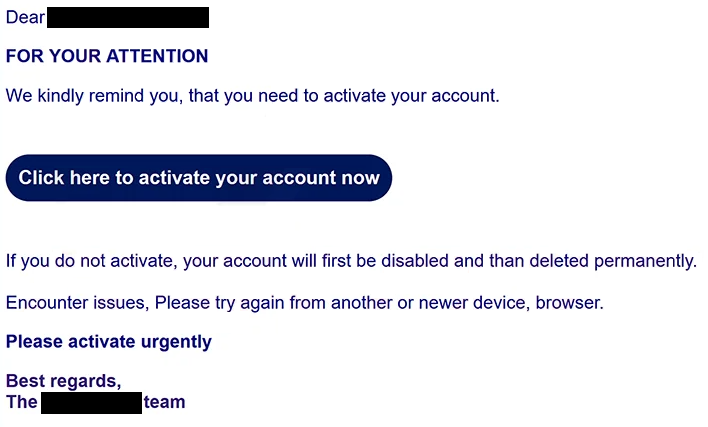
The observed email uses “Activate Letter Notification” as its subject and addresses the recipient by their first name. It states that the email account requires activation and encourages the recipient to complete the procedure immediately. Rather than explaining why an existing and functioning mailbox suddenly requires activation, the message focuses on the consequences of ignoring the request.
According to the email, an account that remains unactivated will first be disabled and later permanently deleted. This warning is fabricated. The scammers use the possibility of losing access to email messages and other account data to pressure recipients into following the provided link without checking whether the notification is legitimate.
The message also contains unusual troubleshooting advice. If recipients cannot complete the activation process, they are instructed to try another or newer browser or device. This may encourage victims to continue attempting to reach the fraudulent website even if their initial browser or security software interferes with access.
Clicking the activation link does not open a legitimate email provider’s account management portal. In the analyzed campaign, the link leads to a counterfeit webmail login page hosted through Google Firebase Storage. The use of legitimate hosting infrastructure does not make the page trustworthy, and Google is not responsible for the phishing campaign.
The fraudulent page displays a generic “Welcome to Webmail” message and asks visitors to provide a username and password. Information submitted through the form is captured by the scammers rather than being used to activate an email account.
Stolen webmail credentials can give attackers access to private correspondence, attachments, invoices, contacts, business information, and other data stored in the mailbox. Email accounts are also frequently used to recover access to other online services. Attackers who control an inbox may therefore attempt password resets for accounts connected to the compromised address.
Cybercriminals may also use a hijacked mailbox to impersonate its owner. They can send phishing links, fraudulent requests, or other deceptive messages to the victim’s contacts. Such messages can be particularly convincing because they originate from an email address that recipients already recognize.
Anyone who entered credentials after following the “Activate Letter Notification” phishing email link should change the affected mailbox password through the legitimate provider. Passwords reused for other services should also be replaced. Users should review recent account activity, terminate unfamiliar sessions where possible, and enable multi-factor authentication if supported.
The full “Activate Letter Notification” phishing email is below:
Subject: Activate Letter Notification
Dear –
FOR YOUR ATTENTION
We kindly remind you, that you need to activate your account.
[Click here to activate your account now]
If you do not activate, your account will first be disabled and than deleted permanently.
Encounter issues, Please try again from another or newer device, browser.
Please activate urgently
Best regards,
The – team
How to recognize fake account activation emails
An unexpected request to activate an email account that is already functioning should be treated cautiously. Rather than using the link supplied in the message, recipients should open their email service independently and check the account through the provider’s normal website or application.
The threat of disabling and permanently deleting the account is another reason to scrutinize the message. Phishing campaigns frequently create artificial consequences or deadlines because recipients concerned about losing access may react before checking whether the warning is genuine.
Links contained in account notifications should also be examined carefully. A login page can copy logos, icons, colors, and other visual elements from legitimate services. Its appearance therefore does not establish who operates it. The domain displayed in the browser’s address bar is a more useful indicator.
In this campaign, the supposed activation page is hosted through Firebase rather than through the recipient’s actual email provider. Users should not submit webmail credentials to an unrelated site simply because it displays a familiar-looking login form.
The generic “Welcome to Webmail” page should also raise suspicion. Legitimate account management normally takes place through the specific provider responsible for the mailbox rather than through an unrelated generic login portal reached from an unsolicited email.
Recipients should inspect the sender’s full email address as well. A displayed sender name suggesting an administrator or support department can easily be falsified and should not be treated as proof that the message originated from the organization it claims to represent.
Instructions to try another browser or device if the page does not work should not persuade users to bypass warnings or security protections. If an unexpected activation page is blocked or fails to load, attempting to reach it through another device can unnecessarily increase exposure to the phishing campaign.
The safest way to handle the “Activate Letter Notification” phishing email is to avoid its link entirely. Recipients can access their mailbox through the normal official login page and determine whether any genuine account notification exists. If the legitimate service shows no activation requirement, the unsolicited message should be treated as phishing and deleted.
Site Disclaimer
2-remove-virus.com is not sponsored, owned, affiliated, or linked to malware developers or distributors that are referenced in this article. The article does not promote or endorse any type of malware. We aim at providing useful information that will help computer users to detect and eliminate the unwanted malicious programs from their computers. This can be done manually by following the instructions presented in the article or automatically by implementing the suggested anti-malware tools.
The article is only meant to be used for educational purposes. If you follow the instructions given in the article, you agree to be contracted by the disclaimer. We do not guarantee that the artcile will present you with a solution that removes the malign threats completely. Malware changes constantly, which is why, in some cases, it may be difficult to clean the computer fully by using only the manual removal instructions.