The “Change to the webmail access interface” email is a phishing attempt that claims users must confirm a new interface for continued access to their webmail accounts. The email states that an update has recently taken place and that users must activate the new interface through a provided link. At first glance, the email appears official. It uses a formal tone and a layout that resembles routine service notifications. However, the email is not connected to any real administrator or service provider. It is sent to trick recipients into entering their login credentials on a website controlled by the attacker.
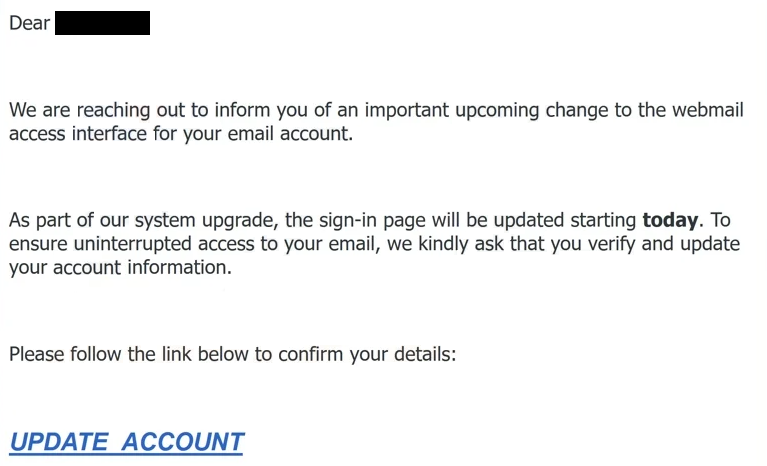
The email usually explains that an interface update has been introduced for performance or security reasons. It then claims that users must confirm the change by clicking a link. Some variants state that the previous interface has been retired. Others warn that failure to activate the new interface may cause access issues. These statements are meant to prompt immediate action. They do not reflect any real update. A legitimate service would not require activation through an unsolicited link, nor would it threaten reduced access without a clear prior notice.
The link provided in the “Change to the webmail access interface” email directs the user to a website that imitates a genuine login page. The design may include colours or icons that resemble a known mail platform. The intent is to convince users that they are using a familiar environment. On the surface, the page may look convincing, but it is entirely unrelated to any real service. The attackers use this imitation to gather the login details entered by the user. Once the credentials are submitted, they are stored by the attacker.
If attackers obtain login credentials, they can access the user’s email account. Email accounts contain sensitive information. Attackers may review stored emails, view contact information, access data linked to financial services, or search for security notices from other platforms. They may also attempt to reset passwords for other accounts tied to the compromised email address. This may lead to unauthorised access to banking services, cloud accounts, or any platform that uses email as the recovery channel.
The “Change to the webmail access interface” phishing attempt also places emphasis on urgency. The email may state that the activation link will expire soon or that the user must confirm the update to avoid interruption. Urgent statements like these are common in phishing because they reduce the recipient’s likelihood of checking details such as the sender’s address or link destination. The false urgency is designed to encourage immediate interaction.
Another consistent characteristic of this phishing email is the absence of personalised details. The email does not address the recipient by name or include information connected to the actual account. It uses general phrasing because the scam is sent to a large number of unrelated recipients. A legitimate update notice would include clear information associated with the user’s account. The lack of such detail is a key indicator that the email is not genuine.
Overall, the “Change to the webmail access interface” email is designed to appear routine while aiming to compromise email accounts. It does not represent any real update or requirement. Any user who receives the email should avoid interacting with the link and delete the email. Only individuals who clicked the link and entered information are at risk. Those users should change their email password immediately, update passwords for other services that depend on that email, and enable two-factor authentication where possible.
The full text from the “Change To The Webmail Access Interface” email is below:
Subject: PLEASE VERIFY ACCOUNT
Dear –
We are reaching out to inform you of an important upcoming change to the webmail access interface for your email account.
As part of our system upgrade, the sign-in page will be updated starting today. To ensure uninterrupted access to your email, we kindly ask that you verify and update your account information.
Please follow the link below to confirm your details:
UPDATE ACCOUNT
This update will help us renew your email certificate and maintain a secure connection for your continued use.
If no action is taken, you may experience issues accessing your account after the upgrade is completed.
Thank you for your attention to this matter.
Best regards,
Customer Care Team
–
© 2025. All rights reserved.
How to recognize phishing emails
Phishing emails often imitate routine account notifications, and the “Change to the webmail access interface” email follows familiar patterns. Identifying these patterns helps users avoid credential theft.
One clear indicator is the sender address. Although the email claims to come from a webmail administrator or system update team, it often uses a sender domain that does not match the real provider. These domains may include random characters or unrelated names. A genuine email system update would use an official domain. Users should always inspect the sender address carefully.
Another warning sign is the lack of personalised content. The “Change to the webmail access interface” email does not reference the user’s name or account information. Instead, it uses general phrasing that could apply to anyone. Real service providers include identifiable details because they maintain account records.
Suspicious links offer another strong sign. Users can hover over the link to view the full destination address. Phishing emails often direct the user to a website that does not belong to the real provider. Even if the link text appears correct, the actual address may be unrelated. If the domain looks unfamiliar or inconsistent with expected domains, the link should not be opened.
Requests for login details through external sites are also indicative of phishing. Legitimate providers do not ask users to enter credentials through email links to confirm updates. Any email requesting credentials through a third-party site should be considered unsafe.
Language quality may also offer clues. Some phishing emails contain inconsistent phrasing or unusual formatting. While this scam may use more polished language, the tone may still differ from the way real providers communicate. Any unusual style should raise suspicion.
Urgency is another common feature in phishing. The “Change to the webmail access interface” email states that the user must act quickly to avoid losing access. Real updates do not rely on time pressure or unsolicited activation links.
Users who encounter any of these signs should avoid interacting with the email. They should not click links or provide any information. If unsure about an update, the user should visit the official website directly rather than using a link provided in an email.
Site Disclaimer
2-remove-virus.com is not sponsored, owned, affiliated, or linked to malware developers or distributors that are referenced in this article. The article does not promote or endorse any type of malware. We aim at providing useful information that will help computer users to detect and eliminate the unwanted malicious programs from their computers. This can be done manually by following the instructions presented in the article or automatically by implementing the suggested anti-malware tools.
The article is only meant to be used for educational purposes. If you follow the instructions given in the article, you agree to be contracted by the disclaimer. We do not guarantee that the artcile will present you with a solution that removes the malign threats completely. Malware changes constantly, which is why, in some cases, it may be difficult to clean the computer fully by using only the manual removal instructions.