The “Cloud Photos Not Syncing” email scam is a phishing attempt that pretends to notify users about an issue with their cloud storage or photo synchronization service. It typically claims that images are no longer syncing properly and that action is required to restore access or prevent data loss. Because cloud services are widely used for storing personal files and media, this type of notification can appear routine and believable. However, the email is not connected to any legitimate provider and is designed to mislead recipients.
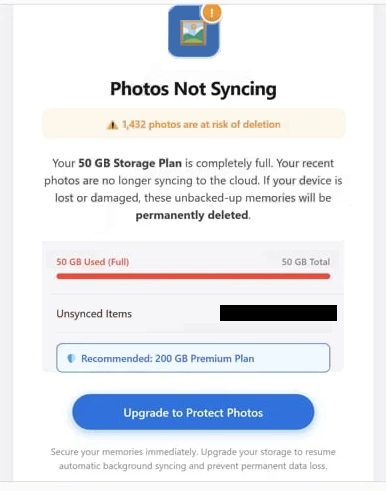
The message usually explains that a synchronization error has occurred, suggesting that photos or files may not be backed up correctly. In some versions, it warns that data could be lost if the issue is not resolved quickly. The “Cloud Photos Not Syncing” email often includes a link or button prompting the user to “fix,” “restore,” or “resync” their account. This step is presented as necessary to ensure continued access to stored files.
Instead of leading to a real cloud service, the provided link redirects to a fraudulent website. These pages are often designed to look like generic cloud login portals rather than a specific provider, which allows the scam to target a wide range of users. Once on the page, users may be asked to sign in or confirm account details. Any information entered is captured by the attackers, giving them access to the account.
In some cases, the phishing page may request additional details beyond login credentials, such as personal information or payment data. This expands the potential impact of the scam, as attackers can use the collected data for further exploitation. The “Cloud Photos Not Syncing” email relies heavily on the fear of losing important files, which increases the likelihood that users will act without verifying the message.
Another factor that makes this scam effective is its lack of specificity. The email often avoids naming a particular cloud provider, making it applicable to users of various services. Since cloud platforms allow users to access stored files from anywhere, notifications about syncing issues can seem plausible even if they are unexpected. This broad approach allows attackers to distribute the same message to a large audience.
If attackers gain access to a cloud account, they may be able to view stored files, download personal data, or use the account for further malicious activity. In some situations, compromised accounts can also be used to send additional phishing emails, spreading the scam further. Because of this, interacting with the “Cloud Photos Not Syncing” email can lead to more than just a single account compromise.
The full “Cloud Photos Not Syncing” phishing email is below:
Subject: Upgrade to resume automatic syncing.
Cloud ServicesPhotos Not Syncing
1,432 photos are at risk of deletionYour 50 GB Storage Plan is completely full. Your recent photos are no longer syncing to the cloud. If your device is lost or damaged, these unbacked-up memories will be permanently deleted.
50 GB Used (Full) 50 GB Total
Unsynced Items –
Recommended: 200 GB Premium Plan
Upgrade to Protect Photos
Secure your memories immediately. Upgrade your storage to resume automatic background syncing and prevent permanent data loss.Sent by Cloud Services Inc.
4563 Cloud Way, Server City, CA.
How to recognize phishing emails
Recognizing phishing emails like the “Cloud Photos Not Syncing” scam requires paying attention to patterns rather than relying on one obvious sign. These emails are designed to look convincing, but they often reveal themselves through small inconsistencies.
One of the most common indicators is the use of urgency. The email may suggest that files are at risk or that immediate action is required to restore synchronization. This pressure is intentional, as it encourages users to act quickly instead of verifying the message. Legitimate cloud providers rarely demand instant action through unsolicited emails.
Another important clue is the link included in the email. While it may appear to direct users to a familiar service, closer inspection often shows that it leads to an unrelated or suspicious domain. Checking where a link leads before clicking it can help prevent redirection to a fake login page.
The sender’s address should also be examined carefully. Phishing emails often imitate official domains but include slight variations that make them difficult to notice at a glance. These differences can indicate that the email is not genuine. Authentic notifications from cloud services typically use consistent and recognizable sender information.
The structure and wording of the email can provide additional hints. Many phishing emails use generic greetings and lack personalized details. They may also include awkward phrasing or formatting inconsistencies. Even when the email appears professionally written, vague language about the service or issue can still be a warning sign.
Another red flag is any request to provide login credentials or other sensitive information through a link. Legitimate cloud services do not ask users to confirm account details in this way. If there is a real issue with synchronization, it will be visible after logging in through the official website.
A safer approach is to ignore the email’s instructions and verify the situation independently. By accessing the cloud account directly through the official service, users can check whether any syncing issue actually exists. If no such problem is present, the email can be identified as fraudulent.
Being aware of these patterns is essential for avoiding phishing scams. The “Cloud Photos Not Syncing” email depends on quick reactions and concern over data loss. Taking time to review the message and confirm its legitimacy can prevent unauthorized access and protect sensitive information.
Incoming search terms:
Site Disclaimer
2-remove-virus.com is not sponsored, owned, affiliated, or linked to malware developers or distributors that are referenced in this article. The article does not promote or endorse any type of malware. We aim at providing useful information that will help computer users to detect and eliminate the unwanted malicious programs from their computers. This can be done manually by following the instructions presented in the article or automatically by implementing the suggested anti-malware tools.
The article is only meant to be used for educational purposes. If you follow the instructions given in the article, you agree to be contracted by the disclaimer. We do not guarantee that the artcile will present you with a solution that removes the malign threats completely. Malware changes constantly, which is why, in some cases, it may be difficult to clean the computer fully by using only the manual removal instructions.