The “Coinbase – Your Account Has Been Inactive” email scam is a phishing campaign that impersonates Coinbase in order to steal cryptocurrency account credentials and wallet information. The message claims that the recipient’s Coinbase account has remained inactive for an extended period and warns that the account may soon be restricted, suspended, or permanently disabled unless action is taken immediately.
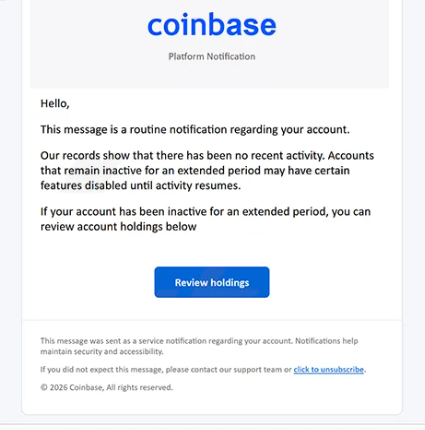
The phishing email presents itself as an official Coinbase security or compliance notice. It informs recipients that inactive accounts are subject to new account management policies and instructs users to verify activity in order to keep the account operational. The message attempts to create urgency by suggesting that failure to respond may result in loss of access to cryptocurrency assets or account functionality.
The “Coinbase – Your Account Has Been Inactive” email includes a button or hyperlink directing users to a counterfeit Coinbase login page. The phishing site imitates Coinbase branding, authentication screens, and account verification interfaces in order to appear legitimate. Victims who enter their credentials into the fake portal unknowingly transmit their usernames and passwords directly to the attackers behind the scam.
Some versions of the phishing site may additionally request two-factor authentication codes, wallet recovery phrases, or other sensitive account information. Once attackers obtain access to a Coinbase account, they may attempt to transfer cryptocurrency assets, access stored payment methods, or compromise additional accounts connected to the victim’s email address.
The “Coinbase – Your Account Has Been Inactive” scam relies heavily on fear of losing access to cryptocurrency holdings. Cryptocurrency users often store digital assets, transaction histories, and linked payment information inside exchange accounts, making warnings about account disablement particularly effective. Attackers exploit this concern to pressure recipients into reacting quickly without carefully verifying the legitimacy of the message.
Another reason the scam can appear convincing is its use of professional formatting and compliance-related language. The phishing email may reference inactivity policies, security reviews, account maintenance, or updated platform regulations in order to imitate legitimate service notifications. References to account restrictions and verification procedures are intended to make the message resemble a routine compliance alert rather than a phishing attempt.
The phishing campaign also benefits from the growing popularity of cryptocurrency platforms and increased awareness of account security requirements. Since legitimate exchanges sometimes request identity verification or account confirmation, attackers imitate these processes to make fraudulent emails appear more believable.
Anyone who entered credentials into a phishing page connected to the “Coinbase – Your Account Has Been Inactive” scam should immediately change their Coinbase password and review the account for unauthorized activity. If the same password was used elsewhere, it should also be changed on all connected services. Users should additionally review withdrawal history, API keys, and security settings to ensure attackers did not gain persistent access.
The full “Coinbase – Your Account Has Been Inactive” phishing email is below:
Subject: Latest Platform Notification – Account disabled
coinbase
Platform Notification
Hello,
This message is a routine notification regarding your account.
Our records show that there has been no recent activity. Accounts that remain inactive for an extended period may have certain features disabled until activity resumes.
If your account has been inactive for an extended period, you can review account holdings below
[Review holdings]
This message was sent as a service notification regarding your account. Notifications help maintain security and accessibility.
If you did not expect this message, please contact our support team or click to unsubscribe.© 2026 Coinb services by base, All rights reserved.
How to recognize phishing emails
Phishing campaigns like the “Coinbase – Your Account Has Been Inactive” scam often imitate legitimate cryptocurrency platforms and account management procedures in order to steal sensitive information. Recognizing suspicious details inside these emails can significantly reduce the risk of account compromise.
One major warning sign is urgency related to account restrictions or disablement. The scam claims that the Coinbase account may be suspended or deactivated because of inactivity. Phishing campaigns frequently use deadlines and threats of account loss to pressure recipients into acting quickly instead of carefully reviewing the legitimacy of the message.
The sender’s address should always be inspected carefully. Fraudulent cryptocurrency emails often imitate support teams or compliance departments while using unrelated domains or suspicious email addresses. Even when the sender name appears professional, the actual address may reveal that the email did not originate from Coinbase.
Links embedded inside phishing emails are another critical warning sign. In scams like “Coinbase – Your Account Has Been Inactive”, the provided link redirects users to a counterfeit login page rather than an official Coinbase-owned domain. Hovering over links before clicking can help reveal suspicious or misleading website addresses.
Users should also be cautious when emails request login credentials, two-factor authentication codes, or wallet-related information after following embedded links. Legitimate cryptocurrency platforms generally encourage users to access account settings directly through official websites rather than through unsolicited email links.
Another indicator is vague policy-related wording combined with account-related threats. The phishing email references inactivity policies and account reviews but often avoids providing detailed account-specific information. Legitimate Coinbase notifications typically contain clearer account details and direct users toward official account management systems instead of urgent external verification pages.
Generic greetings and broad account warnings can also indicate phishing activity. Many cryptocurrency phishing campaigns are distributed in large volumes and therefore avoid personalized information that legitimate account notifications often contain.
The safest response to suspicious cryptocurrency emails is to avoid interacting with the message directly. Instead of clicking links inside the email, users should manually visit the official Coinbase website through a browser and review account notifications there. If no corresponding alert appears within the account itself, the email is likely fraudulent.
Site Disclaimer
2-remove-virus.com is not sponsored, owned, affiliated, or linked to malware developers or distributors that are referenced in this article. The article does not promote or endorse any type of malware. We aim at providing useful information that will help computer users to detect and eliminate the unwanted malicious programs from their computers. This can be done manually by following the instructions presented in the article or automatically by implementing the suggested anti-malware tools.
The article is only meant to be used for educational purposes. If you follow the instructions given in the article, you agree to be contracted by the disclaimer. We do not guarantee that the artcile will present you with a solution that removes the malign threats completely. Malware changes constantly, which is why, in some cases, it may be difficult to clean the computer fully by using only the manual removal instructions.