The “Complete The Required Mailbox Update” phishing email is a fraudulent message that impersonates an email service provider to steal account credentials. It falsely claims that the recipient’s mailbox requires a mandatory update and warns that failure to complete the process could affect email access or message delivery. The notification is not legitimate and is intended to redirect recipients to a phishing website.
Unlike phishing campaigns that focus on password expiration or suspicious login attempts, this scam presents the update as a routine maintenance requirement. The email typically states that new mailbox settings, security improvements, or service changes have been introduced and that every user must complete an update before a specified deadline. The purpose of these claims is to pressure recipients into acting without verifying whether the request is genuine.
To begin the alleged update, the message instructs recipients to click a button or hyperlink labeled with wording such as “Update Mailbox”, “Complete Update”, or “Continue”. Rather than opening the official website of the recipient’s email provider, the link leads to a counterfeit login page designed to imitate a legitimate webmail service. In observed campaigns, phishing pages may even be hosted on trusted cloud infrastructure to appear more convincing.
The fraudulent webpage asks users to enter their email address and password to complete the supposed mailbox update. No update takes place. Instead, every credential entered into the form is transmitted directly to the attackers operating the phishing campaign, allowing them to attempt unauthorized access to the victim’s mailbox.
Compromised email accounts can expose far more than ordinary correspondence. Attackers may obtain password reset messages, authentication codes, invoices, financial notifications, business documents, contracts, and personal conversations. Since many online services rely on email for account recovery, a stolen mailbox can also be used to compromise additional accounts connected to the same address.
The “Complete The Required Mailbox Update” phishing email often appears professionally formatted and may include company branding, support-related language, or references to mailbox maintenance. These visual elements are intended to increase credibility but do not indicate that the email originated from a legitimate provider.
Recipients who submit credentials after following a link contained in the “Complete The Required Mailbox Update” phishing email should immediately change the password for the affected mailbox. If the same password has been reused elsewhere, it should also be replaced on those accounts. Reviewing recent login activity, checking recovery information, and enabling multi-factor authentication are also recommended after a credential compromise.
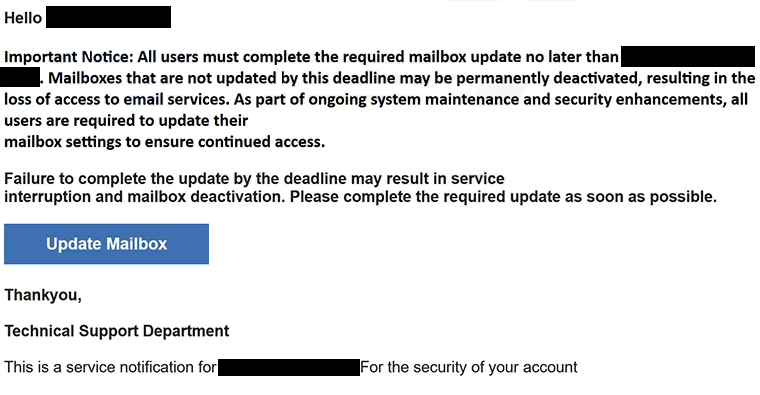
The full “Complete The Required Mailbox Update” phishing email is below:
Subject: [-]: Please confirm to continue.
Hello -,
Important Notice: All users must complete the required mailbox update no later than -. Mailboxes that are not updated by this deadline may be permanently deactivated, resulting in the loss of access to email services. As part of ongoing system maintenance and security enhancements, all users are required to update their mailbox settings to ensure continued access.Failure to complete the update by the deadline may result in service interruption and mailbox deactivation. Please complete the required update as soon as possible.
[Update Mailbox]
Thankyou,
Technical Support Department
This is a service notification for – For the security of your account
How to recognize mailbox update phishing emails
Unexpected emails claiming that a mailbox update is mandatory should always be verified independently. Legitimate email providers generally allow users to manage account settings after signing in through their official websites rather than requiring authentication through unsolicited email links.
Recipients should carefully examine the sender’s email address instead of relying only on the display name. Phishing campaigns frequently impersonate technical support teams or email administrators while using domains unrelated to the organization they claim to represent.
Another warning sign is a message demanding immediate action while providing only vague explanations about the supposed update. Legitimate service providers usually identify the specific feature or policy being changed and do not threaten account restrictions simply because an embedded email link was ignored.
Before entering credentials, users should inspect the destination website carefully. A login page hosted on an unfamiliar domain, even if it closely resembles a genuine webmail interface, should not be trusted.
The safest approach is to ignore links contained in unexpected mailbox maintenance notifications and instead access the email account by manually entering the provider’s official website address into a browser. If no corresponding notification appears after signing in, the email should be considered a phishing attempt.
Site Disclaimer
2-remove-virus.com is not sponsored, owned, affiliated, or linked to malware developers or distributors that are referenced in this article. The article does not promote or endorse any type of malware. We aim at providing useful information that will help computer users to detect and eliminate the unwanted malicious programs from their computers. This can be done manually by following the instructions presented in the article or automatically by implementing the suggested anti-malware tools.
The article is only meant to be used for educational purposes. If you follow the instructions given in the article, you agree to be contracted by the disclaimer. We do not guarantee that the artcile will present you with a solution that removes the malign threats completely. Malware changes constantly, which is why, in some cases, it may be difficult to clean the computer fully by using only the manual removal instructions.