The “Correspondence Record Advisory” phishing email is a scam designed to steal email account credentials through a deceptive file attachment. It presents itself as an automated account notification and informs recipients that an important notice concerning their email account is available for review. Instead of directing users to a legitimate account management service, the email encourages them to open an attached HTML file containing a counterfeit login form.
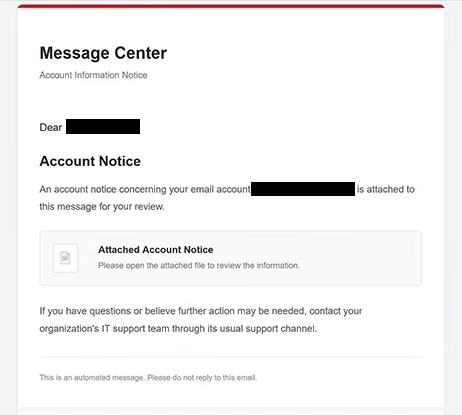
The phishing email uses the subject line “Correspondence Record Advisory” and identifies its sender as “Message Center.” It includes the heading “Account Information Notice” and claims that an account-related document has been attached. However, it does not identify the email provider, explain the purpose of the notice, or describe any specific issue affecting the recipient’s account.
Unlike phishing emails that direct recipients to external websites through embedded links, this campaign delivers its counterfeit authentication page as an HTML attachment. When opened, the file loads in the recipient’s web browser and displays a page headed “LOGIN.” The page asks users to confirm their email addresses by entering their account credentials.
The HTML attachment is the central component of the scam. Because the login page opens from a local file, recipients may not immediately recognize that they are interacting with a phishing form. The absence of an unfamiliar website address in the browser’s address bar can make the deception less obvious, particularly to users who associate phishing primarily with suspicious links.
Information entered into the counterfeit login form is intended to reach the scammers. If recipients provide valid email addresses and passwords, attackers may attempt to access their mailboxes without authorization. A compromised email account could expose private correspondence, stored documents, contact information, and other sensitive data.
Stolen email credentials can also facilitate additional attacks. Scammers may impersonate account owners to send phishing emails to their contacts or attempt to access other services connected to the compromised mailbox. Depending on the account’s permissions and security settings, this could affect cloud storage, financial services, and other online accounts.
The “Correspondence Record Advisory” phishing email also suggests contacting an organization’s IT support team if further assistance is needed. This instruction makes the notification appear more consistent with an ordinary administrative communication, even though the attached file is designed to collect login information.
The scam focuses on credential theft rather than a confirmed malware infection. Opening the HTML attachment displays the deceptive login page, but the identified attack does not require installing software. The primary risk arises when recipients enter their credentials into the form.
Subject: Correspondence Record Advisory— Review—
Message Center
Account Information Notice
Dear -,
Account Notice
An account notice concerning your email account – is attached to this message for your review.
Attached Account Notice
Please open the attached file to review the information.
If you have questions or believe further action may be needed, contact your organization’s IT support team through its usual support channel.
This is an automated message. Please do not reply to this email.
Message Center © 2026
All rights reserved.
How to recognize phishing emails
The “Correspondence Record Advisory” phishing email contains several warning signs, particularly its vague explanation of the supposed account notice. It claims that important information has been attached but does not identify the organization responsible for issuing it or explain why the recipient needs to review it. This lack of context is suspicious when an email concerns account security or verification.
The sender name “Message Center” is another detail worth examining. It sounds administrative but does not identify a recognizable email provider or organization. Similarly, the heading “Account Information Notice” creates an official impression without providing specific information about the recipient’s account.
The attachment is the most distinctive indicator of this campaign. Instead of containing an ordinary document, the HTML file opens a login page requesting email credentials. An unexpected attachment that asks users to enter their passwords should be treated as suspicious, especially when the email provides no clear explanation for the authentication request.
The subject line also contributes to the deception. The phrase “Correspondence Record Advisory” and the reference number “Ref.1758” make the email resemble a formal administrative notice. However, a reference number does not establish that the notification is legitimate, particularly when no identifiable organization or account issue accompanies it.
Another warning sign is the instruction to open the attachment without explaining its contents. The email simply states that an account notice is available for review, leaving recipients to discover the login form after opening the file. This approach conceals the credential request until the recipient has already interacted with the attachment.
The email includes an automated notification disclaimer, a copyright notice, and instructions not to reply. These elements may resemble legitimate system-generated emails, but they can be reproduced by scammers. Their presence does not verify the sender’s identity or establish that the attachment is trustworthy.
Site Disclaimer
2-remove-virus.com is not sponsored, owned, affiliated, or linked to malware developers or distributors that are referenced in this article. The article does not promote or endorse any type of malware. We aim at providing useful information that will help computer users to detect and eliminate the unwanted malicious programs from their computers. This can be done manually by following the instructions presented in the article or automatically by implementing the suggested anti-malware tools.
The article is only meant to be used for educational purposes. If you follow the instructions given in the article, you agree to be contracted by the disclaimer. We do not guarantee that the artcile will present you with a solution that removes the malign threats completely. Malware changes constantly, which is why, in some cases, it may be difficult to clean the computer fully by using only the manual removal instructions.