The “cPanel Bot Prevention Check” phishing email is a scam designed to steal email account passwords by impersonating a webmail security team. It claims that unusual activity has been detected on the recipient’s account and that additional verification is necessary to confirm their identity. The email presents this request as a routine security measure intended to protect against automated attacks and unauthorized access.
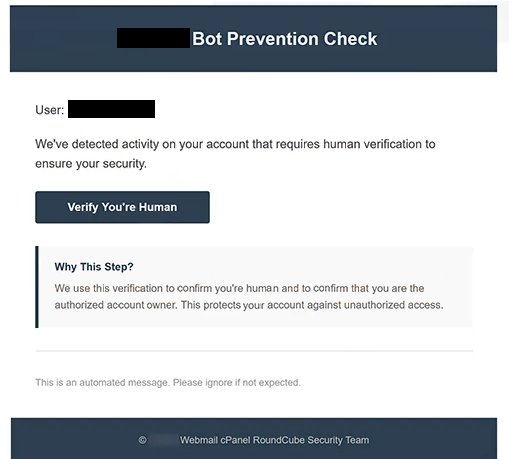
The phishing email uses a subject line containing “Account Verification Confirm you are not a robot” and displays the heading “Bot Prevention Check.” It suggests that the recipient must complete a human verification procedure to maintain account security. However, it provides no specific information about the alleged suspicious activity or evidence that the account has been compromised.
Recipients are instructed to click a button labeled “Verify You’re Human.” Rather than opening a legitimate CAPTCHA or account verification service, the button leads to a fake webmail login page hosted at enfestarif[.]web.tr. The website imitates a cPanel Webmail authentication interface and requests the visitor’s email password.
The phishing page displays familiar webmail branding and automatically fills in the recipient’s email address. This personalization may make the website appear connected to the recipient’s actual email account. However, scammers can include known email addresses in phishing links to make deceptive login forms appear more convincing.
Passwords entered into the form can be captured by the attackers. With valid credentials, scammers may attempt to access private emails, download sensitive attachments, and impersonate the account owner. They could also attempt to compromise other online services associated with the affected email address.
The campaign references cPanel and RoundCube, legitimate software products associated with web hosting and email services. These names are used without any identified authorization or involvement from their developers. The supposed bot prevention procedure serves as a pretext for collecting login credentials.
The full “cPanel Bot Prevention Check” phishing email is below:
Subject: – Account Verification Confirm you are not a robot
– Bot Prevention Check
User: -,
We’ve detected activity on your account that requires human verification to ensure your security.
[Verify You’re Human]
Why This Step?
We use this verification to confirm you’re human and to confirm that you are the authorized account owner. This protects your account against unauthorized access.
This is an automated message. Please ignore if not expected.
© – Webmail cPanel RoundCube Security Team
How to recognize phishing emails
The “cPanel Bot Prevention Check” phishing email contains several warning signs, including its vague claim about unusual account activity. Although it suggests that the recipient’s mailbox requires additional protection, it does not identify the suspicious activity or explain what triggered the verification request. This lack of detail makes the warning difficult to substantiate.
Another suspicious characteristic is the unexpected request to confirm that the recipient is human. Legitimate services may use CAPTCHA challenges to prevent automated abuse, but the identified phishing page requests an email password instead. The difference between the advertised verification procedure and the actual request is a significant indicator of deception.
The “Verify You’re Human” button also conceals an unrelated website destination. The linked page resembles a familiar webmail login interface, but its domain does not establish any connection to the recipient’s hosting provider. A recognizable logo or professionally designed authentication form does not prove that a website is legitimate.
The prefilled email address is another element intended to establish credibility. Recipients may assume that the page recognizes their accounts because their addresses appear automatically. In reality, this information can be inserted into a phishing URL or collected before the email is distributed.
The sender’s claimed identity also deserves scrutiny. The email references a “Webmail cPanel RoundCube Security Team,” combining recognizable software names to create an impression of official technical support. However, these references do not identify the organization responsible for managing the recipient’s mailbox.
The email further reinforces its administrative appearance through automated notification language and instructions not to reply. Such elements can appear in legitimate security communications, but scammers can reproduce them without difficulty.
Site Disclaimer
2-remove-virus.com is not sponsored, owned, affiliated, or linked to malware developers or distributors that are referenced in this article. The article does not promote or endorse any type of malware. We aim at providing useful information that will help computer users to detect and eliminate the unwanted malicious programs from their computers. This can be done manually by following the instructions presented in the article or automatically by implementing the suggested anti-malware tools.
The article is only meant to be used for educational purposes. If you follow the instructions given in the article, you agree to be contracted by the disclaimer. We do not guarantee that the artcile will present you with a solution that removes the malign threats completely. Malware changes constantly, which is why, in some cases, it may be difficult to clean the computer fully by using only the manual removal instructions.