The “cPanel – Mailbox Disk Quota Nearly Full” phishing email is a credential theft scam disguised as an automated mail server notification. It claims that the recipient’s mailbox is running out of storage space and that incoming emails could soon become undeliverable. Scammers exploit concerns about losing access to important correspondence to lure recipients to a fake webmail login page.
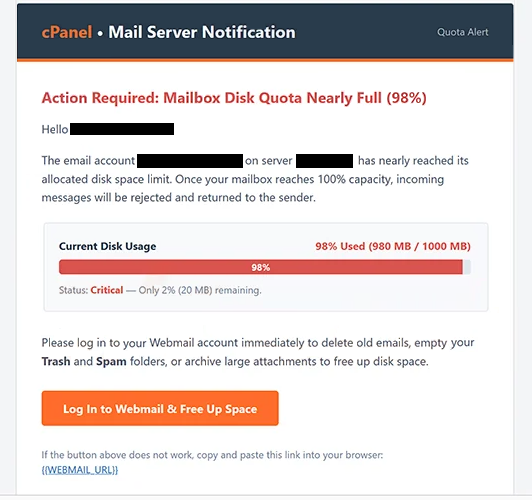
The notification features cPanel branding and a detailed storage usage indicator showing that 980 MB of the allocated 1000 MB has been consumed. According to the email, the mailbox has reached 98% capacity, leaving only 20 MB of available space. Recipients are warned that incoming emails will be returned to their senders once the storage limit is reached.
To address the supposed problem, the notification recommends deleting unnecessary emails, clearing spam and trash folders, or archiving large attachments. It then presents a button labeled “Log In to Webmail & Free Up Space,” making the proposed solution resemble an ordinary mailbox maintenance procedure.
However, the button directs recipients to a phishing website. The page resembles a webmail authentication portal and displays a false session expiration warning. It also automatically populates the email address field, leaving visitors to enter their passwords.
Rather than providing access to mailbox management features, the website captures login credentials for the scammers. Attackers who obtain valid passwords could gain unauthorized access to private correspondence, confidential documents, and sensitive personal or business information.
A compromised mailbox could also become a resource for subsequent attacks. Criminals may exploit existing conversations to impersonate the account owner, deceive business contacts, distribute additional phishing emails, or request password resets for connected online services.
The campaign exploits the reputation of cPanel, a legitimate web hosting management platform. The company has no involvement in the scam, and the storage warning does not mean that the recipient’s mailbox is actually approaching its capacity limit.
The full “cPanel – Mailbox Disk Quota Nearly Full” phishing email is below:
Subject: cPanel • Mail Server Notification – Action Required: Mailbox Disk Quota Nearly Full (98%)
cPanel • Mail Server Notification Quota Alert
Action Required: Mailbox Disk Quota Nearly Full (98%)
Hello -,
The email account – on server – has nearly reached its allocated disk space limit. Once your mailbox reaches 100% capacity, incoming messages will be rejected and returned to the sender.
Current Disk Usage 98% Used (980 MB / 1000 MB)
Status: Critical — Only 2% (20 MB) remaining.
Please log in to your Webmail account immediately to delete old emails, empty your Trash and Spam folders, or archive large attachments to free up disk space.
[Log In to Webmail & Free Up Space]
How to recognize phishing emails
The “cPanel – Mailbox Disk Quota Nearly Full” phishing email is particularly deceptive because it imitates a genuine technical notification that users may encounter when managing hosted email accounts. Its detailed storage figures and critical status indicator give the impression that the warning is based on actual server measurements. However, such information can be fabricated without access to the recipient’s mailbox.
The pressure to act immediately is another notable characteristic. By warning that incoming emails will soon be rejected, the notification creates concern about missing important personal or business correspondence. This sense of urgency encourages recipients to use the embedded login button rather than independently verify their storage usage.
The destination of the button provides a more decisive indication of phishing. The website address does not correspond to an identifiable cPanel or email hosting service associated with the recipient. Its familiar webmail interface is insufficient to establish authenticity.
The session expiration warning displayed on the phishing page is another deceptive element. It gives visitors a seemingly reasonable explanation for why they must enter their passwords before accessing mailbox management features. However, the warning itself does not demonstrate that a legitimate webmail session previously existed.
Similarly, the automatically inserted email address may create an impression that the website recognizes the recipient’s account. Scammers can obtain this information before distributing phishing emails and incorporate it into personalized authentication pages.
Site Disclaimer
2-remove-virus.com is not sponsored, owned, affiliated, or linked to malware developers or distributors that are referenced in this article. The article does not promote or endorse any type of malware. We aim at providing useful information that will help computer users to detect and eliminate the unwanted malicious programs from their computers. This can be done manually by following the instructions presented in the article or automatically by implementing the suggested anti-malware tools.
The article is only meant to be used for educational purposes. If you follow the instructions given in the article, you agree to be contracted by the disclaimer. We do not guarantee that the artcile will present you with a solution that removes the malign threats completely. Malware changes constantly, which is why, in some cases, it may be difficult to clean the computer fully by using only the manual removal instructions.