The “cPanel Roundcube Sync” phishing email pretends to be an automated notification from cPanel Roundcube Webmail. It claims that the recipient’s mailbox has stopped syncing and needs to be updated. The warning is fake and is used to send recipients to a phishing page that collects email account credentials.
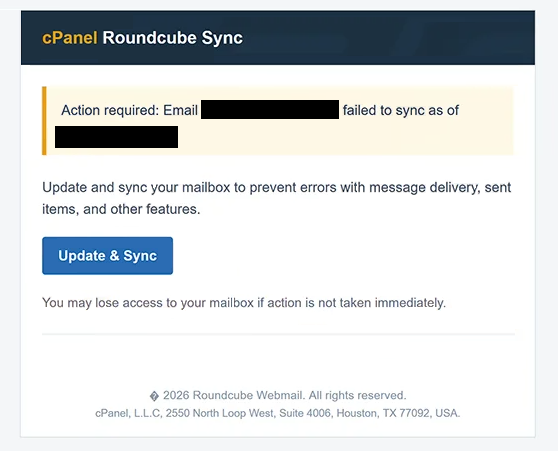
The subject contains the recipient’s email address followed by “Email sync notification.” Inside, the email uses the heading “cPanel Roundcube Sync” and says that the email account failed to sync.
According to the email, the problem could interfere with incoming email delivery, sent items, and other mailbox functions. Recipients are instructed to use “Update & Sync” to correct the supposed problem.
The email also warns that the recipient may lose access to the mailbox if action is not taken immediately. This threat is intended to make the issue appear urgent and discourage recipients from checking whether anything is actually wrong with their account.
Selecting “Update & Sync” opens a fake sign-in page. Rather than showing the same login form to everyone, the phishing site attempts to identify the email service associated with the recipient’s address. It can then display a copied login page that matches that provider. For example, someone using Gmail may be shown a fake Google sign-in form.
The page asks for the recipient’s email address and password. Any credentials submitted through it are collected by the scammers. Updating or synchronizing the mailbox has nothing to do with the process.
cPanel and Roundcube are legitimate services, but neither is involved with this phishing email. Their names are used to make the fake synchronization warning look like a genuine technical notification.
If the stolen credentials work, scammers may gain access to the victim’s mailbox. They could read private emails, search for sensitive information, or use the compromised account to contact other people while impersonating its owner.
Access to email can also create problems beyond the mailbox itself. Many online services use email addresses for password resets and account recovery. Scammers who control an email account may therefore attempt to gain access to other services associated with it, especially if the same password has been reused.
The full “cPanel Roundcube Sync” phishing email is below:
Subject: – Email sync notification
cPanel Roundcube Sync
Action required: Email – failed to sync as of –Update and sync your mailbox to prevent errors with message delivery, sent items, and other features.
[Update & Sync]
You may lose access to your mailbox if action is not taken immediately.
2026 Roundcube Webmail. All rights reserved.
cPanel, L.L.C, 2550 North Loop West, Suite 4006, Houston, TX 77092, USA.
How to recognize the “cPanel Roundcube Sync” phishing email
The claim that a mailbox suddenly needs to be manually “updated and synced” through an unexpected email should immediately be treated with caution. Problems with email synchronization should be checked through the actual webmail service, hosting control panel, or email application rather than through an unfamiliar sign-in page.
The threat of losing mailbox access is another warning sign. The email does not simply report a technical issue. It tells recipients that immediate action is necessary and suggests that failing to respond could prevent them from accessing their email. This pressure is intended to make recipients act before verifying the claim.
The login page is particularly deceptive because its appearance can change according to the email provider being used. Seeing familiar Google or other email-service branding does not prove that the page belongs to that company. Login pages can be copied, and phishing sites can use an email address to decide which design to display.
Recipients should also consider whether the notification makes sense for their account. An unexpected email claiming to come from “cPanel Roundcube Sync” may be suspicious if the recipient does not normally manage their mailbox through cPanel or Roundcube.
Even people who do use these services should not sign in through the email. They can access their webmail or hosting account in the usual way and check whether there are any genuine synchronization problems or account warnings.
The specific date shown in the email can also make the warning appear more credible, but it does not confirm that a sync failure occurred. Dates, email addresses, company names, and other account-related details can all be inserted into phishing emails.
Simply receiving or reading the “cPanel Roundcube Sync” phishing email does not compromise the mailbox. The main danger is entering account credentials on the fake login page.
Incoming search terms:
Site Disclaimer
2-remove-virus.com is not sponsored, owned, affiliated, or linked to malware developers or distributors that are referenced in this article. The article does not promote or endorse any type of malware. We aim at providing useful information that will help computer users to detect and eliminate the unwanted malicious programs from their computers. This can be done manually by following the instructions presented in the article or automatically by implementing the suggested anti-malware tools.
The article is only meant to be used for educational purposes. If you follow the instructions given in the article, you agree to be contracted by the disclaimer. We do not guarantee that the artcile will present you with a solution that removes the malign threats completely. Malware changes constantly, which is why, in some cases, it may be difficult to clean the computer fully by using only the manual removal instructions.