The “cPanel Security Notification” email is a phishing attempt designed to steal email account login credentials. It impersonates cPanel and presents itself as an important security notice concerning a server upgrade. The email is not a legitimate cPanel communication, and its instructions are intended to direct recipients to a phishing website.
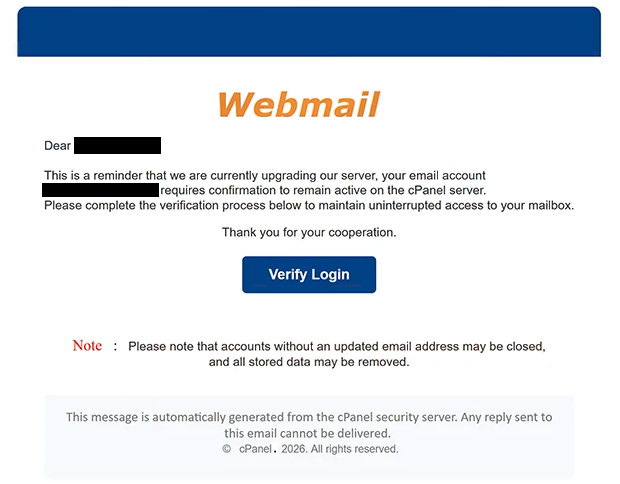
The phishing email has been observed with the subject line “cPanel Security Notification: Server Upgrade Required.” It claims that the recipient’s cPanel server requires an important security upgrade. By describing the supposed update as a security requirement, the email attempts to create urgency and convince recipients that action is necessary to keep their account functioning correctly.
According to the “cPanel Security Notification” email, the upgrade must be completed to maintain server security and prevent potential service problems. The recipient is instructed to follow the provided link or button and complete the requested procedure. Recipients are taken to a phishing website designed to imitate a cPanel or webmail login interface. The page asks visitors to enter their account credentials under the pretext that authentication is necessary to complete the supposed upgrade.
Credentials submitted through the phishing page are collected by the scammers. Entering an email address and password does not update a server, improve its security, or complete any genuine cPanel maintenance procedure.
cPanel is a legitimate web hosting control panel and is not responsible for this phishing campaign. Its name and branding are misused to make the email and resulting login page appear trustworthy. Seeing familiar cPanel elements does not establish that a website or email actually originated from cPanel.
If valid email credentials are obtained, scammers may be able to access the victim’s mailbox. This can expose private correspondence and other information stored in the account. The compromised mailbox could also be used to impersonate its owner and send additional emails from a trusted address.
Email accounts are also commonly connected to other services through password-reset and account-recovery functions. Unauthorized access to a mailbox may therefore provide opportunities to target additional accounts associated with the same email address.
The full “cPanel Security Notification” phishing email is below:
Subject: cPanel Security Notification.
Webmail
Dear –
This is a reminder that we are currently upgrading our server, your email account – requires confirmation to remain active on the cPanel server.
Please complete the verification process below to maintain uninterrupted access to your mailbox.
Thank you for your cooperation.
[Verify Login]
Note : Please note that accounts without an updated email address may be closed, and all stored data may be removed.
This message is automatically generated from the cPanel security server. Any reply sent to this email cannot be delivered.
© cPanel. 2026. All rights reserved.
How to recognize the “cPanel Security Notification” phishing email
An unexpected server security notification requesting account authentication should be verified independently. Recipients should not use a button or link supplied in the email to determine whether their cPanel account or hosting server genuinely requires an upgrade.
Instead, users should access their hosting provider or cPanel interface through the address they normally use. Any legitimate server maintenance or security information can then be reviewed without relying on a destination supplied by an unexpected email.
The complete sender address should also be inspected. The presence of cPanel branding, technical terminology, or a security-related subject line does not prove that the email originated from cPanel. Users should compare the actual sending domain with the organization responsible for their hosting service.
The destination of links or buttons deserves similar attention. A phishing page can reproduce cPanel logos, colors, and login forms while operating on an unrelated domain. Users should verify the website address before entering a username, email address, or password.
The context of the request is another warning sign. A claim that a server requires a security upgrade should not automatically justify entering email credentials into an unfamiliar website. Server maintenance should be confirmed through the hosting provider’s legitimate control panel or support channels.
Users who receive the “cPanel Security Notification” email without entering credentials on the associated website have not disclosed their password through this phishing attempt. They should avoid interacting with the supplied destination and delete the email.
If credentials have already been entered on the phishing page, the affected password should be changed through the legitimate service. Any other account using the same password should also receive a different password. The mailbox should be reviewed for unauthorized activity, unexpected settings changes, or unfamiliar forwarding rules.
Site Disclaimer
2-remove-virus.com is not sponsored, owned, affiliated, or linked to malware developers or distributors that are referenced in this article. The article does not promote or endorse any type of malware. We aim at providing useful information that will help computer users to detect and eliminate the unwanted malicious programs from their computers. This can be done manually by following the instructions presented in the article or automatically by implementing the suggested anti-malware tools.
The article is only meant to be used for educational purposes. If you follow the instructions given in the article, you agree to be contracted by the disclaimer. We do not guarantee that the artcile will present you with a solution that removes the malign threats completely. Malware changes constantly, which is why, in some cases, it may be difficult to clean the computer fully by using only the manual removal instructions.