The “cPanel – The SSL certificate has expired” phishing email is a scam that impersonates cPanel to steal email account credentials. It claims that the SSL certificate associated with the recipient’s domain has expired and that secure website access may be disrupted. The notification encourages recipients to activate a replacement certificate through a link that leads to a fake webmail login page.
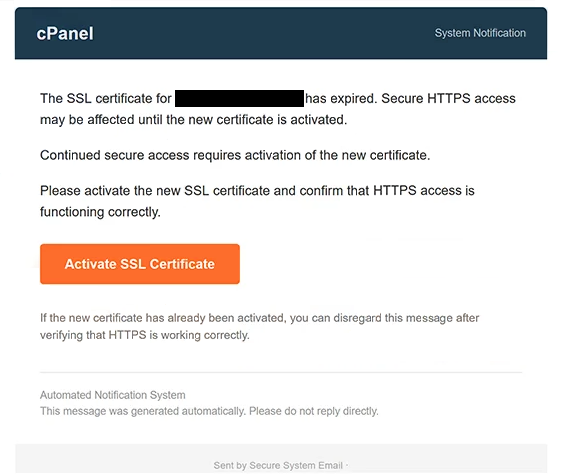
The email uses the subject line “[-]: Please confirm to continue” and presents itself as an automated cPanel system notification. It warns that HTTPS access may be affected until a new SSL certificate is activated. Although SSL certificates are used to secure connections between websites and visitors, the email provides no evidence that the recipient’s certificate has actually expired.
Recipients are instructed to click a button labeled “Activate SSL Certificate” and confirm that HTTPS access is functioning correctly. The email also states that users who have already activated a new certificate can disregard the notification after checking their website. These instructions make the email resemble a routine hosting administration alert.
However, the activation button leads to a phishing page that imitates the Roundcube Webmail login interface. Instead of offering certificate management options, the page requests a full email address and password. The login form is designed to collect credentials rather than activate or renew an SSL certificate.
The phishing page is hosted using Firebase Storage, a legitimate Google Cloud storage service. Scammers can misuse such platforms to host deceptive content, and the presence of a recognizable cloud provider in a URL does not establish that a page is trustworthy. The phishing operation is not associated with Google or the legitimate Roundcube software.
If recipients submit valid credentials, attackers may attempt to access their email accounts without authorization. A compromised mailbox could expose private correspondence, sensitive attachments, and information about other online accounts. Scammers may also impersonate the account owner, distribute additional phishing emails, or attempt password resets for connected services.
The full “cPanel – The SSL certificate has expired” phishing email is below:
Subject: [-]: Please confirm to continue.
cPanel System Notification
The SSL certificate for – has expired. Secure HTTPS access may be affected until the new certificate is activated.
Continued secure access requires activation of the new certificate.
Please activate the new SSL certificate and confirm that HTTPS access is functioning correctly.
[Activate SSL Certificate]
If the new certificate has already been activated, you can disregard this message after verifying that HTTPS is working correctly.
Automated Notification System
This message was generated automatically. Please do not reply directly.Sent by Secure System Email
How to recognize phishing emails
The “cPanel – The SSL certificate has expired” phishing email uses a technical warning that may appear credible to website owners and hosting administrators. It claims that an expired SSL certificate could interfere with secure HTTPS access, a genuine concern for websites. However, the email does not provide verifiable certificate details or demonstrate that the recipient’s domain is experiencing a problem.
One suspicious characteristic is the instruction to activate an SSL certificate through an email button. Although hosting providers may send legitimate certificate expiration notifications, the linked page in this campaign requests webmail credentials instead of displaying certificate management settings. This mismatch between the claimed issue and the requested action is a significant phishing indicator.
The “Activate SSL Certificate” button is particularly misleading because its label suggests a routine technical procedure. Recipients expecting to manage their website’s security certificate are instead presented with a Roundcube-style authentication form. The unexpected request for an email address and password reveals that the link serves a different purpose from the one described.
The hosting location of the phishing page is another detail worth examining. The page uses Firebase Storage rather than a recognizable cPanel administration address or the recipient’s hosting provider. Legitimate cloud infrastructure can host malicious content, so a familiar service name within a website address should not be treated as proof of authenticity.
The email also attempts to establish credibility through administrative formatting. It includes the heading “System Notification,” identifies itself as an automated notice, and instructs recipients not to reply. These elements resemble ordinary service communications but can be reproduced by scammers.
Another warning sign is the generic nature of the certificate warning. The email claims that secure access may be affected but does not provide specific certificate information that would allow recipients to understand the alleged expiration. Its emphasis remains on clicking the activation button rather than explaining the technical problem.
Incoming search terms:
Site Disclaimer
2-remove-virus.com is not sponsored, owned, affiliated, or linked to malware developers or distributors that are referenced in this article. The article does not promote or endorse any type of malware. We aim at providing useful information that will help computer users to detect and eliminate the unwanted malicious programs from their computers. This can be done manually by following the instructions presented in the article or automatically by implementing the suggested anti-malware tools.
The article is only meant to be used for educational purposes. If you follow the instructions given in the article, you agree to be contracted by the disclaimer. We do not guarantee that the artcile will present you with a solution that removes the malign threats completely. Malware changes constantly, which is why, in some cases, it may be difficult to clean the computer fully by using only the manual removal instructions.