The “Critical Payment Failed” pop-up scam is a deceptive browser alert that claims a payment for a subscription has failed. It is presented as an urgent notification, attempting to convince visitors that a service renewal did not process successfully. The pop-up employs payment-related language to lend the warning credibility, even though it is not connected to a real billing system.
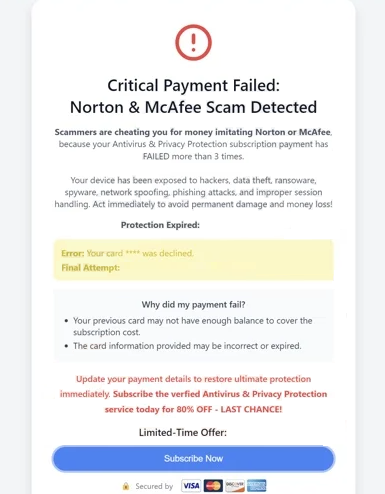
This scam appears inside a web browser, not as a legitimate operating system notice. The message is designed to push an immediate response by suggesting that protection has lapsed or that a subscription is no longer active. Some versions reference well-known security brands and claim that the failed payment has left the device exposed. These claims are used to pressure visitors into clicking a button that leads to another web page.
The destination page promoted by the “Critical Payment Failed” pop-up scam is used to generate profit. In some cases, the redirect leads to a real product page through an affiliate link, meaning the scam operators earn commission when a purchase is made. The visitor is still misled because the pop-up implies a genuine payment problem that requires urgent action, rather than presenting a normal advertisement.
Other versions of the “Critical Payment Failed” pop-up scam route visitors to pages that are not trustworthy. These pages may request payment details, attempt to collect personal information, or promote unwanted software. The scam’s core tactic is to make the visitor treat the alert as an account issue that must be resolved immediately, increasing the chance of submitting sensitive data or purchasing something under false pretenses.
The “Critical Payment Failed” pop-up scam does not confirm that a subscription exists, that a payment attempt occurred, or that any account is connected to the device. It is a fabricated prompt used to create confusion and trigger impulsive clicks. Its appearance should be treated as a web-based scam, not a verified notification from a bank, payment processor, or security provider.
Why users may be redirected to pages showing this pop-up
Redirection to the “Critical Payment Failed” pop-up scam usually happens because the browser is exposed to advertising networks that deliver misleading pages. The pop-up is commonly encountered on websites that use aggressive advertising, where clicks and page views are prioritized over visitor safety. These environments can include pages that rely heavily on pop-ups, forced redirects, and low-quality ad placements.
One common route involves advertisements that open new tabs or redirect the current page after a click. The click may occur on an element that looks normal, such as a play button, a download link, or a navigation control. Instead of performing the expected action, the browser is sent to a scam page that displays the “Critical Payment Failed” alert.
Some redirects occur without a meaningful click because certain ad scripts trigger automatic forwarding when a page loads. This can happen when a website includes third-party advertising content that is poorly controlled. The visitor may only be browsing a page when the browser suddenly loads a different address and displays the scam alert.
Adware can also increase exposure to this type of scam. When adware is present, it can inject additional advertisements into web pages, open sponsored tabs, or force redirects during normal browsing. This makes scam pop-ups appear more frequently and in a wider range of browsing situations, including visits to legitimate websites.
Unwanted browser extensions can contribute similarly. Extensions with advertising behavior can interfere with browsing by inserting ads or routing traffic through promotional pages. When these components are active, redirects to scam pages can occur repeatedly because the browser session is being manipulated.
Search-related exposure can also happen when browsing is routed through advertising-driven results. Clicking a sponsored listing or a misleading result can lead to a redirect chain that ends on a page displaying the “Critical Payment Failed” pop-up scam. The scam does not require a specific device issue. It relies on traffic delivery methods that send visitors to the page.
Site Disclaimer
2-remove-virus.com is not sponsored, owned, affiliated, or linked to malware developers or distributors that are referenced in this article. The article does not promote or endorse any type of malware. We aim at providing useful information that will help computer users to detect and eliminate the unwanted malicious programs from their computers. This can be done manually by following the instructions presented in the article or automatically by implementing the suggested anti-malware tools.
The article is only meant to be used for educational purposes. If you follow the instructions given in the article, you agree to be contracted by the disclaimer. We do not guarantee that the artcile will present you with a solution that removes the malign threats completely. Malware changes constantly, which is why, in some cases, it may be difficult to clean the computer fully by using only the manual removal instructions.