The “Critical Security Alert” pop-up scam is a tech support scam that appears as a sudden, alarming message inside a web browser. It claims a serious security problem has been detected on the user’s computer, such as a malware infection, system breach, or compromised credentials. The notice is engineered to create a sense of urgency, pressuring the visitor to take immediate action. It is not a legitimate alert from the operating system, antivirus software, or any recognized security provider.
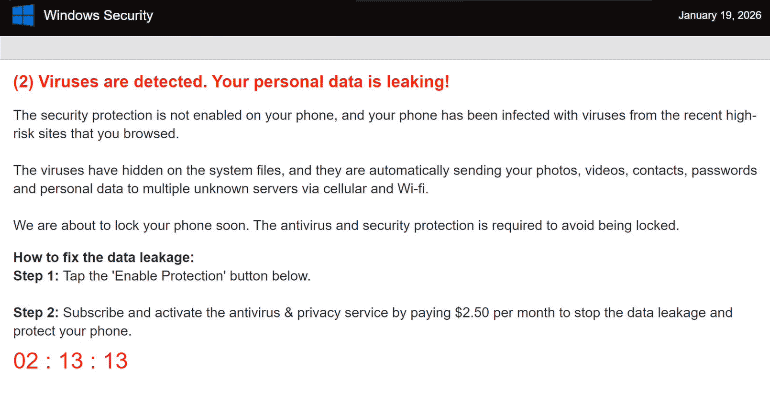
This pop-up typically displays bold warnings like “Critical Security Alert,” “Serious Threat Detected,” or similar phrases. It may use familiar branding, icons, and stylistic elements that resemble official security notifications, but these are visual tricks meant to increase credibility. The pop-up often asserts that the device is at risk right now and that only a specific action, such as calling a phone number, clicking a button, or downloading a tool, can resolve the issue.
The core aim of the scam is to get the visitor to contact fake technical support. A phone number is commonly shown, with instructions to call immediately to “fix” the security problem. In other cases, the pop-up may urge the user to click a link or button that is presented as a protective step. Both paths are traps: calling the number connects the user to scammers posing as tech support agents, while clicking on the link can lead to phishing pages or download pages for unwanted software.
Once contact is made, scammers often attempt to escalate the deception. They may ask for remote access to the Mac, request payment for a bogus “repair,” or collect sensitive information under the guise of diagnosing the supposed threat. Some versions of the scam download what they describe as a “security tool,” but in reality, the software can be unwanted, harmful, or designed to collect personal data. None of these actions addresses a real security issue.
It is important to stress that legitimate security warnings on a Mac do not appear as unsolicited browser pop-ups. True alerts about malware or compromised accounts come through the operating system’s notification system, official security software installed by the user, or verified account management channels. Apple and reputable security products do not use random web pages to deliver urgent warnings or provide direct support numbers embedded in a browser alert.
A web page cannot accurately scan the internal state of a computer. It has no access to system files, installed applications, or real-time threat status. Therefore, any claim by an arbitrary web page that a device is infected, compromised, or at immediate risk is fake. The “Critical Security Alert” pop-up scam uses fear to override normal caution, making it more likely that a user will interact with the scam rather than dismiss it.
Why are users redirected to this scam
The “Critical Security Alert” pop-up scam is usually encountered after visiting web pages that serve aggressive advertising or are part of loosely-regulated ad networks. These pages often host scripts that automatically redirect visitors to scam content. A user browsing content that relies on low-quality ads, such as free video streaming sites, unauthorized download portals, or pages with excessive pop-ups, may be forwarded to a scam page without clicking anything obvious.
One common trigger is deceptive advertisements. Ads on a web page may display large download buttons, fake play controls, or misleading prompts that look like system messages. Interacting with these elements, even a simple click that seems unrelated, can launch a redirect sequence that ends on a scam page displaying the “Critical Security Alert” message.
Some redirects require no user interaction at all. Pages that load third-party advertising or tracking scripts can automatically forward the browser to a scam alert page after a short delay. This behavior can occur on both new and legitimate-looking sites because it originates from embedded ad content that has been injected or is poorly vetted.
Unwanted software known as adware can increase the risk of seeing scam pop-ups. Adware that has been installed on a device may inject extra advertisements into web content, open sponsored tabs, or redirect normal browsing to pages that display scam messages. These adware components may arrive bundled with free downloads, browser extensions, or through deceptive install prompts.
Browser extensions that have advertising functionality can also contribute. Extensions that were added with the promise of enhancing search, providing quick tools, or adding convenience features can sometimes alter how pages load and route traffic through advertising or scam pages. This can make the “Critical Security Alert” scam appear even when visiting sites that would normally be safe.
Fake software update prompts are another source. Web pages may display alerts claiming that a plugin, codec, or component needs to be updated. Clicking these prompts can lead to pages that are designed to show the “Critical Security Alert” scam. The pop-up may then claim that the update failed or that a security issue resulted from ignoring the earlier prompt, increasing pressure to take action.
In all of these scenarios, the common factor is exposure to unsafe advertising content or unwanted redirects. The “Critical Security Alert” pop-up scam does not indicate a real infection or system breach. It is a social engineering tactic designed to manipulate visitors into contacting scammers or interacting with malicious content. Recognizing it as fake and closing the tab or browser window without following the instructions is the safest response.
Site Disclaimer
2-remove-virus.com is not sponsored, owned, affiliated, or linked to malware developers or distributors that are referenced in this article. The article does not promote or endorse any type of malware. We aim at providing useful information that will help computer users to detect and eliminate the unwanted malicious programs from their computers. This can be done manually by following the instructions presented in the article or automatically by implementing the suggested anti-malware tools.
The article is only meant to be used for educational purposes. If you follow the instructions given in the article, you agree to be contracted by the disclaimer. We do not guarantee that the artcile will present you with a solution that removes the malign threats completely. Malware changes constantly, which is why, in some cases, it may be difficult to clean the computer fully by using only the manual removal instructions.