The “Detected Fraudulent Login Alert” scam is a phishing email that claims a suspicious sign-in attempt has been detected on the recipient’s account. The message is presented as a security notification and suggests that the system identified unauthorized access from an unfamiliar device or location. It warns that the account could be at risk and instructs the recipient to review the activity immediately. This alert is not legitimate and is not issued by a real service provider.
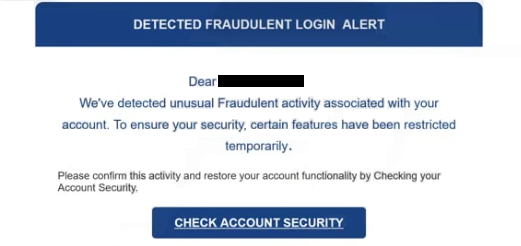
The email attempts to create urgency by implying that the account may be compromised. It may reference a blocked login attempt, an unknown device, or unusual activity detected by automated security systems. The message typically includes a button or link labeled with wording such as “Review Login,” “Secure Account,” or “Verify Activity.” The email suggests that following the link will allow the user to confirm whether the login attempt was legitimate.
Instead of opening the official website of the service mentioned in the email, the link directs the recipient to a counterfeit login page. This page is designed to resemble a legitimate authentication screen. It may include branding elements and a short security notice explaining that the login attempt must be confirmed before account access can continue.
The page requests the user’s login credentials, such as an email address and password. In some cases, it may also prompt for additional verification information, such as one-time authentication codes. The page does not provide access to any real account activity and does not display genuine security alerts. Its only purpose is to collect sensitive information.
Once the credentials are entered, they are sent to the scammers operating the phishing campaign. The site may then display a confirmation message or redirect the user to the legitimate login page to make the process appear normal. By that point, the attackers already have the captured information.
If the stolen credentials are valid, attackers can attempt to sign into the real account. Depending on the service being impersonated, this may allow them to access emails, financial accounts, cloud storage, or business platforms. Attackers may change passwords, modify account settings, or attempt unauthorized transactions.
The warning about fraudulent login activity is fabricated. The scammers do not have access to the recipient’s real account activity and cannot detect login attempts. The message is designed to trigger concern and prompt quick action without verifying the authenticity of the email.
The full “Detected Fraudulent Login Alert” phishing email is below:
Subject: Fwd:NEW LOGIN IP DETECTED.
DETECTED FRAUDULENT LOGIN ALERT
Dear –
We’ve detected unusual Fraudulent activity associated with your account. To ensure your security, certain features have been restricted temporarily.Please confirm this activity and restore your account functionality by Checking your Account Security.
CHECK ACCOUNT SECURITY
If you believe this action was taken in error, please contact our support team immediately.
Thank you for your cooperation.
This message was sent to –
– © 2026. All rights reserved.
How to recognize phishing emails
Several signs can help identify the “Detected Fraudulent Login Alert” scam. The sender address is often inconsistent with the legitimate company being impersonated. While the display name may appear to represent a security or support team, the full email address typically uses a domain unrelated to the official service.
The message content also lacks specific details about the supposed login attempt. It may mention suspicious activity, but does not include clear information such as the device type, IP address, or exact time of the login. Genuine security alerts typically provide more detailed information so users can verify whether the activity is legitimate.
The link included in the email is another indicator. When inspected, the destination URL does not match the official website of the service. The domain may contain additional words, unusual domain endings, or subtle spelling variations intended to resemble the legitimate brand.
The page opened by the link usually focuses entirely on collecting login credentials. It does not provide access to account dashboards or real security information. Authentic services allow users to review login activity through their official websites or applications after signing in directly.
The tone of the email often emphasizes urgency, suggesting that the account may be restricted or compromised if the alert is ignored. This pressure is meant to encourage quick interaction with the link. Real service providers do not require users to confirm login attempts by entering credentials on external pages reached through unsolicited emails.
By examining the sender address, checking the link destination, and recognizing the absence of specific account details, recipients can identify the “Detected Fraudulent Login Alert” scam and avoid exposing their login information.
Site Disclaimer
2-remove-virus.com is not sponsored, owned, affiliated, or linked to malware developers or distributors that are referenced in this article. The article does not promote or endorse any type of malware. We aim at providing useful information that will help computer users to detect and eliminate the unwanted malicious programs from their computers. This can be done manually by following the instructions presented in the article or automatically by implementing the suggested anti-malware tools.
The article is only meant to be used for educational purposes. If you follow the instructions given in the article, you agree to be contracted by the disclaimer. We do not guarantee that the artcile will present you with a solution that removes the malign threats completely. Malware changes constantly, which is why, in some cases, it may be difficult to clean the computer fully by using only the manual removal instructions.