The “DHL Express Parcel Is On Its Way” phishing email is a credential-stealing scam disguised as a DHL Express delivery notification. It tells recipients that a parcel is on its way and provides fabricated shipment details to make the notification appear genuine.
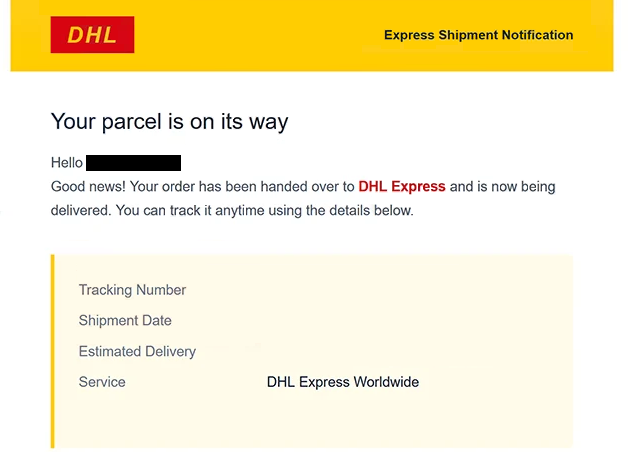
The subject says “Important: DHL Shipment Update”. The email announces that the recipient’s order has been handed over to DHL Express and is being delivered. It also provides a tracking number, shipment date, estimated delivery date, and lists the service as DHL Express Worldwide.
A delivery timeline is included as well. It shows the supposed parcel as picked up and in transit, followed by an out-for-delivery status and an expected delivery date. These details are intended to make the email resemble a normal shipment notification.
Recipients are encouraged to select the “Track Your Shipment” button to supposedly check the parcel’s progress. However, the button does not open a legitimate DHL tracking service. Instead, it leads to a fraudulent Webmail login page.
The fake page displays a Webmail-branded login form and asks visitors to enter their email address and password. It also provides an option to sign in using a cPanel ID. Any credentials entered on the page are sent to the scammers behind the phishing campaign.
This makes the scam somewhat different from delivery phishing emails that attempt to collect payment card information through fake delivery fees. In this case, the goal is to obtain email account credentials.
A compromised email account can expose private correspondence and information stored in the mailbox. It may also provide access to password-reset emails for other services associated with the same address.
DHL is not connected to the phishing campaign. The company’s name and DHL Express branding are being used to make the fake shipment notification more convincing.
Anyone who entered a password on the fraudulent Webmail page should change it immediately. If the same password is used elsewhere, those accounts should be secured with different passwords as well.
The full “DHL Express Parcel Is On Its Way” phishing email is below:
Subject: Important: DHL Shipment Update
DHL Express Shipment Notification
Your parcel is on its way
Hello -.
Good news! Your order has been handed over to DHL Express and is now being delivered. You can track it anytime using the details below.
Tracking Number: –
Shipment Date: –
Estimated Delivery: –
Service: DHL Express WorldwidePicked up & in transit: –
Out for delivery: –
Delivered: –[TRACK YOUR SHIPMENT]
You are receiving this email because a shipment was sent to the address on your order.
This is an automated message from Example Store Inc. — DHL is the delivery carrier for this order.
How to recognize phishing emails
The “DHL Express Parcel Is On Its Way” phishing email uses realistic-looking delivery information to encourage recipients to interact with it. A tracking number, shipment date, estimated delivery date, DHL Express Worldwide service name, and several tracking stages are presented as though they belong to a genuine shipment.
However, these details do not prove that a parcel exists. Unexpected delivery notifications should be checked independently, particularly when the recipient does not recognize the order described in the email.
The “Track Your Shipment” button is the most important element to examine. A genuine shipment-tracking link should lead to an appropriate courier service. In this campaign, selecting the button instead opens an unrelated Webmail login page.
That transition does not match the stated purpose of the email. Tracking a DHL parcel should not require recipients to provide the password for their email account. A request for Webmail credentials after selecting a parcel-tracking button is a strong indication that the page should not be trusted.
The phishing site may appear more convincing because it uses a recognizable Webmail login design and offers a cPanel ID sign-in option. Visual appearance alone cannot confirm that a login page is legitimate. The domain displayed in the browser should be checked before any credentials are entered.
The email itself contains another notable detail. It states that the recipient is receiving the notification because a shipment was sent to the address associated with an order, and it identifies DHL as the delivery carrier. This explanation is designed to make an unexpected shipping email seem reasonable.
Recipients who want to verify a DHL shipment can avoid the email’s button and access DHL’s tracking service independently. If the tracking number belongs to a real shipment, its status can be checked without signing into an unrelated Webmail page.
Site Disclaimer
2-remove-virus.com is not sponsored, owned, affiliated, or linked to malware developers or distributors that are referenced in this article. The article does not promote or endorse any type of malware. We aim at providing useful information that will help computer users to detect and eliminate the unwanted malicious programs from their computers. This can be done manually by following the instructions presented in the article or automatically by implementing the suggested anti-malware tools.
The article is only meant to be used for educational purposes. If you follow the instructions given in the article, you agree to be contracted by the disclaimer. We do not guarantee that the artcile will present you with a solution that removes the malign threats completely. Malware changes constantly, which is why, in some cases, it may be difficult to clean the computer fully by using only the manual removal instructions.