The “DHL Package Delivery Failed” email is a phishing scam that impersonates DHL Express and falsely informs recipients that a package could not be delivered. The message claims that the delivery attempt failed because the recipient’s address was incorrect and instructs them to take action to arrange another delivery. In reality, the notification is not sent by DHL, and the provided button leads to a fraudulent website created to steal email account credentials.
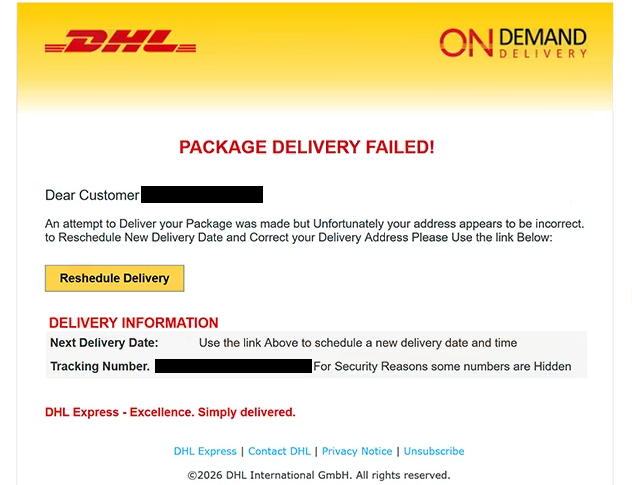
The phishing email has been observed with the subject line “Package Delivery Failed: Reshedule New Delivery Date.” It presents itself as a DHL On Demand Delivery notification and prominently states that the package delivery has failed. The recipient is told that an attempt was made to deliver a parcel but that the address provided for the shipment appears to be incorrect.
To supposedly correct the address and arrange another delivery date, the email provides a button labeled “Reshedule Delivery.” The misspelling of “reschedule” appears in both the email subject and the button itself. The message also displays an obscured tracking number and states that some numbers have been hidden for security reasons.
Selecting “Reshedule Delivery” does not open a legitimate DHL delivery-management service. Instead, recipients are taken to dh-lsys.vercel.app, a phishing website designed to resemble a DHL login portal. The fraudulent page displays DHL branding and asks visitors to provide an email address and password to “View & Complete Tracking Details.”
Credentials submitted through this page are collected by the scammers. Entering an email address and password does not correct a delivery address, provide genuine tracking information, or schedule another delivery attempt.
Stolen email credentials can allow criminals to access the corresponding mailbox if the password remains valid. A compromised email account can expose private correspondence and may also be used to send fraudulent messages while impersonating its owner. Since email accounts can be connected to other services through password-reset functions, attackers may also attempt to use mailbox access to compromise additional accounts.
DHL International GmbH has no connection to this phishing campaign. The company’s name, branding, delivery terminology, and visual identity are being misused to make the fake delivery notification and phishing page appear credible.
The full “DHL Package Delivery Failed” phishing email is below:
Subject: Package Delivery Failed: Reshedule New Delivery Date
DHL On Demand Delivery
PACKAGE DELIVERY FAILED!
Dear Customer -,An attempt to Deliver your Package was made but Unfortunately your address appears to be incorrect. to Reschedule New Delivery Date and Correct your Delivery Address Please Use the link Below:
[Reshedule Delivery]
DELIVERY INFORMATION
Next Delivery Date: Use the link Above to schedule a new delivery date and time
Tracking Number. – For Security Reasons some numbers are HiddenDHL Express – Excellence. Simply delivered.
DHL Express | Contact DHL | Privacy Notice | Unsubscribe
©2026 DHL International GmbH. All rights reserved.
How to recognize the “DHL Package Delivery Failed” phishing email
The delivery problem described in the message should be verified independently rather than through the supplied “Reshedule Delivery” button. Anyone expecting a DHL shipment can access DHL’s legitimate tracking service separately and check the tracking number without relying on a destination provided in an unsolicited email.
Several details in this particular message warrant caution. The subject line contains “Reshedule” instead of “Reschedule,” and the same spelling mistake appears on the button. The body of the message also contains awkward capitalization and grammatical errors while attempting to present itself as an official delivery notification.
The destination behind the button is an even stronger indicator of fraud. Instead of directing recipients to a DHL-controlled domain, it opens dh-lsys.vercel.app. A page displaying a recognizable DHL logo does not establish that DHL operates it. Users should inspect where email buttons lead before entering any credentials.
The request for email credentials is also inconsistent with the problem described in the message. The email initially tells recipients that their delivery address needs to be corrected and a new delivery date selected. After clicking the button, however, the fraudulent site asks for an email address and password to access supposed tracking details. Those credentials are what the scammers are attempting to obtain.
Recipients should also examine the sender’s complete email address rather than trusting DHL branding or the visible sender name. When there is uncertainty about a delivery notification, the shipment should be checked through DHL’s official website instead of through links or buttons contained in the questionable message.
Anyone who received the email but did not submit information through the fraudulent site has not disclosed their password through this phishing attempt. The message should be deleted without interacting with its button.
Site Disclaimer
2-remove-virus.com is not sponsored, owned, affiliated, or linked to malware developers or distributors that are referenced in this article. The article does not promote or endorse any type of malware. We aim at providing useful information that will help computer users to detect and eliminate the unwanted malicious programs from their computers. This can be done manually by following the instructions presented in the article or automatically by implementing the suggested anti-malware tools.
The article is only meant to be used for educational purposes. If you follow the instructions given in the article, you agree to be contracted by the disclaimer. We do not guarantee that the artcile will present you with a solution that removes the malign threats completely. Malware changes constantly, which is why, in some cases, it may be difficult to clean the computer fully by using only the manual removal instructions.