The “DHL – Your Shipment Has Arrived” phishing email pretends to be a delivery notification from DHL. It tells recipients that a shipment has reached a local DHL office and asks them to confirm their delivery details. The shipment does not exist, and DHL is not connected to the email. The scammers use the fake delivery notice to collect personal information.
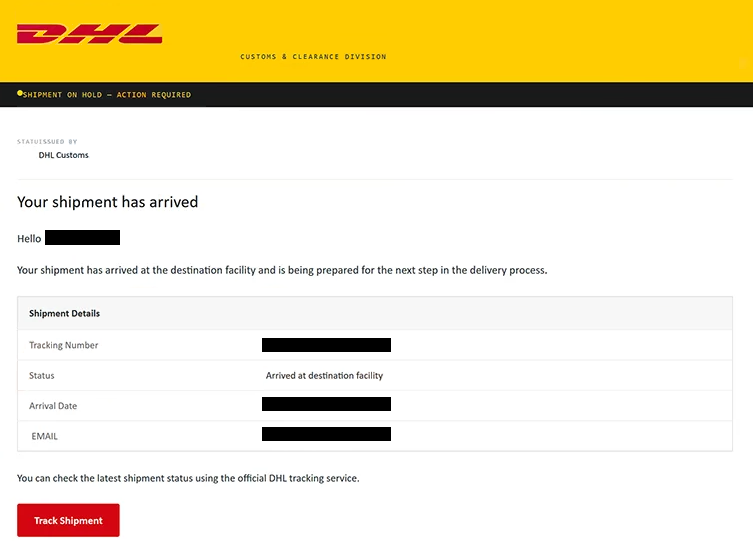
The email uses “DHL – Your Shipment Has Arrived” as its subject and claims that a package is waiting for the recipient. It includes a supposed tracking number and says that the shipment has already reached a nearby DHL location.
Recipients are asked to confirm their address before delivery can continue. The email also states that this must be done within a limited period, adding urgency to what appears to be a routine shipping update. People expecting a package may be more likely to follow the instructions without questioning whether the email actually came from DHL.
To continue, recipients are told to select “Confirm Delivery.” Instead of opening DHL’s official shipment management service, this takes them to a fake delivery page.
The site asks for information such as the recipient’s full name, address, city, postal code, phone number, and email address. These details are presented as necessary for confirming where the package should be delivered. In reality, the information is collected by the scammers.
The fake page may continue through additional steps after the initial delivery form. Depending on how the scam is configured, recipients could be asked for more personal or financial information under the pretext of completing delivery arrangements or paying a small shipping-related charge.
DHL has nothing to do with this email or the website associated with it. The company’s name and visual identity are copied because DHL is a widely recognized delivery company, making an unexpected shipment notification easier to believe.
Personal information collected through this type of scam can be useful for further fraud. A name, phone number, email address, and home address can help scammers create more convincing phishing emails or contact victims while pretending to represent legitimate businesses.
If payment details are requested and provided, there is also a risk of unauthorized transactions. The exact consequences depend on what information the recipient submits while interacting with the fake delivery website.
The full “DHL – Your Shipment Has Arrived” phishing email is below:
Subject: SHIPMENT (BL/INV/PL) ON HOLD- ACTION REQUIRED
Customs & Clearance Division
Shipment on hold — action required
Status Issued by DHL CustomsYour shipment has arrived
Hello -,
Your shipment has arrived at the destination facility and is being prepared for the next step in the delivery process.
Shipment Details
Tracking Number: –
Status: Arrived at destination facility
Arrival Date: –
EMAIL: –You can check the latest shipment status using the official DHL tracking service.
[Track Shipment]If you were not expecting this shipment, please verify the tracking information through DHL’s official website rather than using links from unexpected messages.
How to recognize the “DHL – Your Shipment Has Arrived” phishing email
An unexpected delivery notification should always be checked before following its instructions. The fact that an email includes DHL branding, a tracking number, or shipment details does not prove that a real package exists. These elements can easily be added to a phishing email.
People who are genuinely expecting a DHL shipment can verify its status independently. Instead of using “Confirm Delivery” from the email, they can open DHL’s official website themselves and enter the tracking number there. If the tracking information does not exist or does not match the expected shipment, the email should not be trusted.
Requests to confirm personal information also deserve attention. Delivery companies may sometimes need address information, but recipients should question why they are being asked to enter details again, particularly when the request comes through an unexpected email.
Urgency is another part of the scam. Giving recipients a short period to confirm their delivery can make them worry that the package will be returned or delayed. This pressure is intended to reduce the chance that they will stop and verify the shipment first.
The website itself should also be checked carefully. A page can copy DHL’s logo, colors, and general design while having no connection to the company. The actual website address is more useful for determining whether the page is legitimate than its appearance.
Receiving or opening the “DHL – Your Shipment Has Arrived” phishing email does not cause an infection or automatically expose personal information. The risk begins when recipients follow the instructions and submit information through the fake website.
Site Disclaimer
2-remove-virus.com is not sponsored, owned, affiliated, or linked to malware developers or distributors that are referenced in this article. The article does not promote or endorse any type of malware. We aim at providing useful information that will help computer users to detect and eliminate the unwanted malicious programs from their computers. This can be done manually by following the instructions presented in the article or automatically by implementing the suggested anti-malware tools.
The article is only meant to be used for educational purposes. If you follow the instructions given in the article, you agree to be contracted by the disclaimer. We do not guarantee that the artcile will present you with a solution that removes the malign threats completely. Malware changes constantly, which is why, in some cases, it may be difficult to clean the computer fully by using only the manual removal instructions.