The “Domain Service Deactivation” phishing email is a fraudulent message that attempts to trick recipients into revealing their email account credentials by claiming that their domain-related email service is about to be disabled. The email presents the situation as an administrative issue requiring immediate attention and urges recipients to complete a verification procedure before the stated deadline. The notification is not a legitimate service announcement but part of a credential theft campaign.
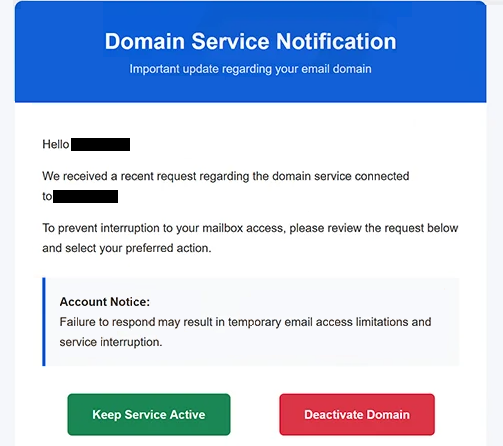
Rather than claiming that an account has already been compromised, the email focuses on the supposed expiration or deactivation of domain services. It informs recipients that email functionality linked to their domain will be suspended unless they confirm or update their account information. This approach is intended to convince users that failure to respond could interrupt business communications.
The message typically contains a button or hyperlink inviting the recipient to keep the domain service active, validate the account, or confirm mailbox settings. Clicking the provided link does not open an official domain management portal. Instead, it leads to a phishing website designed to imitate a webmail login page or an email administration interface.
The phishing page requests the recipient’s email address and password, claiming that authentication is required to prevent the service from being deactivated. No verification takes place. Any credentials entered into the form are transmitted directly to the attackers operating the phishing campaign.
Email account credentials are valuable because they provide access to much more than incoming and outgoing messages. A compromised mailbox may contain confidential business correspondence, invoices, contracts, password reset emails, authentication messages, and other sensitive information. Attackers may also use the compromised account to impersonate the account owner or distribute additional phishing emails to trusted contacts.
The “Domain Service Deactivation” phishing email attempts to increase its credibility by using language commonly associated with domain administration and email hosting. References to server maintenance, domain verification, email continuity, or administrative compliance are included to make the notification resemble a genuine technical announcement.
Unlike phishing campaigns that rely on fake security alerts or mailbox storage warnings, this campaign exploits concerns about domain availability and uninterrupted email service. Users responsible for business domains or company email accounts may be more inclined to respond quickly because they wish to avoid communication outages.
Anyone who entered credentials through a website linked from the “Domain Service Deactivation” phishing email should immediately change the password for the affected mailbox. If the same password has been used for other services, those accounts should also be updated. Users should additionally review account activity and recovery settings for signs of unauthorized access.
The full “Domain Service Deactivation” phishing email is below:
Subject: Final Warning: Email Deactivation Pending
Domain Service Notification
Important update regarding your email domainHello -,
We received a recent request regarding the domain service connected to –
To prevent interruption to your mailbox access, please review the request below and select your preferred action.
Account Notice:
Failure to respond may result in temporary email access limitations and service interruption.[Keep Service Active] [Deactivate Domain]
Regards,
– Support Team
This is an automated notification from the domain security system.
Please do not reply directly to this message. © 2026 – — All Rights Reserved
Recognizing domain-related phishing emails
Unexpected notifications claiming that domain services are about to be suspended should be verified independently before any action is taken. Legitimate hosting providers and domain registrars generally allow customers to manage their accounts by signing in directly through their official websites instead of requiring authentication through links contained in unsolicited emails.
Recipients should also examine the sender’s address carefully. Phishing campaigns frequently use display names suggesting technical support, domain administration, or hosting services while the underlying email originates from an unrelated domain.
Another warning sign is an email that creates unnecessary urgency by imposing a short deadline to prevent service deactivation. Pressure to act immediately is a common social engineering technique intended to reduce careful evaluation of the message.
Users should also inspect the destination of embedded links before opening them. A legitimate domain management notification should direct users only to the official website of their hosting provider or domain registrar. Login pages hosted on unrelated domains should be treated as suspicious.
The safest way to verify claims about domain status or email service is to access the hosting provider or domain registrar directly by manually entering its official web address into a browser. If no corresponding notification appears after signing in, the email should be considered a phishing attempt.
Incoming search terms:
Site Disclaimer
2-remove-virus.com is not sponsored, owned, affiliated, or linked to malware developers or distributors that are referenced in this article. The article does not promote or endorse any type of malware. We aim at providing useful information that will help computer users to detect and eliminate the unwanted malicious programs from their computers. This can be done manually by following the instructions presented in the article or automatically by implementing the suggested anti-malware tools.
The article is only meant to be used for educational purposes. If you follow the instructions given in the article, you agree to be contracted by the disclaimer. We do not guarantee that the artcile will present you with a solution that removes the malign threats completely. Malware changes constantly, which is why, in some cases, it may be difficult to clean the computer fully by using only the manual removal instructions.