The Email Account Status Changed email is a phishing attack designed to steal email login credentials by falsely claiming that a change has already been applied to the recipient’s email account. The message is not a legitimate system notification. Its sole purpose is to direct recipients to a fake verification page where account information can be captured.
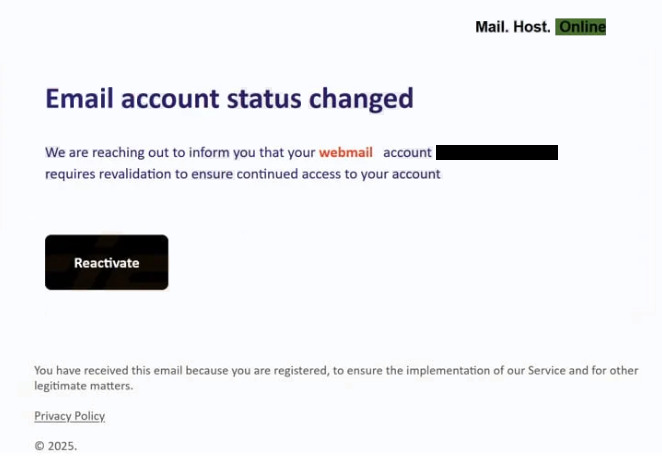
The email presents itself as an automated notice from an email service and states that the account status has been modified. Rather than warning about a future issue, it claims that the change has already occurred and that user confirmation is required. This framing is intentional. By suggesting that the update is complete, the email pressures recipients to comply instead of questioning the message.
No details are provided about what was changed. The email does not reference a specific setting, feature, time, or user action. This lack of information prevents recipients from easily recognising the message as illegitimate and allows the notification to appear like a routine administrative update.
A link in the email prompts the recipient to review or confirm the account status. Clicking the link does not open the official website of any email provider. Instead, it redirects the user to a web page created to resemble an email sign-in or account confirmation screen. The page layout is simple and neutral, using standard login fields and generic wording so it can plausibly represent different email services.
The page requests the recipient’s email address and password. In some instances, it also asks for additional confirmation details, presented as necessary to complete the status review. Any information entered on the page is transmitted to the operators behind the phishing site.
After submission, the page may display a message stating that the account status has been verified or restored. The session may then close or redirect elsewhere. This behaviour is intended to make the interaction appear finished and discourage further scrutiny. The legitimate email account remains unchanged.
With valid credentials, attackers can access the email account without the owner’s awareness. They can read messages, adjust mailbox rules, and initiate password resets for other services connected to the same address. Because email accounts are often used as recovery points, control over one inbox can lead to access across multiple platforms.
The Email Account Status Changed scam does not involve attachments, downloads, or technical exploits. The attack relies entirely on impersonation and familiar account language. Account status notifications are common, which makes the message appear believable at first glance.
The email is sent broadly and does not identify a specific provider. This allows recipients to associate the message with whichever email account they use most often.
How to recognise phishing emails
The Email Account Status Changed phishing email can be recognised by looking closely at what the email asks you to do and what information it does not provide. One of the first things to notice is that the email says your account status has already changed, yet it does not explain what was changed or why. Legitimate email providers normally tell users exactly which setting was modified or what action caused the update.
Another important warning sign is how the email tells you to fix the issue. The message directs you to click a link and enter your email password to confirm or restore your account status. Email providers do not ask users to enter passwords through links sent in unexpected emails. Account checks are done only after you sign in directly on the provider’s official website or app.
The sender information is also worth checking. While the name shown in the inbox may look official, the actual email address often belongs to a domain that has nothing to do with your email service. Opening the sender details can reveal this mismatch.
The link included in the email is another clue. If you hover over it without clicking, the web address often does not match the official website of your email provider. Pages used in this phishing email usually sit on unrelated or generic domains. A lock icon or HTTPS connection does not mean the page is safe.
The message also avoids using your name or any account-specific details. It does not mention your email address, recent activity, or previous notifications. Real account notices usually include some information that confirms the message applies to your account.
Another thing to notice is that the email gives you only one option: click the link in the message. Real providers allow you to check account changes by signing in normally through their website. An email that pushes you toward a single link and discourages other ways of checking should not be trusted.
If you have not changed any settings or experienced access issues, an unexpected Email Account Status Changed email should raise suspicion. The safest response is to ignore the link and go directly to your email provider’s official website by typing the address yourself. If there is no alert after signing in, the email was not legitimate.
Being familiar with how real email providers communicate account changes makes it much easier to spot messages like this and avoid giving away your login details.
Site Disclaimer
2-remove-virus.com is not sponsored, owned, affiliated, or linked to malware developers or distributors that are referenced in this article. The article does not promote or endorse any type of malware. We aim at providing useful information that will help computer users to detect and eliminate the unwanted malicious programs from their computers. This can be done manually by following the instructions presented in the article or automatically by implementing the suggested anti-malware tools.
The article is only meant to be used for educational purposes. If you follow the instructions given in the article, you agree to be contracted by the disclaimer. We do not guarantee that the artcile will present you with a solution that removes the malign threats completely. Malware changes constantly, which is why, in some cases, it may be difficult to clean the computer fully by using only the manual removal instructions.