The “Email Has Been Placed On Restriction” phishing email is a credential-stealing scam that invents a restriction on the recipient’s mailbox. It claims that normal email activity has already been suspended and presents account verification as the only way to restore access.
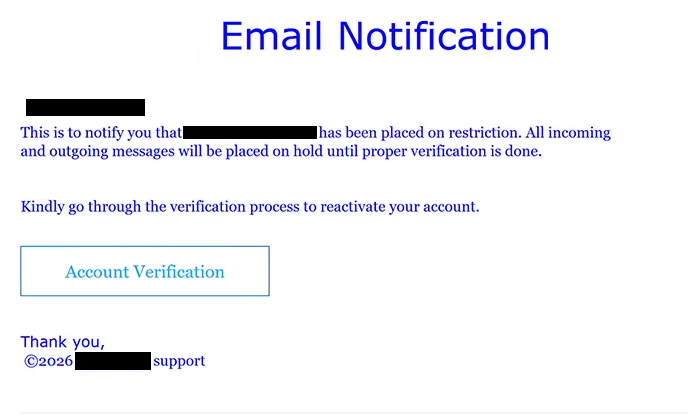
The subject says “Email Notification restriction notice!!!”. Inside, recipients are informed that their email address has supposedly been placed under restriction. The warning goes further by claiming that all incoming and outgoing emails will remain on hold until the account has been properly verified.
This creates two concerns at once. The recipient is led to believe that new emails cannot arrive and that messages they attempt to send will not be delivered. The email then offers a seemingly simple way to remove the restriction through an “Account Verification” button.
The restriction does not exist. Selecting the button takes the recipient to a fraudulent website rather than an account-management page operated by their email provider.
The resulting page presents itself as an email settings portal. It automatically displays the targeted email address and asks the visitor to enter the corresponding password to “verify ownership”. Having the correct address already shown can make the page appear connected to the recipient’s actual mailbox, but this information can simply be passed through the phishing link.
Entering the password gives it to the scammers. It does not verify ownership, remove a restriction, or release any incoming or outgoing emails.
A compromised mailbox can expose private correspondence and information stored in the account. Scammers with access may also attempt to reset passwords for other services connected to the email address or use the hijacked mailbox to contact the victim’s contacts while posing as its owner.
The “Email Has Been Placed On Restriction” phishing email is not associated with a legitimate email provider. Anyone who has already entered a password on the fake page should change it through the real email service and replace the same password on any other accounts where it has been reused.
The full “Email Has Been Placed On Restriction” phishing email is below:
Subject: Email Notification:account restriction notice!!!
Email Notification
This is to notify you that – has been placed on restriction. All incoming and outgoing messages will be placed on hold until proper verification is done.
Kindly go through the verification process to reactivate your account.
[Account Verification]
Thank you,
©2026 – support
How to recognize the “Email Has Been Placed On Restriction” phishing email
This campaign uses loss of basic mailbox functionality as its main pressure tactic. Rather than claiming that restrictions could occur in the future, it tells recipients that the account has already been restricted and that all incoming and outgoing messages are currently being held.
The wording of the subject is another detail worth examining. “Email Notification restriction notice!!!” uses multiple exclamation marks and awkward formatting while supposedly representing an official account notice. The body also provides little explanation for why the restriction was imposed.
Instead, attention is immediately directed toward verification. Recipients are told to go through a verification process to reactivate the account, with “Account Verification” presented as the route to restoring access.
The page reached through this button exposes the purpose of the campaign. A supposed mailbox restriction eventually becomes a request for the recipient’s email password on a third-party website. The site claims that the password is necessary to verify ownership, but legitimate account problems should be handled through the user’s actual email provider.
The pre-filled email address can make the login form more persuasive. Recipients may assume that a page displaying their correct address must already have access to their account information. In reality, knowing an email address does not demonstrate any connection to the mailbox or its provider.
Users can check whether an account has genuinely been restricted without selecting “Account Verification”. They can open their normal webmail application or manually navigate to their provider’s legitimate website and sign in there. Any real restriction affecting incoming and outgoing mail should be visible through the genuine account.
Site Disclaimer
2-remove-virus.com is not sponsored, owned, affiliated, or linked to malware developers or distributors that are referenced in this article. The article does not promote or endorse any type of malware. We aim at providing useful information that will help computer users to detect and eliminate the unwanted malicious programs from their computers. This can be done manually by following the instructions presented in the article or automatically by implementing the suggested anti-malware tools.
The article is only meant to be used for educational purposes. If you follow the instructions given in the article, you agree to be contracted by the disclaimer. We do not guarantee that the artcile will present you with a solution that removes the malign threats completely. Malware changes constantly, which is why, in some cases, it may be difficult to clean the computer fully by using only the manual removal instructions.