The “Email Unable To Send” email scam is a phishing campaign that impersonates an automated email delivery system to steal account login credentials. The phishing emails claim that an outgoing email has been blocked because it was identified as spam. Recipients are instructed to complete an additional verification step to supposedly release the undelivered email.
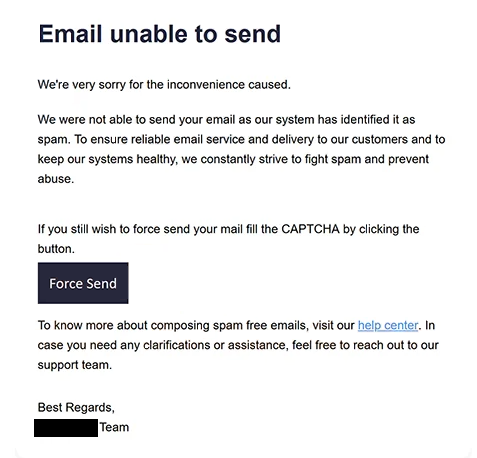
The phishing emails use the subject line “Undelivered Mail Returned to Sender” and present themselves as delivery failure notifications. They explain that the email service automatically blocked a recently sent email to maintain reliable delivery and prevent spam. This explanation is intended to make the notification appear like a routine response from an email provider.
Instead of identifying a specific delivery error or providing technical information about the rejected email, the phishing emails encourage recipients to take action through a button labeled “Force Send.” Users are told that they must complete a CAPTCHA verification to send the blocked email. This creates a seemingly legitimate reason for directing recipients away from their usual email interface.
The button is associated with a phishing website intended to imitate an email service login page. However, the linked website was no longer operational when examined, so its exact appearance and functionality could not be verified. The suspected purpose of the website is to obtain email account credentials by presenting a counterfeit authentication form.
Phishing websites of this kind may imitate familiar email providers and request an email address and password. If recipients enter valid credentials, attackers could potentially access their mailboxes, read private correspondence, and obtain sensitive information stored in emails. Compromised accounts could also be used to impersonate their owners or send additional phishing emails to existing contacts.
Access to an email account may also allow scammers to attempt password resets for other accounts linked to the same address. This could result in additional account compromises, particularly when email is used as the primary recovery method. However, there is no confirmed evidence that these consequences occurred in connection with this specific campaign.
The full “Email Unable To Send” phishing email is below:
Subject: Undelivered Mail Returned to Sender.
Email unable to send
We’re very sorry for the inconvenience caused.
We were not able to send your email as our system has identified it as spam. To ensure reliable email service and delivery to our customers and to keep our systems healthy, we constantly strive to fight spam and prevent abuse.
If you still wish to force send your mail fill the CAPTCHA by clicking the button.
[Force Send]To know more about composing spam free emails, visit our help center. In case you need any clarifications or assistance, feel free to reach out to our support team.
How to recognize phishing emails
Phishing emails disguised as delivery failure notifications can be recognized by examining the actions they request. Genuine email delivery errors may generate automated notifications, but unexpected instructions to visit an external website, complete a CAPTCHA, or provide login credentials to resend an email are significant warning signs.
One characteristic of this campaign is its claim that an outgoing email was blocked for being classified as spam. Recipients who have not recently sent an email should be particularly suspicious of such notifications. Even when an email was recently sent, the notification should be checked against the actual delivery status shown by the email provider.
The “Force Send” button is another important indicator. It suggests that the recipient can override a spam-related delivery restriction by completing a verification process. This request is unusual because legitimate delivery failure notifications generally provide information about why an email could not be delivered rather than requiring authentication through an unfamiliar website.
The reference to CAPTCHA verification can also make the phishing email appear more credible. CAPTCHA challenges are commonly associated with legitimate websites, but their presence does not establish that a service is trustworthy. In this campaign, the CAPTCHA requirement is used as part of the supposed process for releasing a blocked email.
Recipients should also examine the sender’s address and the destination of embedded links. Phishing emails may use sender names resembling automated mail systems while originating from unrelated domains. Similarly, buttons that appear to lead to email management tools may redirect users to websites that have no legitimate connection to their email provider.
Another warning sign is the lack of specific information about the supposedly rejected email. Authentic delivery failure notifications commonly include details such as the intended recipient, delivery status, or technical error information. A generic warning that focuses primarily on encouraging users to click a button should therefore be treated cautiously.
The combination of a spam-related delivery failure claim, a “Force Send” button, and an unexpected CAPTCHA requirement distinguishes this phishing campaign. Recipients can assess the warning by checking their sent emails and delivery notifications directly through their usual email service rather than relying on the instructions contained in the phishing email.
Site Disclaimer
2-remove-virus.com is not sponsored, owned, affiliated, or linked to malware developers or distributors that are referenced in this article. The article does not promote or endorse any type of malware. We aim at providing useful information that will help computer users to detect and eliminate the unwanted malicious programs from their computers. This can be done manually by following the instructions presented in the article or automatically by implementing the suggested anti-malware tools.
The article is only meant to be used for educational purposes. If you follow the instructions given in the article, you agree to be contracted by the disclaimer. We do not guarantee that the artcile will present you with a solution that removes the malign threats completely. Malware changes constantly, which is why, in some cases, it may be difficult to clean the computer fully by using only the manual removal instructions.