The “Email Verification Deadline” phishing email is a fake account notice that pressures recipients to authenticate their email before a specified date. It poses as an automated notification from a supposed mail administrator and warns that ignoring the request could eventually result in the account being deleted.
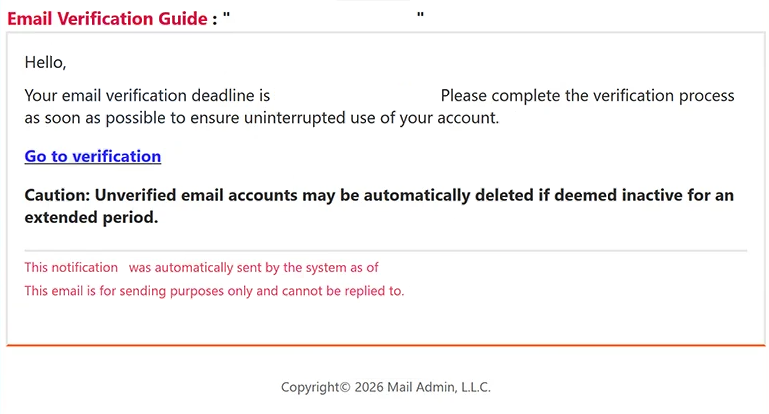
The email tells the recipient that their verification needs to be done by a certain date. Rather than claiming that the mailbox has already been disabled, it presents verification as a requirement for keeping all account functions available without interruption.
A “Go to verification” link is offered as the way to complete the process. The recipient is encouraged to use it as soon as possible, while a separate warning states that unverified accounts may be automatically deleted if they are considered inactive for an extended period.
Several details are included to make the notification resemble an automated administrative email. It addresses the recipient, displays a precise date and time when the notification was supposedly generated, and says that replies cannot be sent because the email is for sending purposes only. It is signed using the name “Mail Admin, L.L.C.”
There is no legitimate company behind that identity in this campaign. The verification requirement and threatened account deletion are fabricated, and the email is part of a phishing attempt intended to obtain email login credentials.
The website behind “Go to verification” was no longer active when the campaign was examined. For that reason, its exact design and the information it requested could not be established. It would be inaccurate to claim that the analyzed site definitely displayed a particular Gmail, Outlook, Yahoo, or Webmail login form.
The purpose of the campaign, however, is credential theft. Victims are directed away from their legitimate email service under the pretext of completing mandatory authentication.
Anyone who entered account credentials after following this email should change the affected password immediately through the real email provider. Reused passwords should also be replaced, and the account should be checked for unfamiliar logins or unauthorized changes.
The full “Email Verification Deadline” phishing email is below:
Subject: -: To restore all functions of the service, you must complete the authentication process.
Email Verification Guide : ” – ”
Hello, -.
Your email verification deadline is -. Please complete the verification process as soon as possible to ensure uninterrupted use of your account.
[Go to verification]
Caution: Unverified email accounts may be automatically deleted if deemed inactive for an extended period.
This notification was automatically sent by the system as of -.
This email is for sending purposes only and cannot be replied to.
Copyright© 2026 Mail Admin, L.L.C.
How to recognize the “Email Verification Deadline” phishing email
A fixed deadline is the main device used to make this phishing attempt persuasive. By telling recipients that verification must be completed by a certain date, the email turns an otherwise vague account request into something that appears time-sensitive.
The threat is not limited to temporary restrictions. Recipients are warned that an unverified account may eventually be considered inactive and automatically deleted. This creates a stronger incentive to select “Go to verification” rather than independently checking whether authentication is actually required.
The supposed sender is another detail worth examining. “Mail Admin, L.L.C.” sounds administrative, but it does not identify the company that genuinely operates the recipient’s email service. A legitimate account-verification request should have a clear connection to the provider responsible for that account.
The exact timestamp included near the bottom of the email serves a similar purpose. Stating that the notification was automatically generated at a specific date and time can make it resemble a real system notice. A timestamp, however, does not demonstrate that the sender has access to the recipient’s account or knows its verification status.
Users should also be cautious of the “Go to verification” link. An email account does not need to be accessed through a link in an unexpected notification. Recipients can instead open their normal webmail application or manually visit their provider’s legitimate website to check whether any verification request actually exists.
In this particular case, the linked phishing site was inactive during analysis. Its exact login interface therefore remains unconfirmed, and recipients should not rely on assumptions about what a specific version of the page might display.
Site Disclaimer
2-remove-virus.com is not sponsored, owned, affiliated, or linked to malware developers or distributors that are referenced in this article. The article does not promote or endorse any type of malware. We aim at providing useful information that will help computer users to detect and eliminate the unwanted malicious programs from their computers. This can be done manually by following the instructions presented in the article or automatically by implementing the suggested anti-malware tools.
The article is only meant to be used for educational purposes. If you follow the instructions given in the article, you agree to be contracted by the disclaimer. We do not guarantee that the artcile will present you with a solution that removes the malign threats completely. Malware changes constantly, which is why, in some cases, it may be difficult to clean the computer fully by using only the manual removal instructions.