The “Failed email delivery reports” email scam is a phishing email that falsely claims an outgoing message could not be delivered. It alleges that one or more recent emails failed to reach their intended recipients, and it suggests that the recipient must take action to resolve the issue. The message is not a legitimate delivery failure report from an email provider or mail server. Its core purpose is to trick the recipient into revealing login credentials or other sensitive information on a fraudulent webpage.
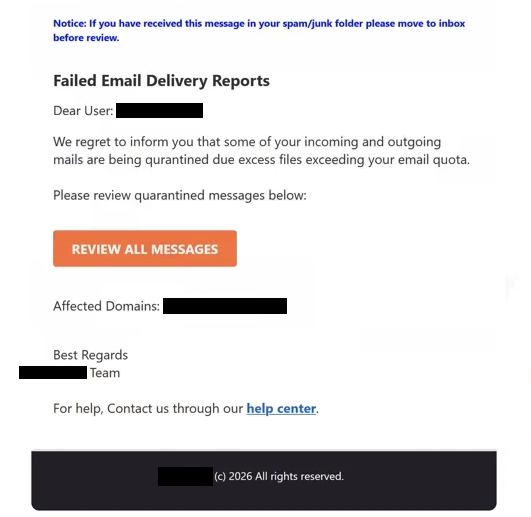
The scam email is formatted to resemble a real system notice. It often contains headers or content that look similar to genuine bounce-back emails generated by mail servers. The subject line may include phrases such as “Failed email delivery report,” “Undelivered Mail Returned to Sender,” or “Delivery Failure Notice.” The body typically lists one or more email addresses that are supposedly undeliverable, or it may include technical jargon about SMTP errors or message rejection. All of this is intended to give the impression that a legitimate mail delivery problem has occurred.
A key component of the scam is the call to action. The email often includes a link or button that claims to allow the recipient to view details about the failed message or to update email settings to prevent future delivery issues. Clicking the link does not lead to a legitimate mail server interface. Instead, it opens a fake login page that mimics a webmail portal or account management page. The page is designed to harvest email addresses and passwords. Any credentials entered are captured directly by scammers.
In some versions of the “Failed email delivery reports” email scam, the fake page may also request additional identifying details. These may include recovery email addresses, phone numbers, or answers to security questions. The information entered can be used by scammers to gain broader access to the victim’s other accounts or to bypass two-factor authentication mechanisms. In some cases, the scam page may attempt to collect billing or financial information under the pretense of verifying ownership of the email account.
Obtaining email login credentials is particularly harmful because once scammers gain access to a mailbox, they can read private messages, access stored contacts, and use the compromised account to send additional phishing emails. Email accounts are often tied to password reset flows for other online services. If scammers have control of an email account, they can attempt to reset passwords for related financial, social, or workplace accounts, leading to wider compromise.
The scam’s success relies on deception and urgency. The “Failed email delivery reports” email is written to appear technical and important, encouraging recipients to click the link without verifying the email’s legitimacy. The mail system itself generates legitimate mail delivery failure messages and does not direct recipients to sign in via links in unsolicited emails.
The full “Failed Email Delivery Reports” phishing email is below:
Subject: Failed Incoming Messages Reports, Awaitng Your Review.
Notice: If you have received this message in your spam/junk folder please move to inbox before review.
Failed Email Delivery Reports
Dear User: -,
We regret to inform you that some of your incoming and outgoing mails are being qurantined due excess files exceeding your email quota.
Please review quarantined messages below:
REVIEW ALL MESSAGES
Affected Domains: –
Best Regards
– TeamFor help, Contact us through our help center.
– (c) 2026 All rights reserved.
How to recognize phishing emails
The “Failed email delivery reports” email scam is delivered as part of large-scale phishing campaigns. Scammers send the same template to many email addresses collected from public sources, data breaches, or automated harvesting tools. Because the email does not rely on knowing the recipient’s actual mail usage, it can be sent broadly and still convince some recipients to engage with the scam.
One of the first signs that the email is fraudulent is the sender’s address. Although the display name may appear to come from a mail server or email service, the actual sending domain often does not match the provider being referenced. A mismatch between what the display name suggests and the actual sending domain is a common indicator of phishing.
The language used in the email is another clue. Phishing emails often include generic or exaggerated phrasing such as “urgent action required,” “delivery failure detected,” or “account must be updated.” Real mail delivery failure messages typically provide precise technical details about why a specific message could not be delivered, including clear SMTP error codes and the exact server that generated the report.
Links in the email are a major warning sign. Phishing emails frequently embed URLs that do not match the legitimate domain of the email provider. Inspecting the link without clicking it by hovering over the button or text can reveal a suspicious destination. If the URL points to an unfamiliar site or a domain unrelated to the user’s email service, it should not be trusted.
Another red flag is a request for login credentials or personal information through a link in an unsolicited email. Legitimate email providers do not ask users to sign in through a link in a delivery failure message. Instead, users are directed to their known webmail portal, and any issues are addressed within the secure account interface.
Site Disclaimer
2-remove-virus.com is not sponsored, owned, affiliated, or linked to malware developers or distributors that are referenced in this article. The article does not promote or endorse any type of malware. We aim at providing useful information that will help computer users to detect and eliminate the unwanted malicious programs from their computers. This can be done manually by following the instructions presented in the article or automatically by implementing the suggested anti-malware tools.
The article is only meant to be used for educational purposes. If you follow the instructions given in the article, you agree to be contracted by the disclaimer. We do not guarantee that the artcile will present you with a solution that removes the malign threats completely. Malware changes constantly, which is why, in some cases, it may be difficult to clean the computer fully by using only the manual removal instructions.