The “FedEx – Your Shipment is in Transit” phishing email is a credential-stealing scam that impersonates FedEx. It claims that the recipient has a package moving through the FedEx delivery network and encourages them to open tracking information and shipping documents.
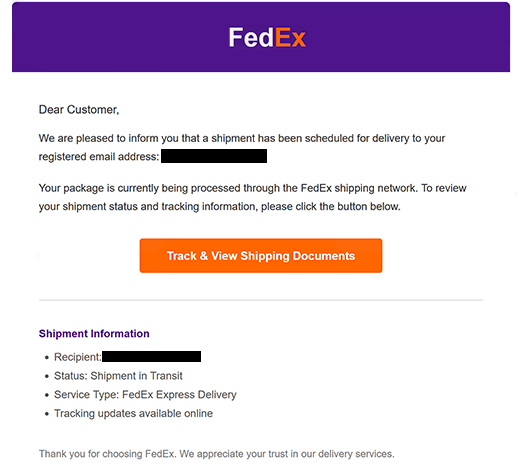
The email is presented as a routine delivery notification. It addresses the recipient as “Dear Customer” and claims that a shipment has been scheduled for delivery. The package status is listed as “Shipment in Transit”, while the service type is shown as “FedEx Express Delivery”.
Recipients are told that tracking updates are available online and are instructed to select “Track & View Shipping Documents”. The wording makes the button appear to provide ordinary package information, but it does not lead to a legitimate FedEx tracking service.
Clicking the button opens a phishing website designed to resemble a shared Microsoft Excel Online document. The page displays a Microsoft Office-style sign-in prompt and tells visitors to log in with their email provider credentials to access the supposed shipping documents.
This login request is fraudulent. Any credentials entered on the page are sent to the scammers behind the campaign. The fake document does not provide legitimate FedEx shipping information.
The scam therefore switches between two trusted brands. FedEx is used in the initial email to make the delivery notification believable, while the phishing site imitates Microsoft services to make the credential request appear legitimate.
Access to an email account can expose private correspondence and other information stored in the mailbox. It may also allow scammers to target services connected to the compromised email address, particularly accounts that use email for password recovery.
FedEx is not associated with the “FedEx – Your Shipment is in Transit” phishing email. Its name and delivery services are impersonated to persuade recipients to visit the fake document page and provide their email login credentials.
The full “FedEx – Your Shipment is in Transit” phishing email is below:
Subject: Your Shipment Is in Transit
FedEx
Dear Customer,
We are pleased to inform you that a shipment has been scheduled for delivery to your registered email address: -.
Your package is currently being processed through the FedEx shipping network. To review your shipment status and tracking information, please click the button below.
[Track & View Shipping Documents]Shipment Information
Recipient: –
Status: Shipment in Transit
Service Type: FedEx Express Delivery
Tracking updates available onlineThank you for choosing FedEx. We appreciate your trust in our delivery services.
2026 FedEx Express. All rights reserved.
How to recognize phishing emails
The “FedEx – Your Shipment is in Transit” phishing email contains several details that recipients can check before interacting with it. One is the generic “Dear Customer” greeting rather than personalized information identifying the intended recipient.
The “Track & View Shipping Documents” button deserves particular attention. Although the email presents it as a way to access FedEx shipment information, following the button takes visitors to a domain unrelated to FedEx.
What happens afterward is an even stronger indication of phishing. Instead of showing a normal FedEx tracking page, the website imitates an Excel Online document and presents a Microsoft Office-style login prompt. Visitors are then asked to provide their email credentials before viewing the supposed shipping documents.
A familiar logo or recognizable login design does not establish that a website is legitimate. Phishing pages can copy visual elements from FedEx, Microsoft, and other companies. The actual domain shown in the browser’s address bar should be checked before any credentials are entered.
The nature of the login request should also raise suspicion. A FedEx shipment notification leading to a third-party page that requests the password for a personal email account does not match the original purpose of checking package tracking information.
Recipients who are expecting a FedEx package can verify its status without using the email’s button. They can access FedEx independently and enter their tracking information through the legitimate tracking service.
Anyone who has already provided credentials through the fake page should change the affected email password. If that password has been reused on other services, those passwords should be changed as well.
Site Disclaimer
2-remove-virus.com is not sponsored, owned, affiliated, or linked to malware developers or distributors that are referenced in this article. The article does not promote or endorse any type of malware. We aim at providing useful information that will help computer users to detect and eliminate the unwanted malicious programs from their computers. This can be done manually by following the instructions presented in the article or automatically by implementing the suggested anti-malware tools.
The article is only meant to be used for educational purposes. If you follow the instructions given in the article, you agree to be contracted by the disclaimer. We do not guarantee that the artcile will present you with a solution that removes the malign threats completely. Malware changes constantly, which is why, in some cases, it may be difficult to clean the computer fully by using only the manual removal instructions.