The “Final Warning: Mailbox Upgrade Required” scam is a phishing email that claims the recipient’s mailbox must be upgraded immediately to avoid service disruption. The message states that the current mailbox version is outdated or no longer compliant with new system standards. It warns that failure to complete the upgrade will result in restricted access, blocked incoming emails, or permanent deactivation. These claims are false and are not issued by a legitimate email provider.
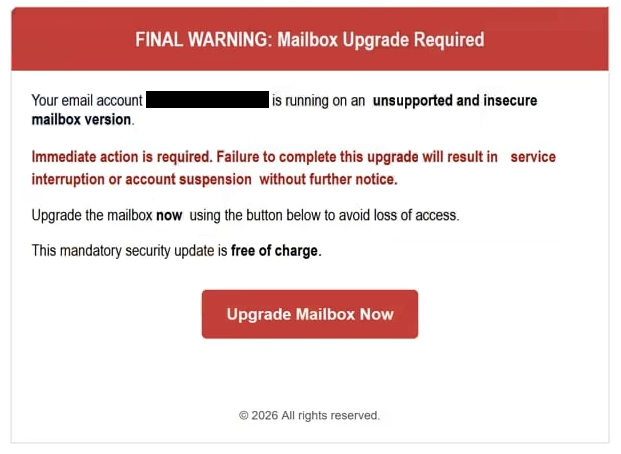
The email is written to create urgency by presenting the upgrade as the final notice. It suggests that previous alerts were ignored and that this is the last opportunity to prevent account suspension. A link or button is included, typically labeled with phrases such as “Upgrade Mailbox,” “Update Now,” or “Confirm Upgrade.” The wording is direct and emphasizes immediate action.
Clicking the provided link does not lead to the official website of the email service. Instead, it opens a fraudulent page designed to look like a webmail login interface. The page may display a simple header referencing mailbox upgrade and include familiar visual elements to appear credible. However, the domain shown in the browser’s address bar does not match the legitimate provider’s domain.
The page requests the user’s email address and password to proceed with the supposed upgrade. In some versions of the scam, the page may also ask for additional details such as recovery email information. The form does not perform any upgrade. Its only function is to capture login credentials and transmit them to the scammers.
After credentials are entered, the page may display a confirmation message stating that the upgrade is complete or redirect the user to the real login page. This behavior is meant to reduce suspicion. Meanwhile, the attackers now have access to the submitted account information.
If the stolen credentials are valid, attackers can sign into the real mailbox. Email accounts often contain personal conversations, attachments, contact lists, and account related notifications from other services. Access to the inbox allows attackers to reset passwords for accounts linked to that email address. They can also send phishing emails from the compromised account, which appear more trustworthy because they originate from a legitimate address.
The mailbox upgrade claim is fabricated. Email providers manage system upgrades internally and do not require users to submit login credentials through unsolicited email links. The “final warning” language is used solely to push recipients into acting quickly without verifying the authenticity of the message.
The full “FINAL WARNING: Mailbox Upgrade Required” phishing email is below:
Subject: [-]:Final Reminder: Mailbox Upgrade Required immediately –
FINAL WARNING: Mailbox Upgrade Required
Your email account (-) is running on an unsupported and insecure mailbox version.
Immediate action is required. Failure to complete this upgrade will result in service interruption or account suspension without further notice.
Upgrade the mailbox now using the button below to avoid loss of access.
This mandatory security update is free of charge.
Upgrade Mailbox Now
© 2026 All rights reserved.
How to identify phishing emails
The “Final Warning: Mailbox Upgrade Required” scam can be recognized by examining both the email’s technical details and its content. The sender address is often the first indicator. Although the display name may appear related to an email support team, the full sender domain typically does not match the official domain of the provider.
The email content frequently lacks personalization. It may not include the recipient’s name or specific account information. Legitimate service notifications generally contain identifiable details or direct users to access their account through established channels rather than through embedded links.
The link in the email is another key sign. When inspected, the destination does not correspond to the official email provider’s website. The domain may contain additional words, unusual domain extensions, or slight variations of the real brand name. Authentic providers require users to log in through their official website or application to manage upgrades or account settings.
The urgency of the message is also a defining feature. The email emphasizes that this is the final notice and suggests that access will be blocked if no action is taken. This pressure is designed to limit careful review. Real mailbox upgrades are handled automatically or communicated through secure account dashboards without requiring credential submission through external pages.
By reviewing the sender domain, checking the link destination, and recognizing that mailbox upgrades are not completed through unsolicited login forms, recipients can identify the “Final Warning: Mailbox Upgrade Required” scam and avoid exposing sensitive account credentials.
Site Disclaimer
2-remove-virus.com is not sponsored, owned, affiliated, or linked to malware developers or distributors that are referenced in this article. The article does not promote or endorse any type of malware. We aim at providing useful information that will help computer users to detect and eliminate the unwanted malicious programs from their computers. This can be done manually by following the instructions presented in the article or automatically by implementing the suggested anti-malware tools.
The article is only meant to be used for educational purposes. If you follow the instructions given in the article, you agree to be contracted by the disclaimer. We do not guarantee that the artcile will present you with a solution that removes the malign threats completely. Malware changes constantly, which is why, in some cases, it may be difficult to clean the computer fully by using only the manual removal instructions.