find-it.pro is a redirect site that appears after a browser hijacker changes browser settings. It is not a page that becomes a homepage or search engine through normal configuration. Instead, an unwanted browser extension or similar component replaces key settings so that find-it.pro is set as the homepage, the default search engine, and the new tab web page. Once these changes are in place, the browser starts loading find-it.pro automatically.
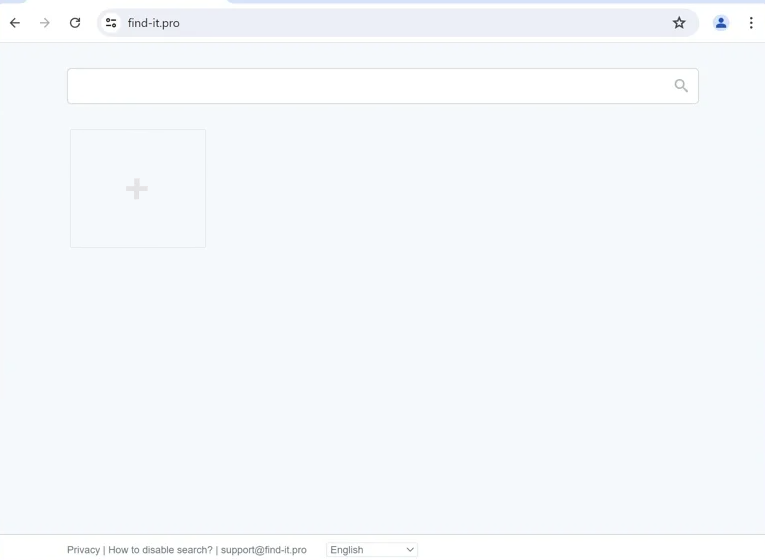
The most noticeable change is what happens when the browser opens. Instead of loading the usual start page, the browser may open directly to find-it.pro. New tabs can also begin opening to the same address, even if the browser previously showed a blank page or a preferred new tab layout. This makes the redirect persistent because it appears during routine browsing, not just once.
Searches are affected similarly. When a search query is typed into the address bar, the browser can route that search through find-it.pro first. The site does not function as a normal search engine that produces its own results. It forwards the search request to another destination. The final results page may look familiar, but the search has still been processed through a redirect that the user did not choose.
This kind of forced routing is usually done for profit. When search traffic is sent through find-it.pro, the operator behind the hijacker can benefit from referral tracking or advertising-based redirection. It can also influence where users end up by directing searches through selected partners or sponsored results.
Privacy is another concern. Redirect pages inserted into the search flow can collect information as searches pass through them. Search terms, visited pages, and technical details related to the browser session may be gathered. This happens because the redirect is part of normal browsing activity once the hijacker has taken control of the settings.
Users often notice that changing settings back does not always solve the problem. The homepage or search engine may be reset manually, but find-it.pro can return after a restart. That usually means the hijacker is still installed and continues applying the same configuration in the background.
find-it.pro does not provide a necessary browsing feature. Its presence as a default page is a sign that the browser has been modified by unwanted software that overrides user preferences.
How do browser hijackers get installed
Browser hijackers that force redirects like find-it.pro are usually installed in ways that make them easy to overlook. One of the most common sources is bundled software. Free program installers sometimes include extra components during setup, such as browser extensions or search-related tools. If the installation is completed using default or recommended settings, the extra component may be installed automatically.
Bundled installers often describe these additions in unclear terms. Instead of clearly stating that the homepage, default search engine, and new tab web page will be changed, the installer may present the extra software as a useful feature. The option to decline may be placed under custom installation settings that many users skip.
Another common source is browser extensions promoted as helpful tools. Some extensions claim to improve searching, provide shortcuts, or add browsing features. After installation, the extension can change browser settings and force find-it.pro into the homepage and search configuration. Because extensions can request permission to change browser behavior, a single install can be enough to cause persistent redirects.
Misleading download pages can also lead to hijacker installs. These sites often use multiple download buttons, pop-ups, or fake prompts that push bundled installers. Some also use fake update messages that claim a browser component needs to be installed. The downloaded file may include unwanted software that changes browser settings.
Advertising can contribute as well. Clicking certain ads can redirect users to pages that promote extensions or bundled downloads. In these cases, the user may believe they are clicking a normal link, but it leads to an installation flow that adds unwanted software.
Remove find-it.pro redirect
To remove find-it.pro redirect, it’s recommended to use an anti-malware program. Browser hijackers can be tricky to remove manually, and using an anti-malware program is much easier.
Site Disclaimer
2-remove-virus.com is not sponsored, owned, affiliated, or linked to malware developers or distributors that are referenced in this article. The article does not promote or endorse any type of malware. We aim at providing useful information that will help computer users to detect and eliminate the unwanted malicious programs from their computers. This can be done manually by following the instructions presented in the article or automatically by implementing the suggested anti-malware tools.
The article is only meant to be used for educational purposes. If you follow the instructions given in the article, you agree to be contracted by the disclaimer. We do not guarantee that the artcile will present you with a solution that removes the malign threats completely. Malware changes constantly, which is why, in some cases, it may be difficult to clean the computer fully by using only the manual removal instructions.