globalsnn10-new.cc is a scam website that not only hosts scams but also attempts to trick users into agreeing to ads on the desktop. When users are redirected to the site, a browser alert appears stating “globalsnn10-new.cc wants to show notifications”. The site abuses a legitimate browser feature to flood users with advertisements. If permission has been granted, users should avoid interacting with the notifications, as doing so may expose them to unsafe content.
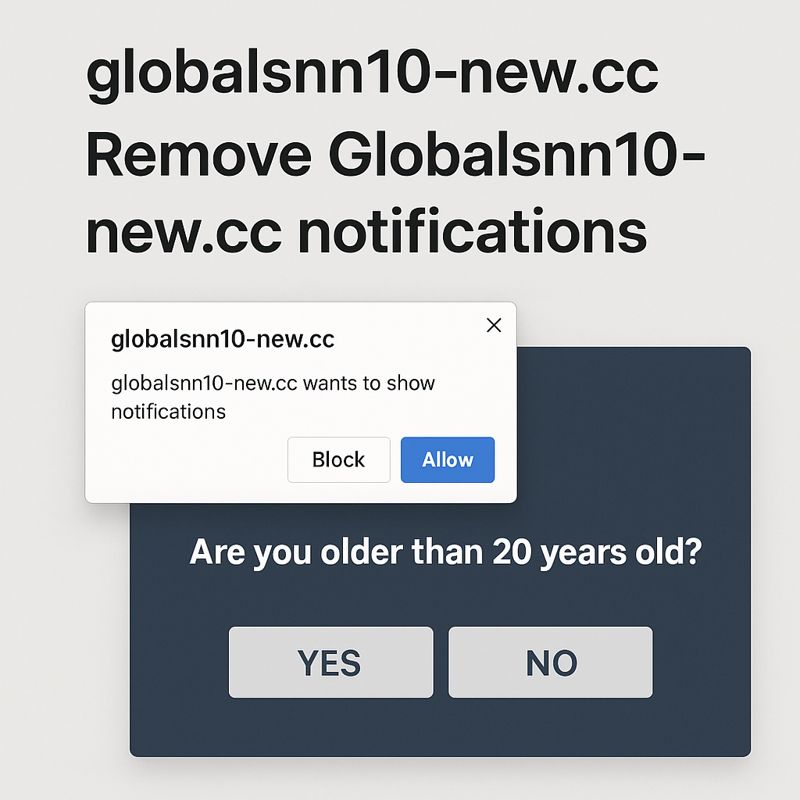
globalsnn10-new.cc currently displays deceptive content. At the moment, the site shows a message asking whether the visitor is older than 20 years old. Regardless of which option is selected, the user is redirected to multiple questionable websites. In addition, upon landing on the site, a browser notification request appears stating “globalsnn10-new.cc wants to show notifications”. Clicking “Allow” authorises the site to send notifications directly to the desktop. These notifications consist of spam advertisements rather than legitimate information. Interacting with them is risky because they may lead to misleading or harmful content.
While the browser notification feature itself is legitimate, permission should only be granted to trusted websites. Notifications can be useful when users want updates from a site they visit regularly. If notifications are no longer desired, permission can be revoked at any time through browser settings.
What triggers redirects to sites like globalsnn10-new.cc
In many cases, users are redirected to sites like globalsnn10-new.cc because no ad blocker is installed on the device. Some websites display excessive advertisements regardless of where users click. Sites hosting explicit or pirated content are especially known for this behaviour. Using an ad blocker can help prevent these redirects and reduce exposure to intrusive ads.
Another possible cause of redirects is the presence of adware. While adware is not always harmful, constant advertisements can quickly become disruptive. Adware often installs through software bundling, meaning it is included as an additional offer with free programs. This allows it to be installed without clear user awareness. Although these offers are optional, they must be manually declined. They are often hidden within settings that users do not normally review. Because of this behaviour, many security programs classify such software as potentially unwanted.
Additional bundled offers can be avoided during installation, but they must first be made visible. This can be done by selecting Advanced or Custom installation settings. Installation windows often recommend using Default settings, which results in all bundled offers being installed automatically. Choosing Advanced settings reveals these offers and allows users to deselect them by unchecking the corresponding boxes.
It is recommended not to allow these additional offers, even if they appear useful. Installing them can clutter the system with unnecessary software and lead to further issues over time.
How to stop globalsnn10-new.cc redirects
If redirects to globalsnn10-new.cc occur frequently, checking the system for adware is advised. Security software can help detect and remove unwanted programs that may be causing the redirects.
If permission has been granted for globalsnn10-new.cc to send notifications, that permission should be revoked through the browser’s settings. Removing the site from the list of allowed notification senders will stop the ads from appearing. Users can also disable notification requests entirely if they prefer not to receive them in the future.
- Mozilla Firefox: Open the menu (the three bars at the top-right corner), click Options, then Privacy & Security. Scroll down to Permissions, press Settings next to Notifications, and remove globalsnn10-new.cc and any other questionable websites from the list. It’s possible to permanently turn off push notification requests by checking the “Block new requests asking to allow notifications” box in the same Notifications settings.
- Google Chrome: Open the menu (the three dots top-right corner), then Settings, then Privacy and security, then Site Settings. Click on Notifications under Permissions, and remove globalsnn10-new.cc and any other questionable websites from the list. It’s possible to permanently turn off push notification requests by toggling off “Sites can ask to send notifications”.
- Microsoft Edge: Open the menu (the three dots top-right corner), then Settings, then Cookies and site permissions, then Notifications. Review which sites have permission and remove globalsnn10-new.cc and any other questionable websites from the list. It’s possible to permanently turn off push notification requests by toggling off “Ask before sending”.
Site Disclaimer
2-remove-virus.com is not sponsored, owned, affiliated, or linked to malware developers or distributors that are referenced in this article. The article does not promote or endorse any type of malware. We aim at providing useful information that will help computer users to detect and eliminate the unwanted malicious programs from their computers. This can be done manually by following the instructions presented in the article or automatically by implementing the suggested anti-malware tools.
The article is only meant to be used for educational purposes. If you follow the instructions given in the article, you agree to be contracted by the disclaimer. We do not guarantee that the artcile will present you with a solution that removes the malign threats completely. Malware changes constantly, which is why, in some cases, it may be difficult to clean the computer fully by using only the manual removal instructions.