The “High-Severity Alert Has Been Triggered” email is a phishing attempt that impersonates Microsoft and attempts to steal email account credentials. It presents itself as an urgent security notification concerning suspicious activity supposedly detected in the recipient’s Microsoft 365 environment. The alert is not sent by Microsoft, and the account warning is fabricated to direct recipients to a phishing website.
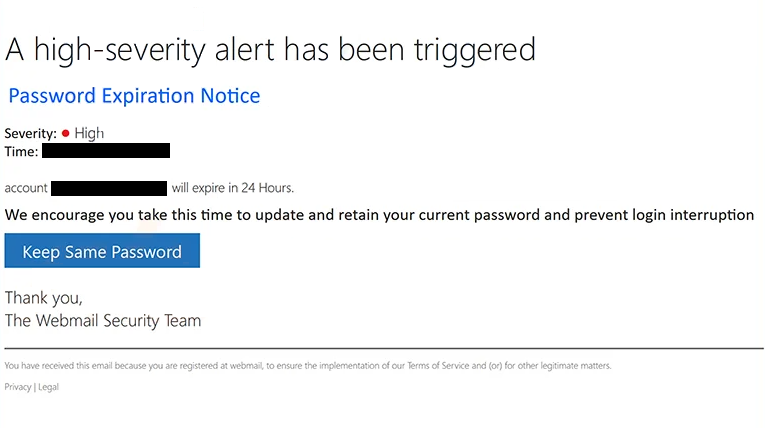
The email has been observed with the subject line “Security Alert: Suspicious Inbox Rule Detected.” It claims that a high-severity security alert has been triggered because an unusual inbox rule was created in the recipient’s mailbox. According to the email, the rule may automatically forward or delete incoming messages, which could supposedly indicate unauthorized access to the account.
To make the warning appear credible, the phishing email includes technical-looking information about the alleged event. It identifies the alert as “Suspicious Inbox Rule Detected” and assigns it a high severity level. The recipient is told that immediate action is required to review the activity and secure the account.
The email provides a button labeled “Review Alert Details.” Selecting this button does not open the Microsoft 365 security portal or another legitimate Microsoft service. Instead, it directs recipients to a phishing website designed to imitate a Microsoft sign-in page.
The fake login page displays Microsoft branding and asks visitors to provide their email address and password. The appearance of the page is intended to make recipients believe that they must authenticate themselves before reviewing the supposed security alert. In reality, credentials entered into the form are collected by the scammers.
Submitting login information does not provide access to details about an inbox rule or resolve a security issue. Microsoft has no connection to this campaign, and its branding is being misused to make both the email and phishing website appear authentic.
If the stolen credentials are valid, scammers may gain unauthorized access to the victim’s email account. This could expose private correspondence and other information accessible through the mailbox. A compromised account could also be used to impersonate its owner or send additional phishing emails.
Email access can also affect other online accounts because email addresses are commonly used for password recovery and identity verification. Attackers who control a mailbox may attempt to reset passwords for other services connected to the compromised address.
The full “High-Severity Alert Has Been Triggered” phishing email is below:
Subject: ATTN : Webmail Account Credentials Expiring – Ref: –
A high-severity alert has been triggered
Password Expiration Notice
Severity: High
Time: –account (-) will expire in 24 Hours.
We encourage you take this time to update and retain your current password and prevent login interruption
[Keep Same Password]
Thank you,
The Webmail Security TeamYou have received this email because you are registered at webmail, to ensure the implementation of our Terms of Service and (or) for other legitimate matters.
Privacy | Legal
How to recognize the “High-Severity Alert Has Been Triggered” phishing email
The urgent security language is one of the main characteristics of this campaign. The email claims that a high-severity alert has been generated and suggests that an unauthorized inbox rule could be forwarding or deleting messages. This scenario creates pressure to investigate immediately.
Recipients should not use the “Review Alert Details” button to determine whether their Microsoft account has actually generated a security alert. Instead, Microsoft 365 and account security information should be accessed independently through Microsoft’s legitimate services.
The destination behind the button should also be examined carefully. A Microsoft-branded login page reached through an unexpected security email should not automatically be trusted. Phishing websites can reproduce logos, colors, login forms, and other visual elements from legitimate services while sending submitted information to scammers.
The sender address is another important detail to inspect. Microsoft branding, security terminology, and references to Microsoft 365 do not prove that an email originated from Microsoft. The complete sender address and its domain should be checked rather than relying on the displayed sender name or the appearance of the email.
Recipients should also question any unexpected request to enter credentials after following a security-alert button. If an account genuinely requires attention, users can navigate directly to the legitimate Microsoft service and review security information without relying on the email’s link.
Simply receiving or reading the “High-Severity Alert Has Been Triggered” email does not provide scammers with the recipient’s password. Users who have not entered information on the phishing website should avoid the supplied button and delete the email.
If credentials have already been submitted through the fake Microsoft login page, the affected password should be changed through the legitimate service. The same password should also be replaced on other accounts where it was reused. The mailbox should be reviewed for unauthorized access, security changes, or unfamiliar forwarding and inbox rules.
Site Disclaimer
2-remove-virus.com is not sponsored, owned, affiliated, or linked to malware developers or distributors that are referenced in this article. The article does not promote or endorse any type of malware. We aim at providing useful information that will help computer users to detect and eliminate the unwanted malicious programs from their computers. This can be done manually by following the instructions presented in the article or automatically by implementing the suggested anti-malware tools.
The article is only meant to be used for educational purposes. If you follow the instructions given in the article, you agree to be contracted by the disclaimer. We do not guarantee that the artcile will present you with a solution that removes the malign threats completely. Malware changes constantly, which is why, in some cases, it may be difficult to clean the computer fully by using only the manual removal instructions.