The “Important Notification! Undelivered Email” phishing email is designed to steal email account credentials. It pretends to be an automated delivery notice and tells recipients that several incoming emails have not reached their inbox because of a system delay. The supposed delivery problem is fake and gives scammers a reason to send recipients to a phishing login page.
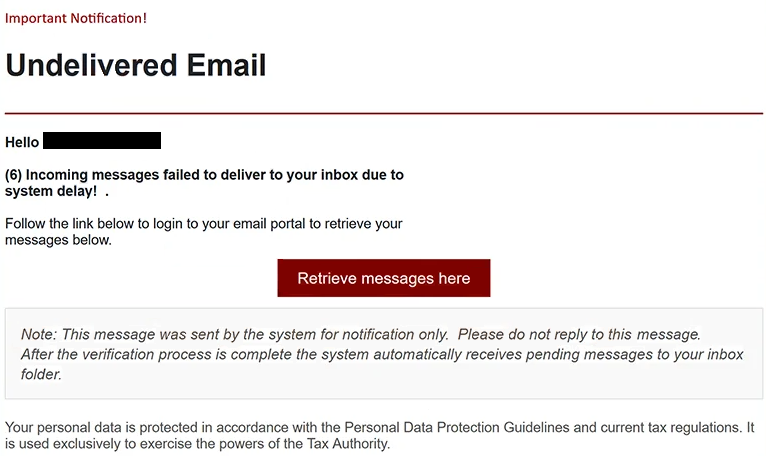
The subject used for this email is “Unblock Messages.” Inside, recipients see the warning “Important Notification! Undelivered Email” followed by a claim that six incoming emails could not be delivered to their inbox.
According to the email, the affected emails are still pending and can be retrieved through the recipient’s “email portal.” Recipients are encouraged to use “Retrieve messages here” to recover them. This does not restore any missing emails. Instead, it opens a fake “Webmail Login” page.
The phishing page asks for an email address and password. It also displays “Secure SSL Connection” in an attempt to make the login form look safe. This wording does not make the page legitimate or prove that it belongs to the recipient’s email provider. Any credentials entered there are collected by the scammers.
The email also claims that once verification is complete, the system will automatically deliver the pending emails to the inbox. This is another part of the scam. There are no six delayed emails waiting to be released, and signing in through the provided page does not fix an email delivery problem.
Another unusual detail appears near the end of the email. It refers to “Personal Data Protection Guidelines,” current tax regulations, and the powers of a “Tax Authority.” None of this has anything to do with delayed emails or webmail delivery. The unrelated wording appears to have been copied from a different context and added to make the email look more official.
If scammers obtain the correct email password, they may be able to access the victim’s mailbox. This could expose private emails and allow them to impersonate the account owner. They may also try to reset passwords for other online accounts connected to the compromised email address.
The full “Important Notification! Undelivered Email” phishing email is below:
Subject: Unblock Messages.
Important Notification!
Undelivered EmailHello [redacted]
(6) Incoming messages failed to deliver to your inbox due to system delay!
Follow the link below to login to your email portal to retrieve your messages below.
[Retrieve messages here]
Note: This message was sent by the system for notification only. Please do not reply to this message.
After the verification process is complete the system automatically receives pending messages to your inbox folder.Your personal data is protected in accordance with the Personal Data Protection Guidelines and current tax regulations. It is used exclusively to exercise the powers of the Tax Authority.
How to recognize the “Important Notification! Undelivered Email” phishing email
The “Important Notification! Undelivered Email” phishing email relies on a common concern: missing incoming emails. Someone who believes important emails are waiting may be tempted to retrieve them immediately, particularly when the email claims that six have already failed to reach the inbox.
There is no reason to sign in through an unfamiliar page to retrieve supposedly delayed emails. If a mail server is experiencing a genuine delay, users should check their mailbox through the service they normally use. Any real account or delivery problems can be investigated from there or confirmed with the email provider.
The wording in this email also gives recipients reasons to be suspicious. It refers to a system delay, asks users to log in to an “email portal,” and then unexpectedly discusses tax regulations and a Tax Authority. These subjects have no logical connection.
The “Secure SSL Connection” wording on the fake login page should not be trusted either. Phishing sites can display security-related phrases, logos, and familiar login forms just as easily as legitimate websites can. What matters is whether the login page actually belongs to the email provider.
Recipients should also be cautious whenever an unexpected email asks them to enter their mailbox password to release, recover, or view pending emails. The safer option is to open the email service normally rather than using anything provided in the email.
Simply receiving or reading the “Important Notification! Undelivered Email” phishing email does not expose the account password. The risk comes from entering credentials on the fake webmail page.
Site Disclaimer
2-remove-virus.com is not sponsored, owned, affiliated, or linked to malware developers or distributors that are referenced in this article. The article does not promote or endorse any type of malware. We aim at providing useful information that will help computer users to detect and eliminate the unwanted malicious programs from their computers. This can be done manually by following the instructions presented in the article or automatically by implementing the suggested anti-malware tools.
The article is only meant to be used for educational purposes. If you follow the instructions given in the article, you agree to be contracted by the disclaimer. We do not guarantee that the artcile will present you with a solution that removes the malign threats completely. Malware changes constantly, which is why, in some cases, it may be difficult to clean the computer fully by using only the manual removal instructions.