The “Mail Capacity Guide” phishing email is a scam designed to steal email account login credentials. It poses as a notification concerning the recipient’s mailbox storage and falsely claims that the account has reached its capacity limit.
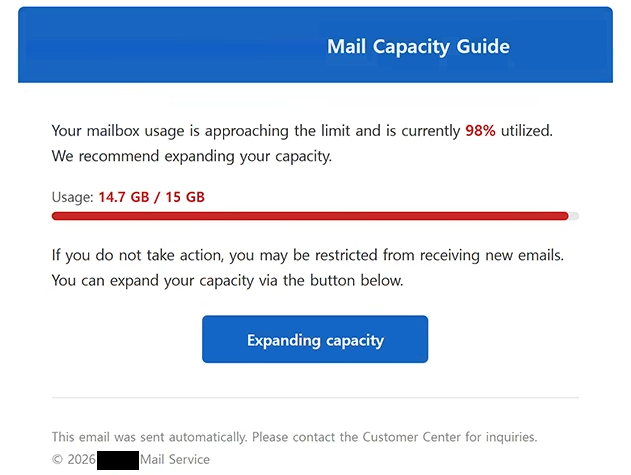
The email tells recipients that their mailbox is full and that they need to take action to continue using it normally. It creates the impression that the storage problem could interfere with incoming or outgoing emails, giving recipients a reason to respond quickly.
To supposedly resolve the issue, recipients are instructed to follow a link provided in the email. The link does not lead to a legitimate storage management page belonging to the recipient’s email provider. Instead, it opens a phishing website designed to collect account credentials.
The fraudulent page imitates an email login interface and asks visitors to provide their email address and password. Information entered on this page is sent to the scammers rather than being used to increase mailbox capacity or manage storage.
The purpose of the “Mail Capacity Guide” phishing email is therefore credential theft. By presenting the password request as part of a routine mailbox-storage procedure, the scammers attempt to convince recipients that signing in through the provided page is necessary.
Compromised email credentials can be particularly valuable because an inbox may contain private correspondence and other sensitive information. An email account can also be connected to other online services and used to receive password-reset emails.
If the same password is reused across multiple accounts, obtaining it can create additional risks. Scammers may attempt to use stolen credentials to access other services where the victim has used the same login information.
Recipients who have already entered their credentials on the phishing site should change the affected email account password. Passwords for other accounts using the same credentials should also be changed. Enabling two-factor authentication where available can add another layer of protection against unauthorized access.
The full “Mail Capacity Guide” phishing email is below:
Subject: Mail box data logger
Mail Capacity Guide
Your mailbox usage is approaching the limit and is currently 98% utilized. We recommend expanding your capacity.
Usage: 14.7 GB / 15 GB
If you do not take action, you may be restricted from receiving new emails. You can expand your capacity via the button below.
[Expanding capacity]
This email was sent automatically. Please contact the Customer Center for inquiries.
© 2026 – Mail Service
How to recognize phishing emails
The mailbox-capacity warning is an important detail to examine in the “Mail Capacity Guide” phishing email. Unexpected claims that an account has reached its storage limit should be verified through the email provider itself rather than through links included in the warning.
Recipients should also consider how the supposed problem is being resolved. A request to enter an email password after following an unsolicited link is a strong reason to inspect the website carefully before providing any information.
The actual destination of the link is particularly important. Phishing websites can reproduce login forms, logos, colors, and other elements associated with legitimate email services. A familiar-looking login screen does not establish that the website is operated by the provider it claims to represent.
The domain shown in the browser’s address bar should therefore be checked before entering credentials. If the address does not belong to the legitimate email provider, the login information should not be submitted.
Sender information can provide another opportunity to detect phishing. The displayed sender name can be made to look legitimate, so recipients should examine the complete email address and its domain rather than trusting the visible name alone.
Mailbox storage can also be checked independently. Instead of using the link provided in the email, recipients can open their normal webmail application or manually navigate to their provider’s official website. Any genuine storage warning should be visible through the legitimate account interface.
Unexpected pressure to solve an account problem immediately should also encourage additional verification. Phishing emails often depend on recipients reacting to a warning before checking whether the underlying claim is genuine.
The “Mail Capacity Guide” phishing email relies on a fabricated mailbox-storage problem to persuade recipients to visit a fake login page. The supposed capacity issue is used as a reason to request email credentials, but entering an email address and password on the linked phishing site exposes that information to the scammers.
Site Disclaimer
2-remove-virus.com is not sponsored, owned, affiliated, or linked to malware developers or distributors that are referenced in this article. The article does not promote or endorse any type of malware. We aim at providing useful information that will help computer users to detect and eliminate the unwanted malicious programs from their computers. This can be done manually by following the instructions presented in the article or automatically by implementing the suggested anti-malware tools.
The article is only meant to be used for educational purposes. If you follow the instructions given in the article, you agree to be contracted by the disclaimer. We do not guarantee that the artcile will present you with a solution that removes the malign threats completely. Malware changes constantly, which is why, in some cases, it may be difficult to clean the computer fully by using only the manual removal instructions.