The “Mail Delivery Issue Detected” email is a phishing scam that attempts to convince recipients that their email account is experiencing technical problems preventing normal message delivery. The email is usually disguised as a notification from a hosting provider, cPanel administrator, or automated mail server system. It commonly claims that incoming or outgoing emails are being blocked, delayed, or rejected due to an authentication or configuration issue. Although the message may appear legitimate, it is fraudulent and intended to steal account credentials.
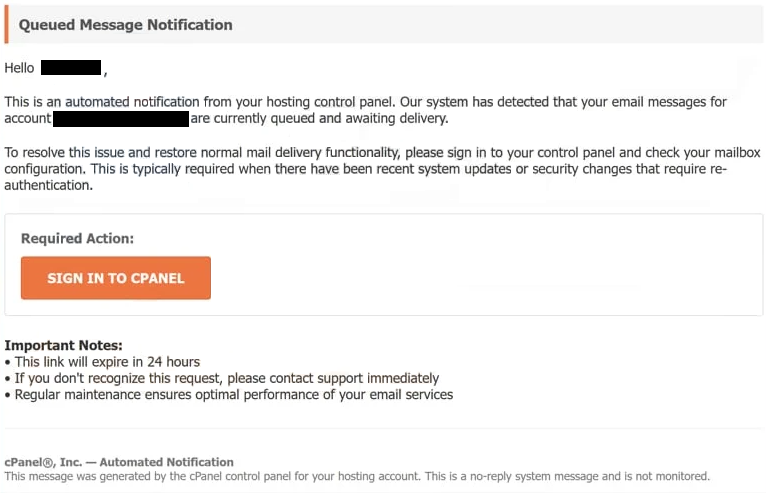
The scam relies on creating concern about communication problems that could affect important emails. The “Mail Delivery Issue Detected” email often warns that messages may continue failing unless the user completes an authentication or verification process. In some versions, the message claims that mailbox functionality will be restricted or temporarily disabled if no action is taken quickly. These warnings are designed to pressure recipients into reacting immediately instead of carefully inspecting the email.
To supposedly resolve the issue, the recipient is instructed to click a link or button included in the message. However, the provided link does not lead to a legitimate cPanel or webmail portal. Instead, it redirects users to a fake login page designed to imitate a real email authentication interface. These phishing pages are often intentionally generic so they can target users of different email providers and hosting services with the same template. Once login credentials are entered, the attackers capture the information directly.
The “Mail Delivery Issue Detected” phishing campaign takes advantage of the fact that server notifications and delivery alerts are common in both personal and business environments. Users who regularly receive technical emails regarding mailbox activity may be more likely to trust the message, especially if it appears formal or includes references to delivery failures and account authentication.
A compromised email account can create serious security risks. Attackers who gain access may review stored correspondence, search for sensitive information, or use the account to send additional phishing emails. Since many online platforms rely on email addresses for password recovery and account verification, access to a single mailbox can potentially expose multiple connected accounts. This can lead to identity theft, financial fraud, or unauthorized access to other online services.
Another factor that makes the “Mail Delivery Issue Detected” scam effective is its broad targeting strategy. The email usually avoids mentioning a specific provider directly and instead relies on generic technical language related to email delivery or account authentication. This allows the same phishing template to be distributed to large numbers of recipients regardless of which email service they use.
How to recognize phishing emails
Recognizing phishing emails like the “Mail Delivery Issue Detected” scam requires paying attention to common warning signs frequently present in fraudulent technical notifications. Even when these emails appear convincing, they often contain inconsistencies that expose their true purpose.
One major warning sign is urgency. Phishing emails commonly suggest that immediate action is required to prevent account problems or communication failures. In this case, the email may claim that emails are being rejected or that mailbox access could be limited if the authentication process is not completed quickly. This pressure is deliberate and is intended to make recipients react without verifying the legitimacy of the message.
The sender’s email address is another important detail to inspect carefully. Fraudulent emails often imitate official support or hosting addresses but include subtle differences such as misspellings, additional characters, or unrelated domains. Even if the sender’s name appears professional, the actual address may reveal that the email did not originate from a legitimate provider or administrator.
Links embedded in phishing emails should also be treated with caution. The visible text may appear trustworthy, but hovering over the link often reveals a suspicious or unrelated destination. These URLs commonly lead to fake login pages created specifically to collect usernames and passwords. Legitimate providers generally encourage users to access account settings directly through official websites instead of through unsolicited links in unexpected emails.
The wording and formatting of phishing emails can provide additional clues. Some messages contain grammatical errors, awkward phrasing, or inconsistent formatting. Others may appear polished but still rely heavily on generic technical wording and vague explanations regarding authentication or delivery failures. A lack of personalization is another common characteristic because phishing campaigns are typically distributed to many recipients at once.
Requests for credentials or account verification through embedded links should always raise suspicion. Legitimate hosting providers and email services do not ask users to confirm passwords or restore access through external login pages sent in random technical alerts. Emails urging recipients to “authenticate,” “verify,” or “restore” accounts through clickable buttons are commonly associated with phishing activity.
Unexpected attachments should also be approached carefully. Some phishing emails include files disguised as delivery reports, mailbox logs, or configuration documents. Opening these attachments may expose devices to malware if the files contain harmful scripts or executable content.
A safer approach is to ignore the instructions inside suspicious emails and instead access the account directly through the official provider website. If there is a genuine issue affecting mail delivery, it will usually appear within the account interface itself. Verifying notifications independently can help prevent credential theft and unauthorized access.
Awareness remains one of the strongest defenses against phishing scams. The “Mail Delivery Issue Detected” campaign relies on technical language, urgency, and concern over interrupted communication to manipulate recipients into surrendering their login credentials. Taking time to inspect the sender, review links carefully, and verify claims independently can significantly reduce the risk of account compromise.
Incoming search terms:
Site Disclaimer
2-remove-virus.com is not sponsored, owned, affiliated, or linked to malware developers or distributors that are referenced in this article. The article does not promote or endorse any type of malware. We aim at providing useful information that will help computer users to detect and eliminate the unwanted malicious programs from their computers. This can be done manually by following the instructions presented in the article or automatically by implementing the suggested anti-malware tools.
The article is only meant to be used for educational purposes. If you follow the instructions given in the article, you agree to be contracted by the disclaimer. We do not guarantee that the artcile will present you with a solution that removes the malign threats completely. Malware changes constantly, which is why, in some cases, it may be difficult to clean the computer fully by using only the manual removal instructions.