The “Mail Delivery Message – Message Undeliverable” scam presents itself as a failed delivery report but leads to a credential phishing page rather than providing any real delivery details. After interacting with the email, the recipient is taken to a page that claims to show the undelivered message or explain the delivery issue. Instead of displaying technical information, the page blocks access and asks the user to sign in to view the content.
This page is not connected to any real mail server. It is built to resemble a webmail login screen and typically contains only a simple form requesting an email address and password. There are no actual delivery logs, no sender details, and no message content. The “undeliverable message” is not available because it does not exist.
When login details are entered, the information is transmitted to the scammers. The page does not restore message access or provide any delivery report. In some cases, it may display a generic loading screen or redirect to a legitimate email provider’s login page. This behavior is meant to reduce suspicion while the credentials have already been collected.
Access to an email account gives attackers broad control. A mailbox can contain personal communication, attachments, account notifications, and contact lists. Once access is obtained, attackers may read stored emails, search for sensitive information, or use the account to send emails that appear legitimate. Email access also allows password reset requests for other services linked to that address.
The failed delivery notice is only a pretext. There is no real message waiting to be recovered, and no delivery error to fix. The entire process is designed to move the user from the email to a login form controlled by the attackers.
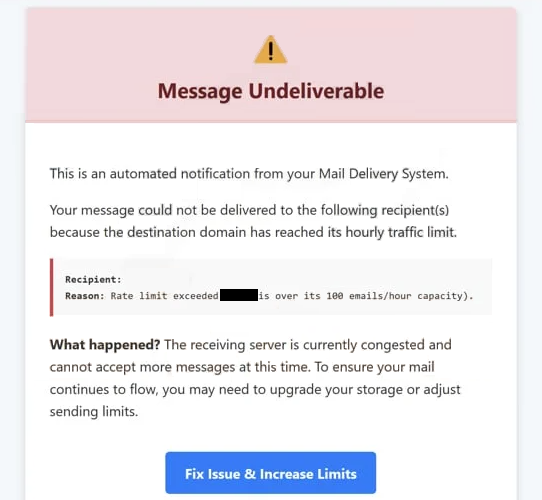
The full “Mail Delivery Message – Message Undeliverable” phishing email is below:
Subject: Mail Delivery Message
Message Undeliverable
This is an automated notification from your Mail Delivery System.
Your message could not be delivered to the following recipient(s) because the destination domain has reached its hourly traffic limit.
Recipient: –
Reason: Rate limit exceeded- is over its 100 emails/hour capacity).What happened? The receiving server is currently congested and cannot accept more messages at this time. To ensure your mail continues to flow, you may need to upgrade your storage or adjust sending limits.
Fix Issue & Increase Limits
© 2026 . All rights reserved.
Please do not reply to this automated system email.
How to recognize phishing emails
The email used in the “Mail Delivery Message – Message Undeliverable” scam is made to resemble an automated system notification. It may appear similar to a standard mail delivery failure report, often using subject lines that reference undelivered messages or delivery errors. The formatting can include technical language or references to mail servers to make the message appear authentic.
Unlike real delivery reports, the email does not include complete technical details. Legitimate bounce messages typically contain information such as the original recipient address, server response codes, and portions of the undelivered message. In this scam, those details are missing or replaced with a simple instruction to view the message through a provided link.
The link is presented as a way to access the failed email. It may be labeled with phrases such as “View Message” or “Retrieve Email.” Clicking it directs the recipient to a page that imitates a webmail login rather than displaying a delivery report. The domain used for this page does not belong to a legitimate email provider.
Another detail is the sender’s address. While it may appear to come from a mail system or administrator, the actual domain often does not match a real mail server. This inconsistency indicates that the message is not a genuine delivery report.
The message relies on confusion rather than urgency. Many users are familiar with delivery failure notices but may not remember their exact format. By imitating the general appearance of such reports and replacing technical details with a login request, the scam encourages users to follow the link without questioning its validity.
The combination of a vague delivery failure notice, absence of real message data, and a login page that does not display any email content defines the “Mail Delivery Message – Message Undeliverable” scam.
Site Disclaimer
2-remove-virus.com is not sponsored, owned, affiliated, or linked to malware developers or distributors that are referenced in this article. The article does not promote or endorse any type of malware. We aim at providing useful information that will help computer users to detect and eliminate the unwanted malicious programs from their computers. This can be done manually by following the instructions presented in the article or automatically by implementing the suggested anti-malware tools.
The article is only meant to be used for educational purposes. If you follow the instructions given in the article, you agree to be contracted by the disclaimer. We do not guarantee that the artcile will present you with a solution that removes the malign threats completely. Malware changes constantly, which is why, in some cases, it may be difficult to clean the computer fully by using only the manual removal instructions.