The “Mail delivery system” email scam is a phishing email that pretends to come from a mail delivery or mail system service. The scam claims that the recipient’s email address is the sender of an undelivered message that failed to reach its destination. It then instructs the recipient to follow a link or open an attachment to view details of the alleged failed delivery. The message is not a real system notification and does not reflect a genuine failure from the email provider or mail server.
The email opens by stating it is a “Mail delivery system” alert. It typically includes text that resembles an automated bounce-back message, such as “Delivery has failed to these recipients” or “Your message could not be delivered.” The scam email may list one or more email addresses that it claims could not be reached. These listed addresses have no connection to real delivery issues for the recipient. Instead, they are used to make the email look technical and urgent.
Following this, the scam instructs the recipient to click a link or open an attachment that is described as containing a copy of the undelivered message or a delivery report. The message often uses wording that suggests the link or attachment is safe and necessary to resolve the delivery issue. It may state that the attachment contains details of the failure or that the link leads to a report that will explain why the delivery failed. In reality, the link or attachment is part of the scam.
When the link is clicked, the recipient is taken to a fake login page or a website that mimics a legitimate mail service login screen. This page is designed to collect credentials such as an email address and a password. The appearance of the page is crafted to resemble the actual sign-in interface of common mail services. Any information entered into this fake page is sent directly to scammers. The scam does not fix a delivery issue because no such issue exists. It simply steals credentials.
The scam message does not contain accurate account or system information. It does not reference actual sent messages, real message IDs, timestamps, or server logs because it is not generated by a mail server. The language is generic and engineered to apply to many recipients at once. Because it mimics the format of legitimate system notifications, it can mislead users who are accustomed to receiving automated delivery failure notices.
The “Mail delivery system” email scam also uses urgency to pressure the recipient into acting. The text may suggest that the account will become overloaded if the delivery issue is not reviewed or that storage limits will be reached. These claims are untrue. Mail systems do not send failure notices that require users to enter credentials to resolve the issue. Legitimate notifications are accessible within the authenticated mail interface and do not rely on unsolicited links or attachments.
Once credentials are captured by the phishing page, scammers can attempt to access the real email account. With access, they can read private messages, monitor incoming mail, and search for sensitive information. Because email accounts are often used for password resets on other services, access to the mailbox can lead to further account compromise on banking, shopping, social media, or workplace platforms. The compromised account may also be used to send additional phishing emails that appear to come from a trusted address.
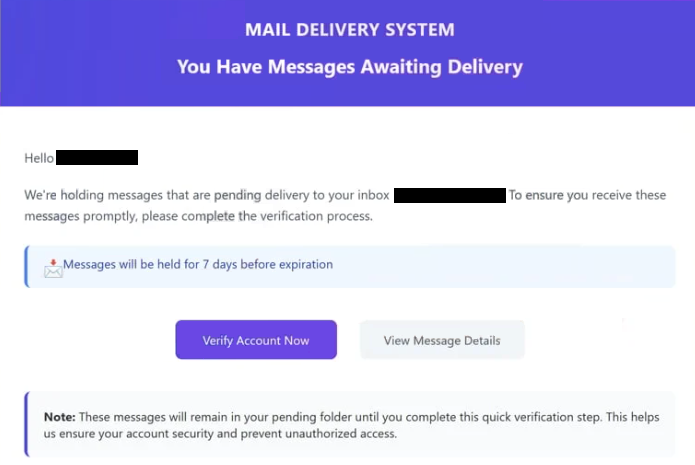
The full “Mail Delivery System” phishing email is below:
Subject: Important Message Delivery Notice
MAIL DELIVERY SYSTEM
You Have Messages Awaiting Delivery
Hello -,
We’re holding messages that are pending delivery to your inbox -. To ensure you receive these messages promptly, please complete the verification process.
Messages will be held for 7 days before expiration
Verify Account Now View Message Details
Note: These messages will remain in your pending folder until you complete this quick verification step. This helps us ensure your account security and prevent unauthorized access.This notification was sent automatically by our message delivery system.
If you have any questions, please contact our support team.
Help Center | Privacy Policy | Terms of Service© 2026 – . All rights reserved.
How to recognize phishing emails
The “Mail delivery system” email scam is distributed through spam campaigns that send identical or similar templates to large numbers of email addresses. Scammers do not verify whether the recipient has recently attempted to send a message or whether any mail delivery issues have occurred. The email is written broadly so that it can be sent widely and still appear plausible to many recipients.
One of the first indicators that the email is fraudulent is the sender’s address. The display name may suggest a mail delivery system, but the actual sending domain often does not match the domain of the recipient’s email provider. Viewing the full sender email address typically shows a domain unrelated to any legitimate mail service. This mismatch is a common sign of phishing.
The content of the email also provides clues. Although it mimics the structure of a delivery failure notice, it lacks specific information that would tie it to a real sent message. Real delivery failure emails include message IDs, timestamps, sender domain details, and references to actual mail server responses. The scam message avoids these specifics because it is not based on real events.
Links included in the email are another warning sign. Hovering over the link without clicking can reveal the actual destination address. If the link does not point to the legitimate domain of the recipient’s mail provider, it should not be trusted. Phishing links often lead to unfamiliar domains that are designed to host fake login pages.
Attachments in these scams can also be suspicious. Files that appear to be PDFs, Word documents, or compressed folders can contain malicious code or lead to phishing pages. Legitimate mail systems do not send delivery failure details as attachments that require separate authentication steps through external pages.
Another red flag is unexpected credential requests. Mail delivery failure notices do not require users to re-enter passwords or account details to view information about a failed message. Legitimate mail systems provide such information only after the user signs in through the official webmail interface.
Site Disclaimer
2-remove-virus.com is not sponsored, owned, affiliated, or linked to malware developers or distributors that are referenced in this article. The article does not promote or endorse any type of malware. We aim at providing useful information that will help computer users to detect and eliminate the unwanted malicious programs from their computers. This can be done manually by following the instructions presented in the article or automatically by implementing the suggested anti-malware tools.
The article is only meant to be used for educational purposes. If you follow the instructions given in the article, you agree to be contracted by the disclaimer. We do not guarantee that the artcile will present you with a solution that removes the malign threats completely. Malware changes constantly, which is why, in some cases, it may be difficult to clean the computer fully by using only the manual removal instructions.