The “Mail System Update” phishing email is a scam that attempts to steal email account passwords by presenting a supposed storage upgrade as a reason for account verification. It impersonates an email service administrator and claims that users must confirm their accounts to continue using the upgraded mail system. The notification is not associated with a legitimate email provider, and the verification request is intended to direct recipients to a phishing website.
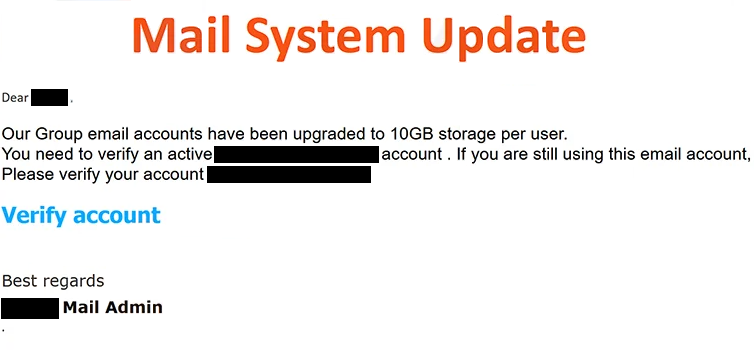
The email uses the subject line “Mail System Update and Email Account User Confirmation” and announces that group email accounts have been upgraded to 10GB of storage per user. It addresses the recipient directly and states that active accounts must be verified following the upgrade. However, the email does not identify the organization responsible for the changes or provide evidence that any storage upgrade has occurred.
Recipients are encouraged to click a link labeled “Verify account” to confirm that they are still using their email addresses. The email suggests that verification is necessary to keep the account active, making the request appear connected to routine system maintenance. In reality, the storage announcement is a pretext for collecting login credentials.
The linked website was designed to imitate the recipient’s email service provider, although it was no longer accessible when examined. Phishing pages used in similar campaigns can adapt their appearance according to the visitor’s email domain, displaying login forms that resemble Gmail, Outlook, Yahoo, or other email services. This technique makes the authentication request appear more familiar and credible.
The purpose of the phishing website is to obtain email addresses and passwords. If recipients submit valid credentials, scammers may attempt to access their mailboxes, read private correspondence, and retrieve sensitive attachments. They could also impersonate account owners or use compromised email accounts to target other people.
Access to a mailbox may also expose services connected to the same email address. Attackers could attempt password resets for online accounts or search stored correspondence for sensitive personal and business information. The consequences depend on the account’s security settings and whether the stolen credentials can be used successfully.
The full “Mail System Update” phishing email is below:
Subject: Mail System Update and Email Account User Confirmation
Mail System Update
Dear -,
Our Group email accounts have been upgraded to 10GB storage per user.
You need to verify an active – account . If you are still using this email account, Please verify your account -.[Verify account]
Best regards
– Mail Admin
How to recognize phishing emails
The “Mail System Update” phishing email contains several warning signs, beginning with its vague announcement about increased mailbox storage. It claims that group accounts have received 10GB of storage per user but does not identify the email provider, explain the upgrade, or provide account-specific details. This makes the supposed system change difficult to verify.
Another suspicious characteristic is the connection between the storage upgrade and the verification requirement. The email suggests that recipients must confirm they are still using their accounts, even though it does not explain why additional authentication would be necessary after increasing storage capacity. The request appears designed to obtain credentials rather than communicate useful information about the upgrade.
The “Verify account” link is particularly important. It directs recipients toward a login page presented as part of the account confirmation process, but the linked website is not established as belonging to their email provider. A familiar-looking login interface does not prove that the authentication request is legitimate.
The greeting and signature also deserve attention. The email uses “Dear” followed by an account identifier and closes with a generic “Mail Admin” signature. It does not identify a specific administrator, hosting company, or support department responsible for the alleged upgrade.
The email’s wording provides additional clues. Phrases such as “Our Group email accounts have been upgraded” and “If you are still using this email account, Please verify your account” are awkwardly constructed. Although language mistakes alone do not prove that an email is malicious, they add to the concerns raised by the unexplained verification request.
Unlike phishing emails that threaten immediate account deletion or financial penalties, this campaign relies primarily on a seemingly beneficial service update. The announcement of additional storage makes the email resemble an ordinary administrative notification, while the suggestion that verification is needed to keep the account active introduces pressure to act.
Site Disclaimer
2-remove-virus.com is not sponsored, owned, affiliated, or linked to malware developers or distributors that are referenced in this article. The article does not promote or endorse any type of malware. We aim at providing useful information that will help computer users to detect and eliminate the unwanted malicious programs from their computers. This can be done manually by following the instructions presented in the article or automatically by implementing the suggested anti-malware tools.
The article is only meant to be used for educational purposes. If you follow the instructions given in the article, you agree to be contracted by the disclaimer. We do not guarantee that the artcile will present you with a solution that removes the malign threats completely. Malware changes constantly, which is why, in some cases, it may be difficult to clean the computer fully by using only the manual removal instructions.