The “Mailbox Notification – Resolve Mailbox Issue” phishing email is a fake mailbox notification designed to steal email account credentials. It claims that the recipient’s mailbox requires attention and that some incoming emails may be temporarily withheld until the account status is confirmed.
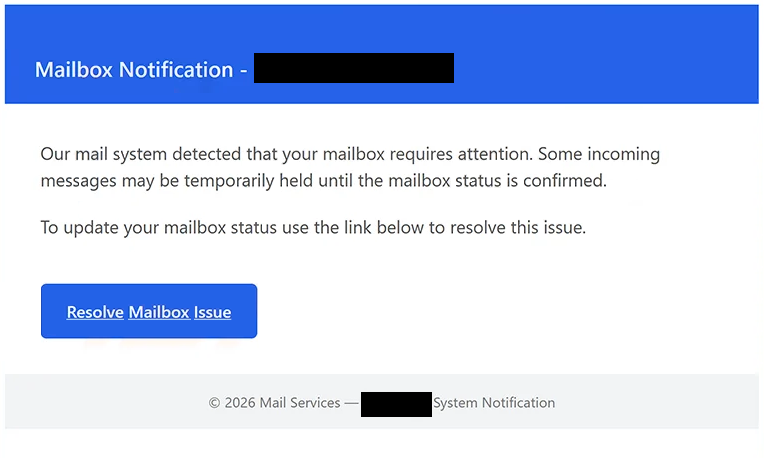
The subject contains the recipient’s email address followed by “Resolve Email Issue.” Inside, the email is presented as a “Mailbox Notification” and says that the mail system has detected a problem requiring the recipient’s attention.
According to the warning, incoming emails may remain on hold until the mailbox status has been confirmed. No specific email provider is identified. This allows the same phishing email to be sent to people using different webmail services without making the claim obviously incompatible with their accounts.
The recipient is told to update the mailbox status to resolve the supposed problem. The email provides “Resolve Mailbox Issue” for this purpose.
Following this instruction opens a fake email login page hosted using Amazon S3 cloud storage. Amazon S3 is a legitimate service, but in this case its infrastructure is being abused to host the phishing page.
The site displays a Google logo and an “Email Login” form. The recipient’s email address may already appear in the form, leaving them to provide their password. Having the correct address displayed does not mean that Google or the recipient’s actual email provider is involved. The address can be taken from information included in the phishing link.
Any credentials submitted through the page are collected by the scammers. There is no mailbox status to confirm, and signing in does not release any withheld emails.
Neither Google nor Amazon is responsible for the scam. The email also does not come from a legitimate mailbox provider. Recognizable services and cloud infrastructure are simply used to make different parts of the phishing attempt appear more trustworthy.
A stolen mailbox password may allow scammers to access private correspondence, attachments, contacts, and other information stored in the account. They could also use the compromised address to send emails while pretending to be its owner.
Control of an email account can put other services at risk as well. Email is commonly used for password resets and account recovery, so attackers may try to gain access to other accounts registered with the stolen address.
The full “Mailbox Notification – Resolve Mailbox Issue” phishing email is below:
Subject: Resolve Email Issue
Mailbox Notification –
Our mail system detected that your mailbox requires attention. Some incoming messages may be temporarily held until the mailbox status is confirmed.
To update your mailbox status use the link below to resolve this issue.
[Resolve Mailbox Issue]© 2026 Mail Services — – System Notification
How to recognize the “Mailbox Notification – Resolve Mailbox Issue” phishing email
The “Mailbox Notification – Resolve Mailbox Issue” phishing email creates a problem without clearly explaining what caused it. It says that the mailbox “requires attention” and that incoming emails may be held, but it provides no specific technical reason for this supposed restriction.
The lack of a clearly identified email provider is another suspicious detail. Instead of naming the company responsible for managing the mailbox, the email relies on generic terms such as “mail system,” “Mail Services,” and “System Notification.” This makes the same warning applicable to a wide range of recipients.
The request to use “Resolve Mailbox Issue” should also be treated cautiously. If a genuine email account has a problem, users can check it by opening their webmail service normally. There should be no need to enter a mailbox password on an unfamiliar page reached through an unexpected notification.
The Google branding shown after following the instructions can create additional confusion. A Google logo is easy to copy and does not establish that the website belongs to Google. This is especially important when the original email never said that the mailbox was managed by Google in the first place.
Recipients should also not assume that a pre-filled email address proves the login page is genuine. Phishing links can contain information identifying the intended recipient, allowing a fake page to display the address automatically.
Anyone concerned that incoming emails are actually being withheld should access their mailbox directly. Account notifications, storage problems, delivery restrictions, and other genuine issues can then be checked without using anything supplied in the suspicious email.
Simply receiving or reading the “Mailbox Notification – Resolve Mailbox Issue” phishing email does not compromise the account. The password is exposed if it is entered into the fake “Email Login” form.
Site Disclaimer
2-remove-virus.com is not sponsored, owned, affiliated, or linked to malware developers or distributors that are referenced in this article. The article does not promote or endorse any type of malware. We aim at providing useful information that will help computer users to detect and eliminate the unwanted malicious programs from their computers. This can be done manually by following the instructions presented in the article or automatically by implementing the suggested anti-malware tools.
The article is only meant to be used for educational purposes. If you follow the instructions given in the article, you agree to be contracted by the disclaimer. We do not guarantee that the artcile will present you with a solution that removes the malign threats completely. Malware changes constantly, which is why, in some cases, it may be difficult to clean the computer fully by using only the manual removal instructions.