The “Messages Failure Notifications” email is a phishing attempt designed to steal email account login credentials. It is disguised as an automated notification from the recipient’s mail system and claims that several incoming messages could not be delivered. The supposed delivery failure is fabricated and is used to persuade recipients to visit a fake webmail login page.
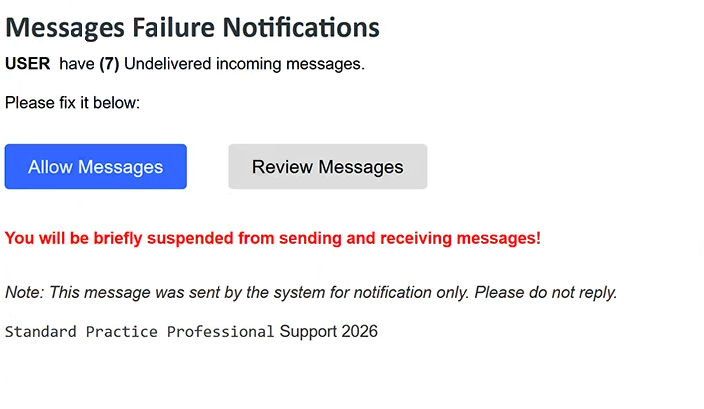
The email has been observed with the subject line “(7) Messages Failure Notification.” It tells recipients that they have seven undelivered incoming messages and instructs them to resolve the problem immediately. Two buttons are provided for this purpose: “Allow Messages” and “Review Messages.”
The phishing email also warns that the recipient will be briefly suspended from sending and receiving messages if no action is taken. This threat creates urgency by suggesting that ignoring the notification could interfere with normal use of the email account.
At the bottom, the email states that it was generated by the system for notification purposes and should not be answered. It also includes the line “Standard Practice Professional Support 2026.” This name is not associated with a legitimate organization and is another element used to make the email resemble an administrative notification.
Users who click on the buttons in the emails are presented with a fake login form requesting an email address and password. The page also provides a “Log in via cPanelID” button as an alternative sign-in option. Despite its appearance, the website is not a genuine webmail login service associated with the recipient’s account.
Credentials entered into the form are collected by the malicious actors. Providing an email address and password does not release any of the seven supposedly undelivered messages or prevent the threatened account suspension.
Valid stolen credentials could allow scammers to access the victim’s mailbox. This can expose private correspondence and potentially allow the compromised email account to be used to target other services linked to it or impersonate the account owner.
The full “Messages Failure Notifications” phishing email is below:
Subject: (7) Messages Failure Notification
Messages Failure Notifications
USER have (7) Undelivered incoming messages.
Please fix it below:
[Allow Messages] [Review Messages]
You will be briefly suspended from sending and receiving messages!
Note: This message was sent by the system for notification only. Please do not reply.
Standard Practice Professional Support 2026
How to recognize the “Messages Failure Notifications” phishing email
The claim that exactly seven incoming messages have failed provides the central lure in this phishing email. Rather than giving useful information about those messages, the email immediately pushes recipients toward “Allow Messages” or “Review Messages” and threatens temporary restrictions on sending and receiving email.
Recipients should not use either button to determine whether messages are genuinely waiting for delivery. Instead, they should open their email service independently through the website or application they normally use and check the account there.
The destination behind the buttons is another strong warning sign. Both lead to a questionable site rather than an official webmail service associated with the recipient’s account. Wix Studio is a legitimate website-building platform, but the phishing page hosted through it is being used to collect credentials.
The fake login page should also be examined critically. Generic “Webmail” branding and an interface resembling cPanel do not demonstrate that the page belongs to the recipient’s email provider. An unexpected email should not determine where users enter their mailbox password.
The sender’s complete email address should also be checked rather than trusting the system-notification language. The phrase “Standard Practice Professional Support 2026” does not identify a genuine organization responsible for the recipient’s mailbox.
Simply receiving or reading the “Messages Failure Notifications” email does not expose the recipient’s password. Users who have not submitted credentials should avoid both buttons and delete the email.
If credentials have already been entered on the fake webmail page, the affected email password should be changed immediately through the legitimate provider. The password should also be replaced on other accounts where it was reused, and two-factor authentication should be enabled where available.
Site Disclaimer
2-remove-virus.com is not sponsored, owned, affiliated, or linked to malware developers or distributors that are referenced in this article. The article does not promote or endorse any type of malware. We aim at providing useful information that will help computer users to detect and eliminate the unwanted malicious programs from their computers. This can be done manually by following the instructions presented in the article or automatically by implementing the suggested anti-malware tools.
The article is only meant to be used for educational purposes. If you follow the instructions given in the article, you agree to be contracted by the disclaimer. We do not guarantee that the artcile will present you with a solution that removes the malign threats completely. Malware changes constantly, which is why, in some cases, it may be difficult to clean the computer fully by using only the manual removal instructions.