The “Microsoft Office 365 Email Account Will Expire” email is a phishing attempt that impersonates Microsoft and tries to obtain email account login credentials. It claims that the recipient’s Microsoft email account is approaching expiration and must be reactivated immediately to prevent loss of access.
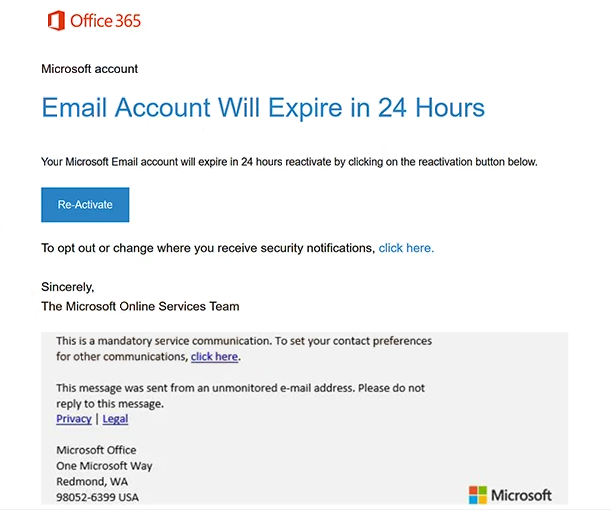
The email has been observed with the subject line “Email Account Will Expire.” It uses Office 365 and Microsoft account branding and states that the recipient’s email account will expire within 24 hours. The short deadline creates urgency and encourages the recipient to respond before checking whether the warning actually originated from Microsoft.
According to the email, the account can be kept active by using a button labeled “Re-Activate.” The message is signed as coming from “The Microsoft Online Services Team,” further attempting to create the appearance of an official Microsoft account notification.
The “Re-Activate” button does not lead to a legitimate Microsoft account-management service. Instead, it opens a phishing page titled “Welcome to Webmail.” The page is hosted using Google Firebase Storage, a legitimate cloud hosting service that is being abused in this campaign to host the phishing content.
The fake Webmail page contains fields requesting a username and password. The username can already be filled in using the recipient’s email address, making the page appear specifically connected to that account. However, this personalization does not establish that the website is legitimate.
Credentials entered into the page are sent to the scammers. Submitting the requested information does not reactivate a Microsoft account or prevent an email address from expiring. Microsoft has no involvement with the phishing campaign, and its name and branding are being used without authorization.
If scammers obtain valid email credentials, they may be able to access the victim’s inbox and read private correspondence. A compromised mailbox can also be used to impersonate its owner. Since email addresses are frequently connected to other online services for account verification and password recovery, unauthorized mailbox access may also help scammers target additional accounts.
The full “Microsoft Office 365 Email Account Will Expire” phishing email is below:
Subject: Email Account Will Expire
Office 365
Microsoft account
Email Account Will Expire in 24 Hours
Your Microsoft Email account will expire in 24 hours reactivate by clicking on the reactivation button below.
[Re-Activate]To opt out or change where you receive security notifications, [click here].
Sincerely,
The Microsoft Online Services Team
How to recognize the “Microsoft Office 365 Email Account Will Expire” phishing email
The 24-hour expiration warning is one of the central elements of this phishing email. Instead of independently checking the account, recipients are encouraged to react immediately through a button supplied in the message. Unexpected warnings about account expiration should be verified directly through the service supposedly responsible for the account.
Recipients should not use the “Re-Activate” button to check whether their Microsoft account requires attention. Microsoft account information can be reviewed by navigating independently to Microsoft’s official website and signing in there.
The destination behind the button is another important warning sign. The phishing page is hosted through Google Firebase Storage rather than Microsoft’s account infrastructure. Although Firebase is a legitimate Google service, a page hosted there is not automatically trustworthy. In this campaign, the platform is being used to host a fake Webmail login form.
Users should also inspect the complete sender address rather than relying on Office 365 branding, Microsoft logos, or the “Microsoft Online Services Team” signature. These elements can be copied into an email and do not prove who actually sent it.
The pre-filled username on the phishing page can also make the scam appear more convincing. An email address can be transferred through a phishing link and automatically displayed on the resulting page. Users should therefore not treat a pre-filled address as proof that the website is connected to Microsoft or their email provider.
Anyone who receives the “Microsoft Office 365 Email Account Will Expire” email without submitting credentials should avoid the “Re-Activate” button and delete the email. Simply receiving or reading it does not provide scammers with the account password.
If credentials have already been entered on the fake Webmail page, the affected password should be changed through the legitimate email service. The same password should also be replaced on other accounts where it was reused, and the mailbox should be checked for unauthorized activity or unexpected changes.
Incoming search terms:
- testing32x9gaJ5\) OR 741=(SELECT 741 FROM PG_SLEEP(15))--
- testing5QIXWLEt\; waitfor delay \0:0:15\ --
- testingBGSBtiBq\)) OR 768=(SELECT 768 FROM PG_SLEEP(15))--
- testingedDSayBk\ OR 417=(SELECT 417 FROM PG_SLEEP(15))--
- testingtyxpbyDb
Site Disclaimer
2-remove-virus.com is not sponsored, owned, affiliated, or linked to malware developers or distributors that are referenced in this article. The article does not promote or endorse any type of malware. We aim at providing useful information that will help computer users to detect and eliminate the unwanted malicious programs from their computers. This can be done manually by following the instructions presented in the article or automatically by implementing the suggested anti-malware tools.
The article is only meant to be used for educational purposes. If you follow the instructions given in the article, you agree to be contracted by the disclaimer. We do not guarantee that the artcile will present you with a solution that removes the malign threats completely. Malware changes constantly, which is why, in some cases, it may be difficult to clean the computer fully by using only the manual removal instructions.