The “Microsoft Outlook Notification” scam is a phishing campaign designed to steal Outlook account credentials by impersonating an official Microsoft security or maintenance alert. The email claims that the recipient’s Outlook email client is outdated and warns that mailbox functionality may soon be interrupted unless an update or verification process is completed immediately.
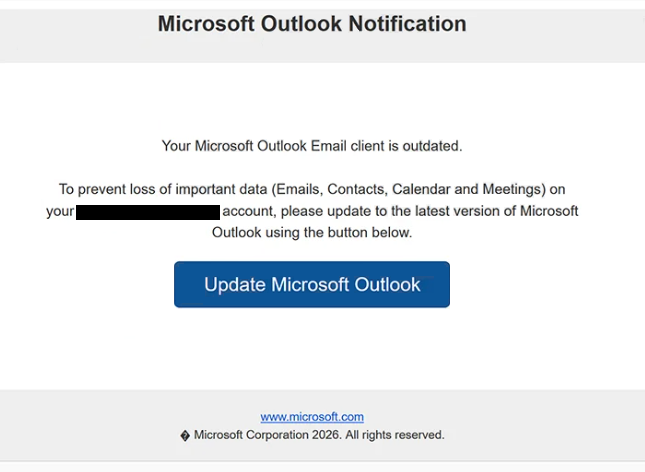
The email presents itself as a legitimate Outlook or Microsoft notification related to account maintenance. It informs recipients that they must upgrade their Outlook email client to continue using mailbox features normally. The scam attempts to create urgency by warning that outdated versions may stop syncing emails, lose access to messages, or become disabled entirely if the requested action is ignored.
The “Microsoft Outlook Notification” email includes a hyperlink directing users to a phishing website disguised as an Outlook sign-in page. The fraudulent portal imitates Microsoft branding, layout, and authentication screens in order to appear convincing. Recipients who enter their Outlook credentials into the fake page unknowingly send their usernames and passwords directly to the attackers operating the phishing campaign.
Unlike legitimate Microsoft notifications, the phishing email does not direct users to official Microsoft-owned domains. Instead, the scam relies on counterfeit websites designed specifically to harvest login information. The fraudulent login page may closely resemble the authentic Outlook interface, making it difficult for some users to immediately recognize the deception.
The “Microsoft Outlook Notification” scam relies heavily on fear of losing access to email services. Outlook accounts are often connected to personal communication, business correspondence, cloud storage, calendars, and password recovery systems for other online services. Attackers exploit this dependence by presenting the fake update request as urgent and mandatory.
Once attackers gain access to an Outlook account, they may misuse it in several ways. Compromised mailboxes can be searched for sensitive information, financial documents, saved credentials, or personal conversations. Attackers may also use the stolen account to distribute additional phishing emails, impersonate the victim in communication with contacts, or reset passwords connected to other services.
Anyone who entered credentials into a phishing page connected to the “Microsoft Outlook Notification” scam should change their Outlook password immediately and review the account for suspicious activity. If the same password was reused elsewhere, it should also be changed on all connected services.
The full “Microsoft Outlook Notification” phishing email is below:
Subject: Microsoft Outlook security notification for Eco-Tours Email Accounts
Microsoft Outlook Notification
Your Microsoft Outlook Email client is outdated.
To prevent loss of important data (Emails, Contacts, Calendar and Meetings) on your – account, please update to the latest version of Microsoft Outlook using the button below.
[Update Microsoft Outlook]
[www.microsoft.com]
Microsoft Corporation 2026. All rights reserved.
How to recognize phishing emails
Phishing campaigns like the “Microsoft Outlook Notification” scam often imitate trusted companies and routine technical notifications in order to appear legitimate. Recognizing suspicious details inside these emails can help prevent credential theft and account compromise.
One of the most important warning signs is urgency related to account functionality. The scam claims that Outlook access may soon be interrupted unless the recipient upgrades or verifies the email client immediately. Phishing campaigns frequently rely on deadlines and service-related warnings to pressure users into acting quickly without carefully checking whether the message is authentic.
The sender’s address should always be inspected carefully. Fraudulent Outlook-themed emails often imitate Microsoft support teams while using unrelated domains or suspicious addresses. Even when the sender name appears professional, the actual email address may reveal that the message did not originate from Microsoft.
Links embedded inside the email are another major warning sign. In the “Microsoft Outlook Notification” scam, the provided link redirects users to a counterfeit Outlook login page rather than an official Microsoft-owned domain. Hovering over links before clicking can help reveal suspicious or unrelated website addresses.
Another indicator is vague technical wording combined with account-related threats. The phishing email references outdated software or required upgrades but often avoids providing detailed technical explanations. Legitimate Microsoft notifications generally direct users to official account portals instead of pressuring them through unsolicited links in emails.
Users should also be cautious of unexpected requests to sign in after clicking email links. Legitimate service providers usually encourage users to access account settings directly through official websites rather than through login forms reached from unsolicited notifications.
The overall structure of phishing emails can also expose warning signs. Some campaigns contain generic greetings, inconsistent formatting, awkward phrasing, or missing personalization. Others appear polished but still rely heavily on urgency and broad technical claims instead of detailed account-specific information.
A safer approach is to avoid interacting with suspicious Outlook notifications directly. Instead of clicking links inside the message, users should manually access the official Microsoft or Outlook website through a browser and check for alerts there. If no matching notification exists within the account itself, the email is likely fraudulent.
Site Disclaimer
2-remove-virus.com is not sponsored, owned, affiliated, or linked to malware developers or distributors that are referenced in this article. The article does not promote or endorse any type of malware. We aim at providing useful information that will help computer users to detect and eliminate the unwanted malicious programs from their computers. This can be done manually by following the instructions presented in the article or automatically by implementing the suggested anti-malware tools.
The article is only meant to be used for educational purposes. If you follow the instructions given in the article, you agree to be contracted by the disclaimer. We do not guarantee that the artcile will present you with a solution that removes the malign threats completely. Malware changes constantly, which is why, in some cases, it may be difficult to clean the computer fully by using only the manual removal instructions.