The “Norton – Your subscription has ended” phishing email is a scam that impersonates Norton, a legitimate cybersecurity company, to trick recipients into revealing their email account credentials. It claims that the recipient’s antivirus subscription has expired and warns that their device is vulnerable to serious security threats. The supposed expiration notice is designed to create fear and encourage recipients to follow a deceptive renewal link.
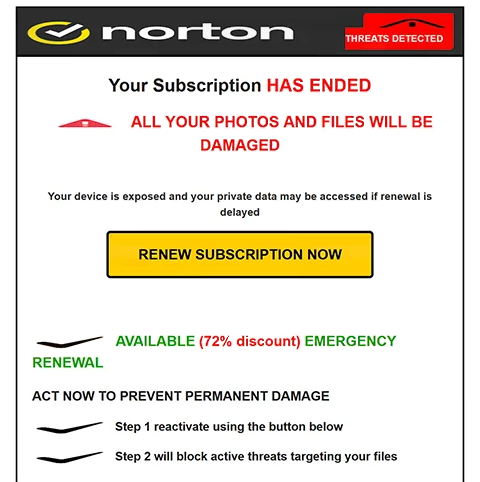
The phishing email uses the subject line “ACCOUNT WARNING – Protect Your Login Details” and presents alarming claims about the recipient’s device. It suggests that threats have been detected and that personal files, including photographs and documents, could be permanently damaged. However, the email provides no evidence that a security scan has occurred or that the recipient’s computer is infected.
To make the warning more persuasive, the phishing email offers an emergency subscription renewal with a supposed 72% discount. Recipients are encouraged to click a button labeled “RENEW SUBSCRIPTION NOW” to restore their antivirus protection. Another observed version includes a five-minute countdown, increasing the pressure to act immediately.
Despite the claims about Norton protection, the renewal button leads to a counterfeit cPanel Webmail login page hosted on an unrelated website. The page requests the visitor’s email address and password rather than providing a legitimate antivirus subscription renewal process. This reveals that the actual purpose of the scam is to obtain email account credentials.
Information submitted through the counterfeit login form can be captured by the scammers. If the credentials are valid, attackers may attempt to access the victim’s mailbox, read private correspondence, and obtain sensitive attachments. They could also impersonate the account owner or attempt to compromise additional services associated with the same email address.
Other scams impersonating Norton may direct users to fake payment pages or legitimate subscription websites through affiliate links. However, the identified “Norton – Your subscription has ended” phishing email primarily targets email credentials through a deceptive webmail authentication page.
The warning does not establish that the recipient’s Norton subscription has expired or that malware has been detected on their device. Norton is being impersonated and has no identified involvement in the phishing campaign.
The full “Norton – Your subscription has ended” phishing email is below:
Subject: ACCOUNT WARNING – Protect Your Login Details
Norton
THREATS DETECTED
Your Subscription HAS ENDED
ALL YOUR PHOTOS AND FILES WILL BE DAMAGEDYour device is exposed and your private data may be accessed if renewal is delayed
[RENEW SUBSCRIPTION NOW]
AVAILABLE (72% discount) EMERGENCY RENEWAL
ACT NOW TO PREVENT PERMANENT DAMAGEStep 1 reactivate using the button below
Step 2 will block active threats targeting your files
SYSTEM AT CRITICAL RISK ACTION REQUIRED
How to recognize phishing emails
The “Norton – Your subscription has ended” phishing email contains several warning signs, beginning with its exaggerated claims about the recipient’s device security. It warns that files and photographs could be permanently damaged but does not identify any specific malware or provide evidence of a genuine security incident. Such alarming statements are commonly used to pressure recipients into taking immediate action.
Another suspicious characteristic is the supposed 72% emergency renewal discount. The email combines the fear of losing antivirus protection with an unusually large promotional offer, encouraging recipients to renew quickly. The five-minute countdown displayed in another version reinforces this urgency and discourages careful examination of the request.
The subject line “ACCOUNT WARNING – Protect Your Login Details” is also worth examining. Although it suggests an account security problem, the email body focuses on an expired antivirus subscription and alleged threats to personal files. This combination of different warnings can indicate an attempt to attract attention rather than communicate a specific account issue.
The “RENEW SUBSCRIPTION NOW” button is particularly revealing. Instead of directing recipients to Norton’s legitimate subscription management service, it opens a website displaying a cPanel Webmail login form. An antivirus renewal process should not unexpectedly require users to enter credentials for an unrelated email account.
The counterfeit login page may appear convincing because it imitates a familiar webmail authentication interface. However, recognizable branding and standard password fields do not establish that a website is legitimate. The mismatch between the claimed Norton subscription renewal and the requested email credentials is a strong indicator of phishing.
The sender’s email address is another important detail. Even when a phishing email displays Norton’s name or uses security-related branding, the complete sender address may reveal that it originated from an unrelated domain. Company logos, promotional formatting, and copyright notices can be copied and should not be treated as proof of authenticity.
Site Disclaimer
2-remove-virus.com is not sponsored, owned, affiliated, or linked to malware developers or distributors that are referenced in this article. The article does not promote or endorse any type of malware. We aim at providing useful information that will help computer users to detect and eliminate the unwanted malicious programs from their computers. This can be done manually by following the instructions presented in the article or automatically by implementing the suggested anti-malware tools.
The article is only meant to be used for educational purposes. If you follow the instructions given in the article, you agree to be contracted by the disclaimer. We do not guarantee that the artcile will present you with a solution that removes the malign threats completely. Malware changes constantly, which is why, in some cases, it may be difficult to clean the computer fully by using only the manual removal instructions.