The “Notification: Action Required on Your Account” phishing email is a credential-stealing scam that impersonates an email service provider. The message claims that the recipient’s mailbox has been flagged by a compliance team and that an account verification procedure must be completed to maintain uninterrupted email access. The email is fraudulent and is intended solely to trick recipients into revealing their email login credentials.
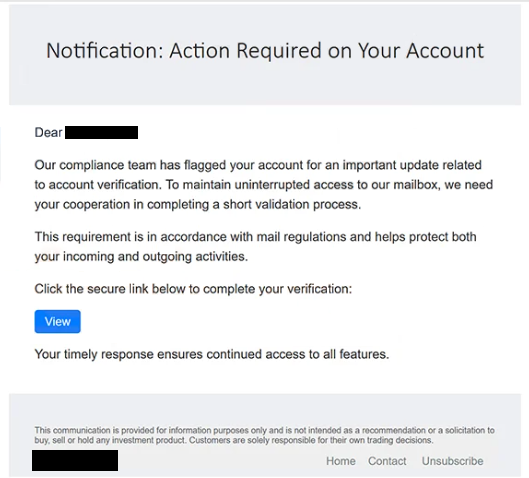
The email typically arrives with the subject line “Urgent Action Required!!!” and informs the recipient that an important update related to account verification is required. It states that completing a short validation process is necessary to comply with mail regulations and continue using the mailbox without interruption. These statements are fabricated and do not originate from a legitimate email provider.
Recipients are instructed to click a “View” button included in the email. Instead of opening an official account management page, the button redirects users to a phishing website hosted on ikcontech[.]cam. The fraudulent page presents itself as a generic email login portal and displays a Google logo in the background to make the page appear more trustworthy. The login form requests the visitor’s email address and password.
Entering credentials on the phishing page does not verify the account. Instead, the submitted information is transmitted directly to the operators of the phishing campaign. Attackers can then access the compromised mailbox using the stolen credentials.
Unauthorized access to an email account can expose a significant amount of sensitive information. Email inboxes often contain personal correspondence, business communications, invoices, password reset emails, verification messages, financial notifications, and documents exchanged with other users. Because many online services rely on email for password recovery, compromising a mailbox can also enable attackers to gain access to additional accounts connected to the same address.
One distinctive characteristic of the “Notification: Action Required on Your Account” phishing email is an unrelated disclaimer placed near the end of the message. Although the email discusses mailbox verification, it concludes with text referring to investment products and trading decisions. This disclaimer has no connection to email administration and is inconsistent with a genuine account verification notice.
The email also attempts to pressure recipients into acting quickly by suggesting that verification is required to maintain uninterrupted mailbox access. Creating urgency is a common tactic used in phishing campaigns because it encourages recipients to follow instructions before verifying whether the notification is legitimate.
Anyone who submitted their credentials through the linked website should immediately change the password for the affected email account. If the same password has been reused elsewhere, it should be changed on those accounts as well. Users should also review recent account activity and update recovery information if unauthorized changes are detected.
The full “Notification: Action Required on Your Account” phishing email is below:
Subject: [-] Urgent Action Required!!!
Notification: Action Required on Your Account
Dear -,
Our compliance team has flagged your account for an important update related to account verification. To maintain uninterrupted access to our mailbox, we need your cooperation in completing a short validation process.
This requirement is in accordance with mail regulations and helps protect both your incoming and outgoing activities.
Click the secure link below to complete your verification:
[View]
Your timely response ensures continued access to all features.
This communication is provided for information purposes only and is not intended as a recommendation or a solicitation to buy, sell or hold any investment product. Customers are solely responsible for their own trading decisions.
-. Home Contact Unsubscribe
How to recognize phishing emails like “Notification: Action Required on Your Account”
An email requesting account verification through an embedded link should always be treated with caution. Legitimate email providers generally allow users to manage their accounts by signing in through their official websites instead of directing them to external login pages via unsolicited emails.
Recipients should also verify where email buttons and hyperlinks lead before interacting with them. In this campaign, the verification button directs users to a domain unrelated to the email provider being impersonated. A mismatch between the organization named in the email and the destination website is a strong indication of phishing.
Another warning sign is language that emphasizes urgency or claims that immediate action is required to avoid losing access to an account. Phishing campaigns frequently use this tactic to discourage recipients from independently verifying the request.
Users should also examine the sender’s address rather than relying only on the displayed sender name. Cybercriminals often use names that resemble legitimate organizations while sending messages from unrelated domains.
The safest way to respond to emails claiming that an account requires verification is to ignore the links provided in the message and instead sign in to the account by manually entering the official website address into a browser. If no corresponding notification appears after logging in, the email can be treated as a phishing attempt.
Incoming search terms:
Site Disclaimer
2-remove-virus.com is not sponsored, owned, affiliated, or linked to malware developers or distributors that are referenced in this article. The article does not promote or endorse any type of malware. We aim at providing useful information that will help computer users to detect and eliminate the unwanted malicious programs from their computers. This can be done manually by following the instructions presented in the article or automatically by implementing the suggested anti-malware tools.
The article is only meant to be used for educational purposes. If you follow the instructions given in the article, you agree to be contracted by the disclaimer. We do not guarantee that the artcile will present you with a solution that removes the malign threats completely. Malware changes constantly, which is why, in some cases, it may be difficult to clean the computer fully by using only the manual removal instructions.