The “Our AI server has detected that your email account requires verification” phishing email is a credential-stealing scam disguised as an automated security notification. The message attempts to convince recipients that an artificial intelligence system responsible for monitoring email accounts has identified a verification requirement. In reality, there is no legitimate account check taking place, and the message is designed to direct users to a fraudulent login page where their email credentials can be stolen.
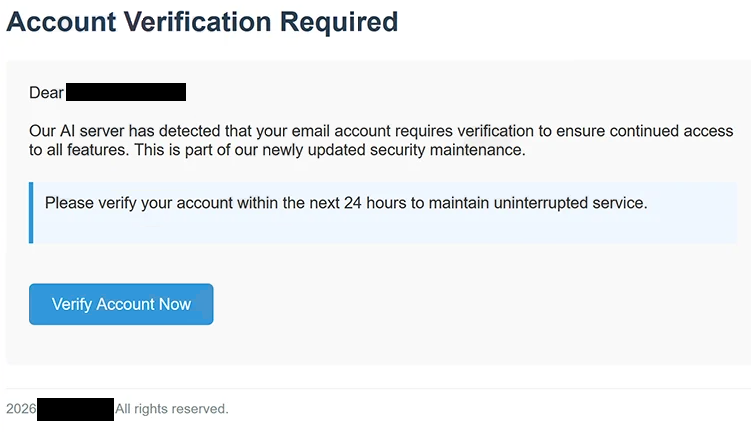
The email arrives with the subject “Account Verification Required” and tells the recipient that an AI server has supposedly detected a problem requiring verification. According to the message, completing this process is necessary to retain access to all available email features. It presents the request as part of recently updated security maintenance, giving what would otherwise be a vague verification demand a technical-sounding explanation.
Recipients are also told that they have only 24 hours to verify their accounts. This deadline has no legitimate technical purpose. It is a social-engineering tactic intended to reduce the amount of time recipients spend questioning the message or checking their accounts independently.
Notably, the email does not identify a particular email provider. Instead, it uses generic terminology that could apply to users of numerous webmail services. This allows the same phishing message to be distributed broadly without attackers having to customize it for Gmail, Outlook, cPanel users, or customers of a particular hosting company.
A “Verify Account Now” link is provided as the supposed way to complete the procedure. Following it does not open genuine account settings. The link instead takes the recipient to a phishing website hosted using IPFS (InterPlanetary File System).
The fraudulent page imitates a cPanel Webmail login interface and asks visitors to provide an email address and password. Despite resembling a normal authentication screen, the page is not operated by cPanel. cPanel, L.L.C. has no connection with this phishing campaign.
Credentials entered on the fake login page are collected by the scammers. No email account is verified, no security maintenance is completed, and entering the requested information simply provides the attackers with credentials they can potentially use to access the victim’s mailbox.
An exposed email account can provide cybercriminals with considerably more information than individual messages. Mailboxes may contain private correspondence, invoices, documents, customer information, password-reset messages, security notifications, and details about other online accounts belonging to the victim.
Attackers who successfully access the mailbox may also attempt to reset passwords for services connected to the compromised email address. Depending on which accounts are linked to it, this can potentially extend the compromise to social media, cloud storage, shopping accounts, business platforms, and other services.
A hijacked mailbox can additionally be used to impersonate its owner. Fraudulent payment requests, malicious links, or additional phishing messages can be sent to contacts from a genuine email address. Messages coming from a known colleague, customer, friend, or business partner can appear significantly more credible than ordinary unsolicited spam.
Anyone who entered their credentials after interacting with the “Our AI server has detected that your email account requires verification” phishing email should change the affected email password immediately through the legitimate provider. Passwords reused on other services should also be changed, active sessions should be reviewed, and unfamiliar sessions should be terminated where the provider offers that option. Multi-factor authentication should also be enabled if available.
The full “Our AI server has detected that your email account requires verification” phishing email below:
Subject: Account Verification Required
Account Verification Required
Dear -,
Our AI server has detected that your email account requires verification to ensure continued access to all features. This is part of our newly updated security maintenance.
Please verify your account within the next 24 hours to maintain uninterrupted service.
[Verify Account Now]
2026 – All rights reserved.
How to recognize phishing emails requesting account verification
The reference to an “AI server” is one of the distinctive elements of this particular campaign. The scammers use current technology terminology to make an otherwise generic account-verification request sound sophisticated. A claim that an automated or AI-powered system detected an issue should not be treated as proof that a message came from a legitimate security service.
The absence of a clearly identified provider is another important clue. The email claims that an account requires security maintenance while failing to clearly explain which company operates the account or why the specific verification is necessary. This allows the same message to be sent to recipients using completely different email services.
The 24-hour deadline should also encourage additional scrutiny. Urgent deadlines are frequently used in phishing messages because recipients who believe they may lose account functionality are more likely to follow instructions immediately. Users should independently confirm account warnings rather than allowing a deadline inside an unsolicited email to determine how they access their mailbox.
The destination of the verification link is even more important than the appearance of the email itself. In this campaign, clicking “Verify Account Now” takes users to an IPFS-hosted page rather than to their normal email provider. A login form presented through unrelated infrastructure should not be trusted simply because it resembles cPanel Webmail.
Users should inspect the address displayed in the browser before entering credentials. Logos, familiar colors, email icons, and realistic password fields can all be copied. The actual domain or hosting location provides a much stronger indication of whether the page belongs to the service it claims to represent.
A pretext involving account verification can also be checked without interacting with the message. Instead of using the provided button, recipients can open their normal email service independently, sign in through the known official address, and review security or account notifications there.
Sender information should likewise be examined carefully. A display name suggesting that a message came from an email support or security department can be created by anyone. The underlying sender address and domain should correspond to the organization supposedly responsible for the account.
The safest response to the “Our AI server has detected that your email account requires verification” phishing email is to avoid the provided verification link entirely. Any genuine account requirement should be confirmed by accessing the email provider through its normal website or application rather than through an unexpected security email.
Site Disclaimer
2-remove-virus.com is not sponsored, owned, affiliated, or linked to malware developers or distributors that are referenced in this article. The article does not promote or endorse any type of malware. We aim at providing useful information that will help computer users to detect and eliminate the unwanted malicious programs from their computers. This can be done manually by following the instructions presented in the article or automatically by implementing the suggested anti-malware tools.
The article is only meant to be used for educational purposes. If you follow the instructions given in the article, you agree to be contracted by the disclaimer. We do not guarantee that the artcile will present you with a solution that removes the malign threats completely. Malware changes constantly, which is why, in some cases, it may be difficult to clean the computer fully by using only the manual removal instructions.