The “PayPal – Access a new device” email is a phishing attempt that mimics a legitimate security alert from PayPal in order to deceive recipients into believing their account has been accessed without authorization. These emails are carefully structured to resemble official notifications, often including fabricated technical details such as login locations, device types, browser names, and IP addresses. While these elements may appear convincing, they are entirely false and are included solely to make the email seem trustworthy.
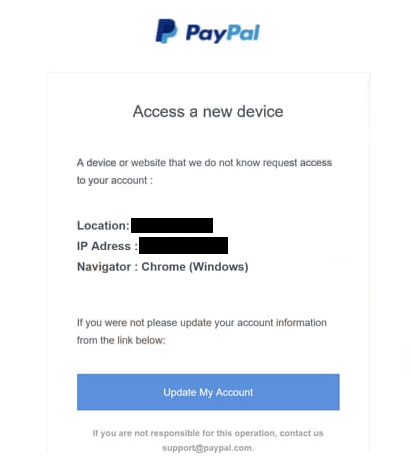
The intention behind the “PayPal – Access a new device” scam is to provoke concern and urgency. By suggesting that an unknown party has accessed the account, the email creates a situation where the recipient feels compelled to act quickly. In most cases, the email includes a prominent button or link prompting the user to “secure,” “review,” or “confirm” their account. This action is presented as necessary to prevent further unauthorized access or potential account restrictions.
However, the link embedded in the email does not lead to PayPal’s official website. Instead, it redirects to a fraudulent page designed to closely imitate PayPal’s login interface. These counterfeit pages are often visually accurate, using similar layouts, logos, and design elements to reduce suspicion. Once a user enters their login credentials on this page, the information is immediately captured by the attackers. In some instances, additional prompts may request further personal or financial details, increasing the amount of data collected.
Different versions of the “PayPal – Access a new device” phishing email may vary in wording, subject lines, or formatting. Some may emphasize account limitations, while others focus on unusual login attempts. Despite these differences, they all follow the same underlying strategy. They introduce a believable issue, create pressure to respond quickly, and provide a direct path to a malicious website disguised as a solution. This consistency makes the scam effective, particularly for users who do not closely examine the details of the email.
The risks associated with this phishing attempt can be significant. If attackers gain access to a PayPal account, they may initiate unauthorized transactions, transfer funds, or use stored payment methods for purchases. Additionally, compromised credentials can sometimes be reused to access other accounts, especially if the same login details are used across multiple platforms. This extends the potential impact beyond a single service, making it important to recognize and avoid such scams.
The full “PayPal – Access a new device” phishing email is below:
Subject: Nach einer ungewöhnlichen Anmeldung wurde Ihr Konto eingeschränkt und Sie müssen Ihre Informationen überprüfen, um es wieder freizuschalten.
PayPal
Access a new device
A device or website that we do not know request access to your account :
Location: –
IP Adress : –
Navigator : Chrome (Windows)If you were not please update your account information from the link below:
Update My Account
If you are not responsible for this operation, contact us support@paypal.com.
How to recognize phishing emails
Recognizing phishing emails is a critical step in avoiding threats like the “PayPal – Access a new device” scam. These emails rely on manipulation rather than technical complexity, which means they often share recognizable patterns that can be identified with careful observation.
One of the most noticeable warning signs is the tone of urgency. Phishing emails frequently suggest that immediate action is required to prevent negative consequences, such as account suspension or unauthorized activity. In the case of the “PayPal – Access a new device” email, the message may claim that the account is at risk or that access has already been compromised. This urgency is designed to prompt quick reactions, reducing the likelihood that the recipient will verify the authenticity of the email.
Another important factor is the link included within the email. Although it may appear legitimate, it often leads to a domain that is unrelated to PayPal. The visible text might suggest an official connection, but hovering over the link usually reveals a different destination. This mismatch is a strong indicator of phishing. Legitimate companies do not use misleading links to direct users to their services.
The sender’s address can also provide valuable clues. Phishing emails often attempt to imitate official email addresses but include subtle differences, such as additional characters, misspellings, or unusual domain extensions. While these variations may be easy to overlook at a glance, they become more apparent when examined closely. Authentic emails from PayPal typically originate from consistent and recognizable domains.
The overall quality of the email’s language is another aspect to consider. Many phishing emails contain grammatical errors, awkward phrasing, or inconsistent formatting. Even when the message appears polished, there may still be minor irregularities that suggest it was not created through official channels. Paying attention to these details can help distinguish between legitimate communication and fraudulent attempts.
It is also important to be cautious of any request for sensitive information. Phishing emails often direct users to provide login credentials, personal data, or financial details through external links. Legitimate services like PayPal do not request such information in this manner. Instead, they encourage users to log in through their official website if any account-related action is required.
Another useful approach is to consider whether the email aligns with recent activity. If there has been no attempt to access the account from a new device, receiving such a notification should immediately raise suspicion. Rather than interacting with the email, it is safer to open a browser and manually navigate to the official PayPal website to check account activity directly.
Developing a habit of verifying unexpected emails can significantly reduce the risk of falling victim to phishing. Even well-crafted scams like the “PayPal – Access a new device” email rely on quick, unexamined reactions. Taking a moment to review the details, check links, and question the context can prevent unauthorized access and protect sensitive information.
Site Disclaimer
2-remove-virus.com is not sponsored, owned, affiliated, or linked to malware developers or distributors that are referenced in this article. The article does not promote or endorse any type of malware. We aim at providing useful information that will help computer users to detect and eliminate the unwanted malicious programs from their computers. This can be done manually by following the instructions presented in the article or automatically by implementing the suggested anti-malware tools.
The article is only meant to be used for educational purposes. If you follow the instructions given in the article, you agree to be contracted by the disclaimer. We do not guarantee that the artcile will present you with a solution that removes the malign threats completely. Malware changes constantly, which is why, in some cases, it may be difficult to clean the computer fully by using only the manual removal instructions.