The “Pending Messages Awaiting Transfer” phishing email is a credential-stealing scam disguised as an inbox notification. It tries to make recipients believe that multiple incoming emails are stuck outside their mailbox and require manual confirmation before they can be delivered.
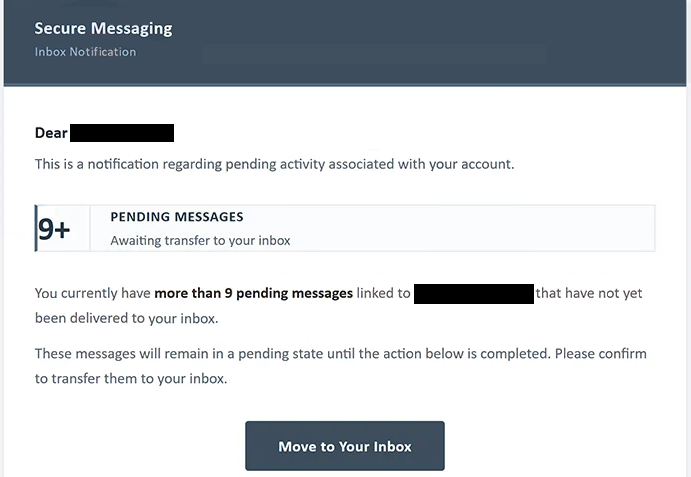
The subject says “9+ Pending Messages For -“. Inside, the email uses labels such as “Secure Messaging” and “Inbox Notification” to give the warning the appearance of an automated mail-system notice.
According to the email, more than nine messages associated with the recipient’s address have not reached the inbox. Their status is described as “Awaiting transfer to your inbox”, suggesting that the emails exist but are being temporarily held by the mail system.
Recipients are told that the pending messages will remain unavailable until they complete a required action. A “Move to Your Inbox” button is provided as the supposed way to release them.
The warning also claims that additional messages may be withheld if the recipient does not act. This turns the alleged delivery problem into an ongoing threat: not only are several emails supposedly waiting already, but future correspondence could also be affected.
None of these claims represent a genuine mailbox condition. The labels “Secure Messaging” and “Mail Center” used in the email are not associated with a legitimate email service involved in the notification. The pending-message warning is simply the pretext used to direct recipients to a phishing website.
The site linked from the analyzed email was no longer operational when it was examined. Its precise appearance and login fields therefore could not be established. It would be inaccurate to describe a specific Gmail, Outlook, Yahoo, or other provider login screen as a confirmed feature of this particular page.
The campaign is designed to obtain email account credentials. If recipients provide their login information after following the phishing link, scammers may use the stolen credentials to access the mailbox.
An exposed email account can contain private correspondence and sensitive information. It may also serve as a recovery point for other online accounts. Criminals who gain access could attempt to take over connected services or use the compromised mailbox to send additional phishing emails to the victim’s contacts.
Anyone who submitted credentials after following the “Move to Your Inbox” button should change the affected password immediately through the legitimate email provider. Passwords reused on other services should be changed as well.
The full “Pending Messages Awaiting Transfer” phishing email is below:
Subject: 9+ Pending Messages For –
Secure Messaging
Inbox NotificationDear -,
This is a notification regarding pending activity associated with your account.
9+ Pending Messages
Awaiting transfer to your inboxYou currently have more than 9 pending messages linked to – that have not yet been delivered to your inbox.
These messages will remain in a pending state until the action below is completed. Please confirm to transfer them to your inbox.
[Move to Your Inbox]
Further messages may be withheld if the above action is not completed.
This email was sent from the Mail Center.
Copyright © 2026 Inc. All rights reserved.
How to recognize the “Pending Messages Awaiting Transfer” phishing email
The unusual delivery process described in the email is one of the first details worth questioning. Normal incoming emails do not need to be manually moved into an inbox through an unexpected “Move to Your Inbox” button sent by an unidentified “Mail Center”.
The number of supposedly waiting emails is another deliberate element. Instead of reporting one failed delivery, the “Pending Messages Awaiting Transfer” phishing email claims that more than nine messages are already queued. This gives recipients a stronger reason to worry that they may be missing important correspondence.
The email then increases that pressure by warning that further messages may also be withheld. Someone who relies heavily on email for work or personal communication may be tempted to act quickly to prevent additional messages from disappearing.
The branding does little to establish who actually sent the notification. Terms such as “Secure Messaging”, “Inbox Notification”, and “Mail Center” sound official but do not clearly identify the company responsible for the recipient’s email account.
Recipients should also be cautious of the “Move to Your Inbox” button. A supposed mail-delivery problem can be checked without following an embedded link. Users can open their normal email application or access their provider’s website independently and inspect the inbox and account status there.
Since the phishing page associated with the analyzed email is inactive, assumptions should not be made about exactly how it presented its credential request. The confirmed deception occurs earlier: recipients are falsely told that more than nine messages are awaiting transfer and are directed away from their normal email service to resolve the fabricated problem.
Site Disclaimer
2-remove-virus.com is not sponsored, owned, affiliated, or linked to malware developers or distributors that are referenced in this article. The article does not promote or endorse any type of malware. We aim at providing useful information that will help computer users to detect and eliminate the unwanted malicious programs from their computers. This can be done manually by following the instructions presented in the article or automatically by implementing the suggested anti-malware tools.
The article is only meant to be used for educational purposes. If you follow the instructions given in the article, you agree to be contracted by the disclaimer. We do not guarantee that the artcile will present you with a solution that removes the malign threats completely. Malware changes constantly, which is why, in some cases, it may be difficult to clean the computer fully by using only the manual removal instructions.