The “Quarantine Report For Your Zoho Account” scam is a phishing email that pretends to be a security notification related to a Zoho mailbox. The message claims that several incoming emails have been placed in quarantine due to suspicious content. It suggests that the recipient must review the report and release the messages to ensure proper delivery. This notification is fraudulent and is not issued by Zoho.
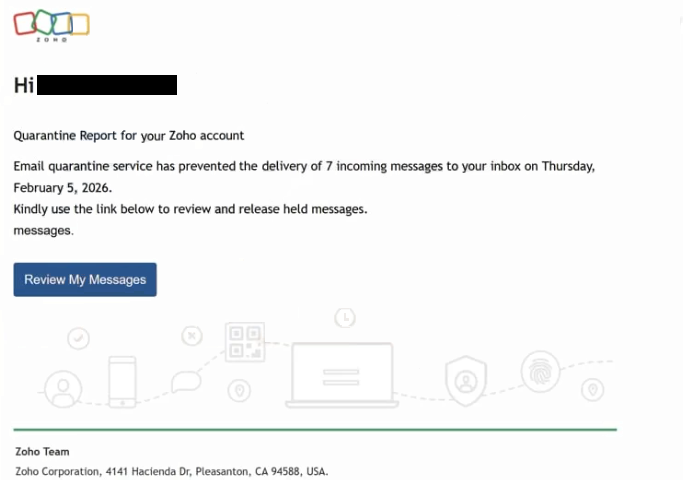
The email is structured to resemble an automated security summary. It may list a number of quarantined messages, include timestamps, or display a brief table referencing blocked senders. The wording presents the quarantine as part of routine filtering, but states that user action is required to release the messages. A button is provided, usually labeled with phrases such as “View Report,” “Release Messages,” or “Verify Quarantine.”
Clicking the button does not open the official zoho.com website. Instead, it directs the user to a counterfeit login page made to resemble a Zoho Mail sign-in screen. The page may include the Zoho logo and a minimal interface asking for an email address and password. The web address displayed in the browser does not belong to Zoho, even if the page visually imitates it.
The purpose of the page is to collect login credentials. It does not display real quarantine reports or actual message details. Once the user enters their email address and password, the information is transmitted to the scammers. The page may then redirect to the legitimate Zoho login page or display a generic confirmation notice to avoid raising suspicion.
If attackers obtain valid Zoho credentials, they can access the real mailbox. A compromised email account can expose private correspondence, attachments, contact lists, and stored business information. Email accounts are also used to reset passwords for other services. With control over the inbox, attackers can initiate password reset requests and gain access to additional accounts linked to that address.
The quarantine report described in the email is fabricated. The scammers do not have access to the recipient’s real mailbox or its filtering system. The alert is used to create urgency and prompt credential submission without verification. Legitimate quarantine notifications are managed within the official Zoho Mail dashboard and do not require users to enter credentials through unsolicited email links.
How to identify phishing emails
The “Quarantine Report For Your Zoho Account” scam can be identified by reviewing both technical details and content. One of the clearest warning signs is the sender’s address. While the display name may reference Zoho or a mail administrator, the full email address typically uses a domain unrelated to zoho.com.
The email often lacks specific account details. It may not include the recipient’s name or verified account information. Genuine Zoho notifications usually reference account-related data within the official system rather than relying on generic language.
The link in the message is another key indicator. When examined, the destination URL does not match the official Zoho domain. The domain may contain additional words, unusual extensions, or subtle spelling differences. Authentic Zoho services require users to sign in directly through their official website or application to review quarantined messages.
The design of the linked page also reveals its purpose. It focuses only on collecting login credentials and does not provide a full mailbox interface or access to settings. Legitimate quarantine management takes place inside the authenticated Zoho environment, not on isolated login forms hosted elsewhere.
The tone of the message may emphasize that messages will be permanently deleted if not reviewed quickly. This pressure is intended to encourage fast action without checking authenticity. Real service providers allow users to manage quarantine settings through their account dashboard and do not require credential submission through external links.
By verifying the sender domain, inspecting the link destination, and recognizing that quarantine reports are accessed through the official Zoho platform, recipients can identify the “Quarantine Report For Your Zoho Account” scam and avoid exposing sensitive account credentials.
Site Disclaimer
2-remove-virus.com is not sponsored, owned, affiliated, or linked to malware developers or distributors that are referenced in this article. The article does not promote or endorse any type of malware. We aim at providing useful information that will help computer users to detect and eliminate the unwanted malicious programs from their computers. This can be done manually by following the instructions presented in the article or automatically by implementing the suggested anti-malware tools.
The article is only meant to be used for educational purposes. If you follow the instructions given in the article, you agree to be contracted by the disclaimer. We do not guarantee that the artcile will present you with a solution that removes the malign threats completely. Malware changes constantly, which is why, in some cases, it may be difficult to clean the computer fully by using only the manual removal instructions.