The “Recent updates to Microsoft policies” email scam is a phishing campaign that impersonates Microsoft to steal account login credentials. The phishing email claims that recent changes to Microsoft’s policies require users to sign in again to their applications. It presents the request as a routine administrative procedure necessary to maintain uninterrupted access to Microsoft services.
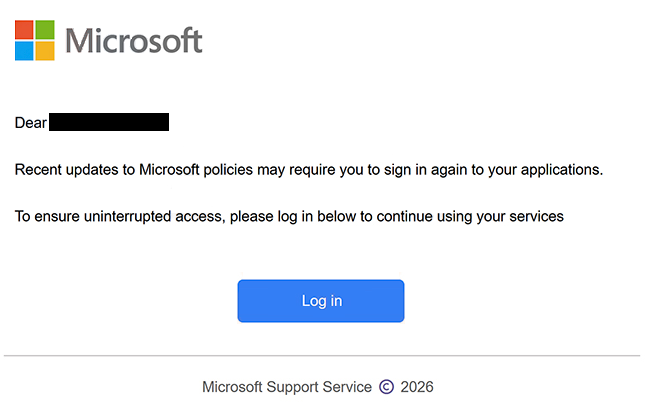
The phishing email uses the subject line “OFFICE365 PASSWORD UPDATE” and identifies itself as a notification from Microsoft Support Service. It informs recipients that policy changes may affect their existing application sessions and encourages them to authenticate again. Although the email refers to a policy update, it does not explain which policies have changed or why users need to provide their credentials.
To complete the supposed verification process, recipients are instructed to click a button labeled “Log in.” The button leads to a phishing website hosted at cocoonwoodsavoie.com, which is unrelated to Microsoft. The website imitates Microsoft’s authentication interface, displays the company’s logo, and requests an email address or phone number to begin the sign-in process.
The counterfeit website is designed to collect login information rather than authenticate users with Microsoft. Credentials submitted through the phishing page can be captured by the scammers and potentially used to access the corresponding Microsoft accounts. The familiar appearance of the login interface helps conceal the fact that users are interacting with an unauthorized website.
A compromised Microsoft account can expose sensitive information stored across connected services. Depending on the account and its permissions, scammers may gain access to Outlook emails, OneDrive documents, personal information, and other associated resources. They could also impersonate the account owner, attempt to access additional services, or target other accounts if the same password has been reused.
The full “Recent updates to Microsoft policies” phishing email is below:
Subject: OFFICE365 PASSWORD UPDATE
Dear –
Recent updates to Microsoft policies may require you to sign in again to your applications.
To ensure uninterrupted access, please log in below to continue using your services
[Log in]Microsoft Support Service ©️ 2026
How to recognize phishing emails
Phishing emails impersonating software providers frequently use account verification requests, security updates, and administrative changes to encourage recipients to disclose their credentials. In the “Recent updates to Microsoft policies” email scam, the main warning sign is the claim that users must sign in again because of unspecified policy changes. The email provides no meaningful explanation of the update or why it would require authentication through an embedded button.
The subject line “OFFICE365 PASSWORD UPDATE” is another detail worth examining. While it suggests a password-related change, the email body discusses Microsoft policies and continued application access instead. This inconsistency between the subject and the actual request can indicate that the email is designed to attract attention rather than communicate a legitimate account update.
The request to click a “Log in” button is particularly suspicious because it directs recipients away from Microsoft’s official authentication services. Phishing emails often disguise external destinations behind buttons with familiar labels, making it less obvious that users are being sent to unrelated websites. Checking the actual destination can reveal whether the link belongs to the organization supposedly sending the email.
The counterfeit Microsoft login page also illustrates how phishing websites can imitate legitimate authentication systems. It displays recognizable branding and requests familiar account identifiers, including an email address, phone number, or Skype username. However, these features can be copied, and their presence does not establish that the website is operated by Microsoft.
Another indicator is the email’s use of the name “Microsoft Support Service” and a copyright notice to create an official appearance. Company names, logos, and formal signatures can be reproduced in phishing emails without the organization’s authorization. The sender’s complete email address and the destination of embedded links provide more useful information than branding alone.
Recipients should also be cautious when an unexpected email claims that access to applications may be interrupted unless they complete an authentication procedure. This type of warning creates pressure to act, even when no specific account problem has been identified. Legitimate account notifications can be checked by opening the relevant service independently rather than following an unsolicited login link.
Site Disclaimer
2-remove-virus.com is not sponsored, owned, affiliated, or linked to malware developers or distributors that are referenced in this article. The article does not promote or endorse any type of malware. We aim at providing useful information that will help computer users to detect and eliminate the unwanted malicious programs from their computers. This can be done manually by following the instructions presented in the article or automatically by implementing the suggested anti-malware tools.
The article is only meant to be used for educational purposes. If you follow the instructions given in the article, you agree to be contracted by the disclaimer. We do not guarantee that the artcile will present you with a solution that removes the malign threats completely. Malware changes constantly, which is why, in some cases, it may be difficult to clean the computer fully by using only the manual removal instructions.