The “Roundcube Webmail Delivery Error” phishing email is a credential theft scam that disguises itself as an automated notification concerning email delivery problems. It claims that the recipient’s account lacks the permissions required to send emails and encourages them to resolve the issue through an online dashboard. The supposed technical problem is used as a pretext for stealing email account credentials.
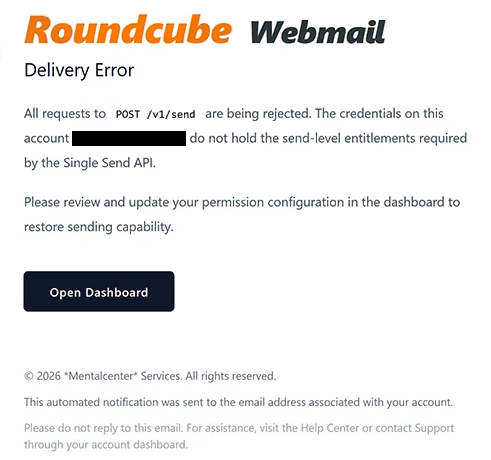
The email contains an account identifier followed by “Delivery Error!!” in its subject line. It uses Roundcube branding and technical terminology to present the notification as a genuine system-generated alert.
According to the email, requests to the POST /v1/send endpoint are being rejected because the account lacks the permissions required by the Single Send API. Recipients are instructed to modify their account settings to restore outgoing email functionality.
The button labeled “Open Dashboard” directs recipients to a phishing site, a fake Roundcube Webmail login page. The page displays the Roundcube logo and contains fields requesting an email address and password. Instead of providing access to permission settings, the form collects credentials for the scammers.
Unauthorized access to a mailbox can have consequences beyond the exposure of private correspondence. Scammers could examine business communications, obtain confidential documents, impersonate the account owner, or initiate password recovery requests for other online services associated with the compromised email address.
In a corporate environment, stolen email credentials could also facilitate business email compromise attacks. Access to existing correspondence may allow criminals to identify business relationships and exploit them in subsequent impersonation or payment redirection scams.
Roundcube is a legitimate webmail application with no identified involvement in this phishing campaign. The notification does not establish that the recipient’s email permissions have been restricted or that any delivery problems exist.
The full “Roundcube Webmail Delivery Error” phishing email is below:
Subject: – :Delivery Error!!
Roundcube Webmail
Delivery ErrorAll requests to POST /v1/send are being rejected. The credentials on this account – do not hold the send-level entitlements required by the Single Send API.
Please review and update your permission configuration in the dashboard to restore sending capability.
[Open Dashboard]© 2026 *Mentalcenter* Services. All rights reserved.
This automated notification was sent to the email address associated with your account.
Please do not reply to this email. For assistance, visit the Help Center or contact Support through your account dashboard.
How to recognize phishing emails
A distinctive feature of the “Roundcube Webmail Delivery Error” phishing email is its reliance on technical terminology rather than conventional account suspension threats. References to API endpoints and account permissions make the notification resemble an infrastructure-related error. However, technical language does not establish that the sender has legitimate knowledge of the recipient’s email configuration.
The email’s footer contains a particularly noticeable inconsistency. Although the notification presents itself as a Roundcube Webmail alert, its copyright statement identifies “Mentalcenter Services.” The unexplained difference between these identities raises questions about the notification’s origin.
The subject line is another suspicious element. The use of double exclamation marks following “Delivery Error” creates unnecessary emphasis and contrasts with the technical tone of the email body. Although punctuation alone does not prove phishing, it contributes to the overall inconsistencies.
Examining the destination of the dashboard button reveals a more significant warning sign. The linked website uses an unrelated domain rather than an identifiable webmail administration address. Its display of the Roundcube logo does not establish a legitimate connection to the software or the recipient’s email provider.
There is also a mismatch between the promised functionality and the page presented to visitors. Recipients are told that they need to adjust sending permissions, yet the destination displays a basic webmail authentication form. No permission management interface or information about the alleged delivery error is presented.
Site Disclaimer
2-remove-virus.com is not sponsored, owned, affiliated, or linked to malware developers or distributors that are referenced in this article. The article does not promote or endorse any type of malware. We aim at providing useful information that will help computer users to detect and eliminate the unwanted malicious programs from their computers. This can be done manually by following the instructions presented in the article or automatically by implementing the suggested anti-malware tools.
The article is only meant to be used for educational purposes. If you follow the instructions given in the article, you agree to be contracted by the disclaimer. We do not guarantee that the artcile will present you with a solution that removes the malign threats completely. Malware changes constantly, which is why, in some cases, it may be difficult to clean the computer fully by using only the manual removal instructions.